
Join us at FabCon Atlanta from March 16 - 20, 2026, for the ultimate Fabric, Power BI, AI and SQL community-led event. Save $200 with code FABCOMM.
Register now!Vote for your favorite vizzies from the Power BI Dataviz World Championship submissions. Vote now!
Hi,, I have a survey question response that the users able to select multiple selection up to 5. Each selection response is recorded into individual column.
In this table below, each selection consist of 3 items, i.e Country, Percentage & Amount. It is fixed for each selection must fill up 3 items.
My question is how can I arrange all 5 selection response into only 3 columns called Country, Percentage & Amount. I am aware of repetitve data value on early column before them (ex. Name & Gender of the respondence) so when I am selecting any column (before the multiple selection) I need to use distinct (means no duplication).
Solved! Go to Solution.
Hi, @alvin199
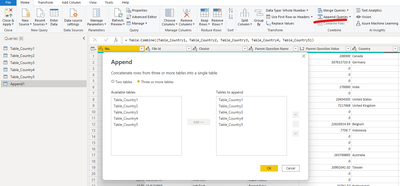
As a workaround, you can create 5 tables to extract the data of these 5 areas. After filtering out the null values of the last four tables, you need to append these new tables.
Best Regards,
Community Support Team _ Eason
Hey @alvin199 ,
you can archive that by unpivoting the columns in Power Query.
Check the documentation for more information:
https://docs.microsoft.com/power-query/unpivot-column
If you post the content of the table I can also give you an example how that would look like.
If you need any help please let me know.
If I answered your question I would be happy if you could mark my post as a solution ✔️ and give it a thumbs up 👍
Best regards
Denis
Blog: WhatTheFact.bi
Follow me: twitter.com/DenSelimovic
Hi @selimovd
The unpivot seems does not show the expected result. I wish to have it like in this format
Here is the sample data that I have used.
Hi, @alvin199
As a workaround, you can create 5 tables to extract the data of these 5 areas. After filtering out the null values of the last four tables, you need to append these new tables.
Best Regards,
Community Support Team _ Eason
Vote for your favorite vizzies from the Power BI World Championship submissions!
If you love stickers, then you will definitely want to check out our Community Sticker Challenge!
Check out the January 2026 Power BI update to learn about new features.
| User | Count |
|---|---|
| 64 | |
| 53 | |
| 42 | |
| 20 | |
| 17 |
| User | Count |
|---|---|
| 123 | |
| 104 | |
| 44 | |
| 32 | |
| 24 |