Advance your Data & AI career with 50 days of live learning, dataviz contests, hands-on challenges, study groups & certifications and more!
Get registeredGet Fabric Certified for FREE during Fabric Data Days. Don't miss your chance! Request now
Hey guys,
I am trying to use the ArcGIS map visual, but i can't seem to get the map to fill in my postal codes, instead it just display it as dots. Like this:
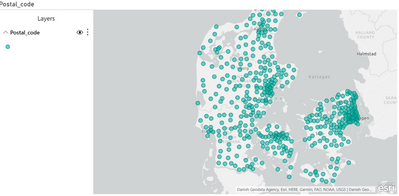
If i use the "Filled map" visual i get what i want:
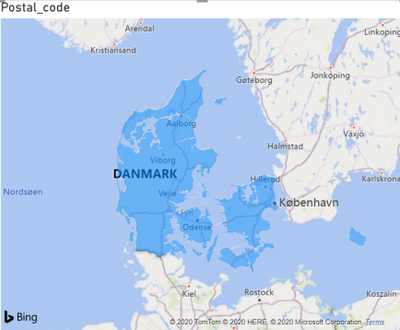
But using this visual i don't think i can assign values to each postal code, to color them a certain way? At least there is no "color" field as far as i can see. I just want it so that i can create a map where each postal code is colored according to how many events happen in that post code.
My location data right now is formatted like this:
"2300 Denmark"
"2860 Denmark"
etc.
I added the "Denmark" bit at the end, because the "2300" by itself didn't map to Denmark, and instead just plotted all over the world, or didn't plot at all. I assume the issue is that ArcGIS doesn't recognize the location as a postcode, but as some sort of address, i'm not sure. I've set the data category to "Postal code" too. Is there a way I can get a list of postal codes to make a filled map with this visual? Is there a specific way i need to format my data?
Thanks 🙂
Solved! Go to Solution.
Hey @amitchandak ,
Ah so you think i need to import the shapefile myself. I'll give it a shot, i didn't know you could do that. I'll follow that guide then.
Just for anyone else doing this i found the TopoJSON file for danish postal codes here https://github.com/Neogeografen/dagi/blob/master/geojson/postnumre.geojson
As it wasn't in the mapcruzin link.
I'll give it a shot later today and tomorrow, hopefully i can get it to work. I'll post here if i get it to work 🙂
Sort of unrelated question, but does anyone know how to change the colors in the ArcGIS visual? The scale colors i mean. I cant seem to change them, i don't know if they're linked to the theme or what. Otherwise I guess i'll find a way.
Edit: Got it to work by using the shapefile visual and importing the TopoJSON file, thanks.
Advance your Data & AI career with 50 days of live learning, contests, hands-on challenges, study groups & certifications and more!
Check out the October 2025 Power BI update to learn about new features.