This is best Fabric, Power BI, SQL and AI community event. How do we know? The last event sold out! Save €200 with code FABCMTY200.
Register nowA new Data Days event is coming soon! This time we’re going bigger than ever. Fabric, Power BI, SQL, AI and more. Don't miss out.
Hey guys,
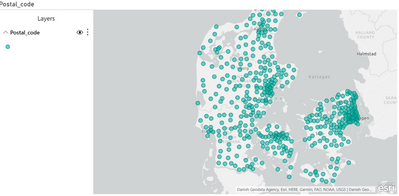
I am trying to use the ArcGIS map visual, but i can't seem to get the map to fill in my postal codes, instead it just display it as dots. Like this:
If i use the "Filled map" visual i get what i want:
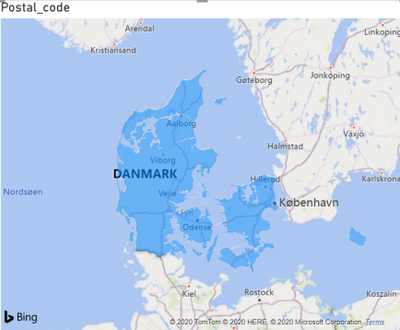
But using this visual i don't think i can assign values to each postal code, to color them a certain way? At least there is no "color" field as far as i can see. I just want it so that i can create a map where each postal code is colored according to how many events happen in that post code.
My location data right now is formatted like this:
"2300 Denmark"
"2860 Denmark"
etc.
I added the "Denmark" bit at the end, because the "2300" by itself didn't map to Denmark, and instead just plotted all over the world, or didn't plot at all. I assume the issue is that ArcGIS doesn't recognize the location as a postcode, but as some sort of address, i'm not sure. I've set the data category to "Postal code" too. Is there a way I can get a list of postal codes to make a filled map with this visual? Is there a specific way i need to format my data?
Thanks 🙂
Solved! Go to Solution.
Hey @amitchandak ,
Ah so you think i need to import the shapefile myself. I'll give it a shot, i didn't know you could do that. I'll follow that guide then.
Just for anyone else doing this i found the TopoJSON file for danish postal codes here https://github.com/Neogeografen/dagi/blob/master/geojson/postnumre.geojson
As it wasn't in the mapcruzin link.
I'll give it a shot later today and tomorrow, hopefully i can get it to work. I'll post here if i get it to work 🙂
Sort of unrelated question, but does anyone know how to change the colors in the ArcGIS visual? The scale colors i mean. I cant seem to change them, i don't know if they're linked to the theme or what. Otherwise I guess i'll find a way.
Edit: Got it to work by using the shapefile visual and importing the TopoJSON file, thanks.
Check out the May 2026 Power BI update to learn about new features.
Sign up to receive a private message when registration opens and key events begin.
If you have recently started exploring Fabric, we'd love to hear how it's going. Your feedback can help with product improvements.
| User | Count |
|---|---|
| 27 | |
| 26 | |
| 22 | |
| 19 | |
| 17 |
| User | Count |
|---|---|
| 47 | |
| 46 | |
| 41 | |
| 21 | |
| 18 |