cancel
Showing results for 
Search instead for 
Did you mean: 

The Power BI Data Visualization World Championships is back! It's time to submit your entry. Live now!

Reply
Evanooruvan
Helper II
Helper II

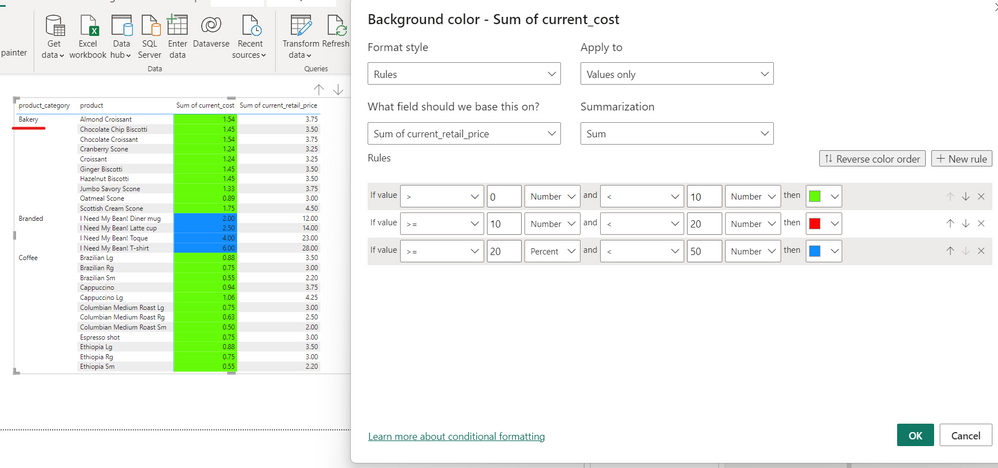
Apply conditional formatting for different section

I would like to give different conditional formatting for product bakery
while others should remain the same


Evanooruvan_0-1675153436901.png

@PaulDBrown🙂

1 ACCEPTED SOLUTION
MFelix
Super User
Super User

Hi @Evanooruvan ,


For this you need to create a metric that refers explicity to the bakery products something similar to:


Formatting =
SWITCH (
    TRUE (),
    SELECTEDVALUE ( Table[product_category] ) = "Bakery"
        && SUM ( Table[current_retail_price] ) < 10, "green",
    SELECTEDVALUE ( Table[product_category] ) = "Bakery"
        && SUM ( Table[current_retail_price] ) < 20, "red",
    SELECTEDVALUE ( Table[product_category] ) = "Bakery"
        && SUM ( Table[current_retail_price] ) < 50, "blue"
)

Regards

Miguel Félix


Did I answer your question? Mark my post as a solution!

Proud to be a Super User!

Check out my blog: Power BI em Português


View solution in original post

1 REPLY 1
MFelix
Super User
Super User

Hi @Evanooruvan ,


For this you need to create a metric that refers explicity to the bakery products something similar to:


Formatting =
SWITCH (
    TRUE (),
    SELECTEDVALUE ( Table[product_category] ) = "Bakery"
        && SUM ( Table[current_retail_price] ) < 10, "green",
    SELECTEDVALUE ( Table[product_category] ) = "Bakery"
        && SUM ( Table[current_retail_price] ) < 20, "red",
    SELECTEDVALUE ( Table[product_category] ) = "Bakery"
        && SUM ( Table[current_retail_price] ) < 50, "blue"
)

Regards

Miguel Félix


Did I answer your question? Mark my post as a solution!

Proud to be a Super User!

Check out my blog: Power BI em Português


Helpful resources

Announcements
Power BI DataViz World Championships

Power BI Dataviz World Championships

The Power BI Data Visualization World Championships is back! It's time to submit your entry.

January Power BI Update Carousel

Power BI Monthly Update - January 2026

Check out the January 2026 Power BI update to learn about new features.

FabCon Atlanta 2026 carousel

FabCon Atlanta 2026

Join us at FabCon Atlanta, March 16-20, for the ultimate Fabric, Power BI, AI and SQL community-led event. Save $200 with code FABCOMM.