Don't miss your chance to take the Fabric Data Engineer (DP-600) exam for FREE! Find out how by watching the DP-600 session on-demand now through April 28th.
Learn moreJoin the FabCon + SQLCon recap series. Up next: Power BI, Real-Time Intelligence, IQ and AI, and Data Factory take center stage. All sessions are available on-demand after the live show. Register now
Hello everyone,
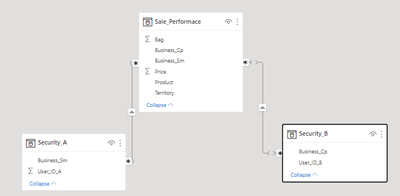
I got into trouble when I applied RLS in my dashboard. I have 2 tables: Security_A, and Security_B (photo below).
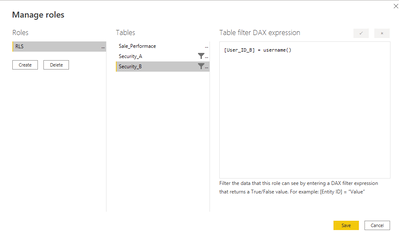
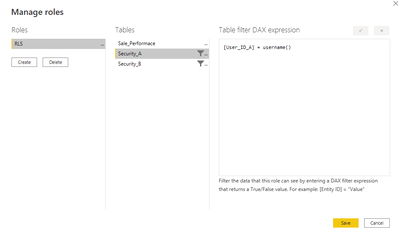
The user's username in Security_A (user_ID_A) or Security_B(user_ID_B). When the user login the server, the dashboard automatically applies the RLS by username, I set the RLS in the PBI Desktop like the photo below. But it doesn't work. What should I do to fix that? Can anyone help me? Thanks
Solved! Go to Solution.
Hi,
When working with RLS, it could be a good practice to use the USERPRINCIPALNAME() native function. This function returns the current authenticated user that is viewing the report. Also, you can filter the dimensions directly in your facts table (Sale_Performance) by looking up the user name in your security table (In this way you dont need to create relashionship between your security and sales table).
In the manage roles popup you could filter 'Sale_Performance'[business_Sm] field like this:
[Business_Sm] = LOOKUPVALUE(
Security_A[Business_Sm],
Security_A[User_ID_A],
USERPRINCIPALNAME() -- User Authenticated email // If you can, you also can format this string to bring the value you want
)
Hope it helps
Excellent @Anonymous 🙂
Hi,
When working with RLS, it could be a good practice to use the USERPRINCIPALNAME() native function. This function returns the current authenticated user that is viewing the report. Also, you can filter the dimensions directly in your facts table (Sale_Performance) by looking up the user name in your security table (In this way you dont need to create relashionship between your security and sales table).
In the manage roles popup you could filter 'Sale_Performance'[business_Sm] field like this:
[Business_Sm] = LOOKUPVALUE(
Security_A[Business_Sm],
Security_A[User_ID_A],
USERPRINCIPALNAME() -- User Authenticated email // If you can, you also can format this string to bring the value you want
)
Hope it helps
Check out the April 2026 Power BI update to learn about new features.
If you have recently started exploring Fabric, we'd love to hear how it's going. Your feedback can help with product improvements.
A new Power BI DataViz World Championship is coming this June! Don't miss out on submitting your entry.
| User | Count |
|---|---|
| 45 | |
| 38 | |
| 34 | |
| 21 | |
| 17 |
| User | Count |
|---|---|
| 66 | |
| 64 | |
| 31 | |
| 26 | |
| 26 |