Join us at FabCon Atlanta from March 16 - 20, 2026, for the ultimate Fabric, Power BI, AI and SQL community-led event. Save $200 with code FABCOMM.
Register now!The Power BI Data Visualization World Championships is back! Get ahead of the game and start preparing now! Learn more
Hello everyone,
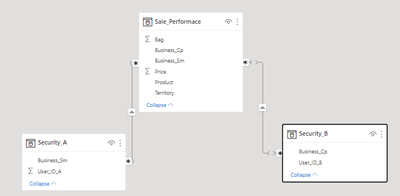
I got into trouble when I applied RLS in my dashboard. I have 2 tables: Security_A, and Security_B (photo below).
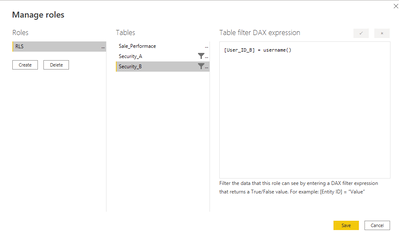
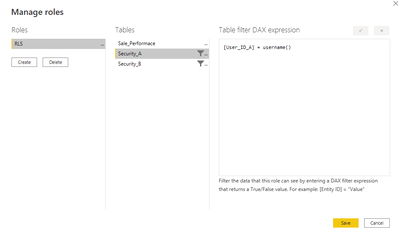
The user's username in Security_A (user_ID_A) or Security_B(user_ID_B). When the user login the server, the dashboard automatically applies the RLS by username, I set the RLS in the PBI Desktop like the photo below. But it doesn't work. What should I do to fix that? Can anyone help me? Thanks
Solved! Go to Solution.
Hi,
When working with RLS, it could be a good practice to use the USERPRINCIPALNAME() native function. This function returns the current authenticated user that is viewing the report. Also, you can filter the dimensions directly in your facts table (Sale_Performance) by looking up the user name in your security table (In this way you dont need to create relashionship between your security and sales table).
In the manage roles popup you could filter 'Sale_Performance'[business_Sm] field like this:
[Business_Sm] = LOOKUPVALUE(
Security_A[Business_Sm],
Security_A[User_ID_A],
USERPRINCIPALNAME() -- User Authenticated email // If you can, you also can format this string to bring the value you want
)
Hope it helps
Excellent @Anonymous 🙂
Hi,
When working with RLS, it could be a good practice to use the USERPRINCIPALNAME() native function. This function returns the current authenticated user that is viewing the report. Also, you can filter the dimensions directly in your facts table (Sale_Performance) by looking up the user name in your security table (In this way you dont need to create relashionship between your security and sales table).
In the manage roles popup you could filter 'Sale_Performance'[business_Sm] field like this:
[Business_Sm] = LOOKUPVALUE(
Security_A[Business_Sm],
Security_A[User_ID_A],
USERPRINCIPALNAME() -- User Authenticated email // If you can, you also can format this string to bring the value you want
)
Hope it helps
The Power BI Data Visualization World Championships is back! Get ahead of the game and start preparing now!
| User | Count |
|---|---|
| 40 | |
| 35 | |
| 34 | |
| 31 | |
| 28 |
| User | Count |
|---|---|
| 137 | |
| 102 | |
| 68 | |
| 66 | |
| 64 |