FabCon is coming to Atlanta
Join us at FabCon Atlanta from March 16 - 20, 2026, for the ultimate Fabric, Power BI, AI and SQL community-led event. Save $200 with code FABCOMM.
Register now!- Power BI forums
- Get Help with Power BI
- Desktop
- Service
- Report Server
- Power Query
- Mobile Apps
- Developer
- DAX Commands and Tips
- Custom Visuals Development Discussion
- Health and Life Sciences
- Power BI Spanish forums
- Translated Spanish Desktop
- Training and Consulting
- Instructor Led Training
- Dashboard in a Day for Women, by Women
- Galleries
- Data Stories Gallery
- Themes Gallery
- Contests Gallery
- QuickViz Gallery
- Quick Measures Gallery
- Visual Calculations Gallery
- Notebook Gallery
- Translytical Task Flow Gallery
- TMDL Gallery
- R Script Showcase
- Webinars and Video Gallery
- Ideas
- Custom Visuals Ideas (read-only)
- Issues
- Issues
- Events
- Upcoming Events
Get Fabric Certified for FREE during Fabric Data Days. Don't miss your chance! Request now
- Power BI forums
- Forums
- Get Help with Power BI
- Desktop
- Re: Append to row above in Power BI
- Subscribe to RSS Feed
- Mark Topic as New
- Mark Topic as Read
- Float this Topic for Current User
- Bookmark
- Subscribe
- Printer Friendly Page


- Mark as New
- Bookmark
- Subscribe
- Mute
- Subscribe to RSS Feed
- Permalink
- Report Inappropriate Content
Append to row above in Power BI
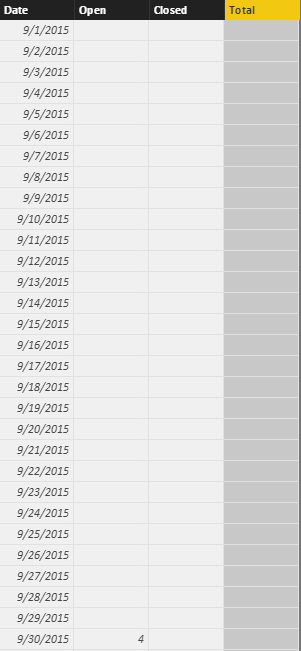
Hello… Is there a way to do something like this in Power BI?
In Excel, I have a table called TD_COUNT which consist of 4 columns, | Date | Open | Close | Total |
What I would like to accomplish is on a row 2, column D formula like this:
=IF([@[Date Open]]="","", [@Open])
but then on the row 3, I need to append row 2 column 😧
=IF([@[Date Open]]="","", [@Open]+D2)
and so on....

btw, I have created query table in Power BI called "Date List" and I have same columns as in Excel
Solved! Go to Solution.
- Mark as New
- Bookmark
- Subscribe
- Mute
- Subscribe to RSS Feed
- Permalink
- Report Inappropriate Content
That consistent 87 is suspicious. Did you by chance create 'Cumulative Open Tickets' as a Column rather than a Measure?


- Mark as New
- Bookmark
- Subscribe
- Mute
- Subscribe to RSS Feed
- Permalink
- Report Inappropriate Content
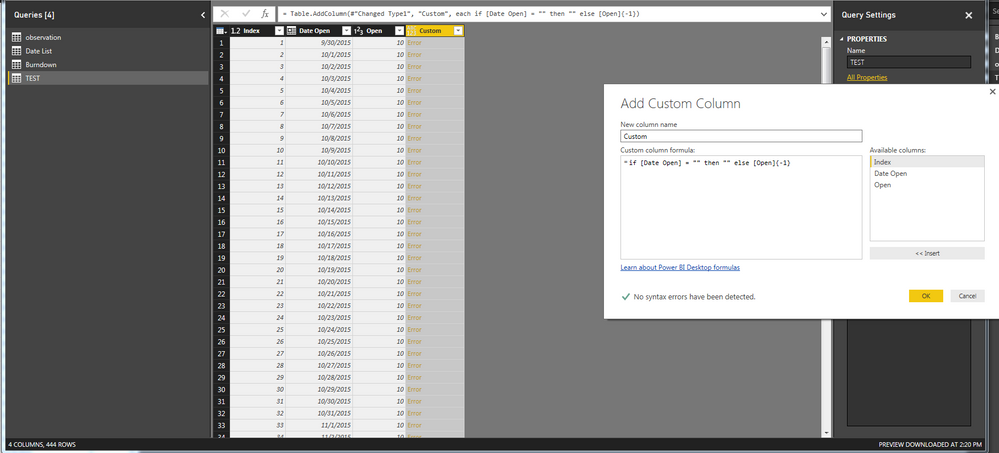
In power query (query editor in Power BI), you can create a custom column that references values in specific cells (i.e. a row offset such as the cell above). To do this, you would first need to add an index column starting with 1, and then the syntax for referencing that index column as a row offset would be:
=if [Date Open] = "" then "" else "Table"[Open]{Index-1}
Here the "Index" value will be the row number (essentially) so by subtracting 1 you are telling the function to use the value in the [Open] column but from the row above.
You will need to adapt this approach for your specific goal. It looks like you want a running total perhaps? Not sure but hope this helps
- Mark as New
- Bookmark
- Subscribe
- Mute
- Subscribe to RSS Feed
- Permalink
- Report Inappropriate Content
Thank you for reply however, I can't get it to work.
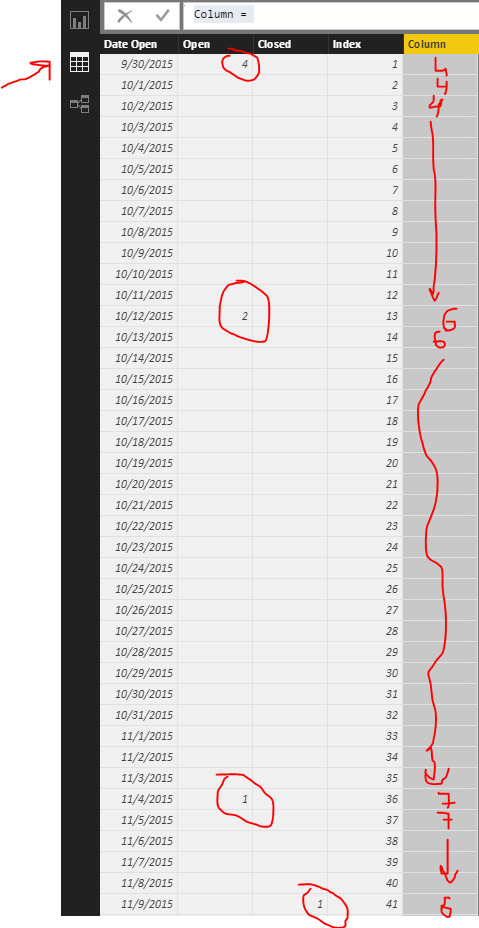
BTW, I am fearly new to Power BI. What I am looking for is if date 9/30/2015 has 10 open, I would like to take that 10 and add to the row below + whatever number under Open for the row 10/1/2015. So in this case would be 20 and so on (row on 10/2/2015 should be 30 since row above was 20 plus another 10 under open on that particular date)...
- Mark as New
- Bookmark
- Subscribe
- Mute
- Subscribe to RSS Feed
- Permalink
- Report Inappropriate Content
Is there a way to do this in DAX?
- Mark as New
- Bookmark
- Subscribe
- Mute
- Subscribe to RSS Feed
- Permalink
- Report Inappropriate Content
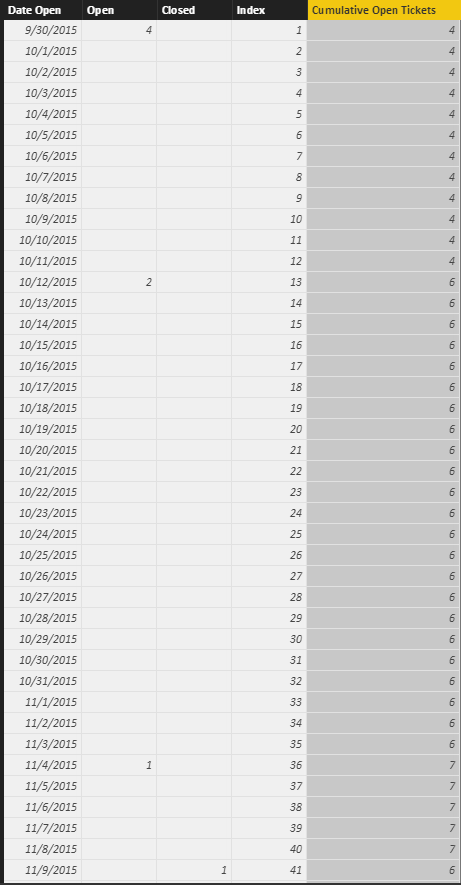
Try something like this as a measure, based on http://www.daxpatterns.com/cumulative-total/:
Cumulative Open Tickets =
CALCULATE (
    SUM (Table1[Open]) - SUM (Table1[Closed]),
    FILTER (
        ALL (Table1),
        Table1[Index] <= MAX (Table1[Index])
    )
)
- Mark as New
- Bookmark
- Subscribe
- Mute
- Subscribe to RSS Feed
- Permalink
- Report Inappropriate Content
Thank you for the reply/ your time to help with this.. this formula makes sence logically however it's not working 😞
Might be good thing to note that inorder to get number of open (column) I am using formula:
Open = COUNTX(
		FILTER('observation', 'observation'[Date Opened]='Date List'[Date Open]),
		'observation'[Date Opened])
And similar thing for Closed... not sure if that would affect the way Cumulative Open Tickets column?
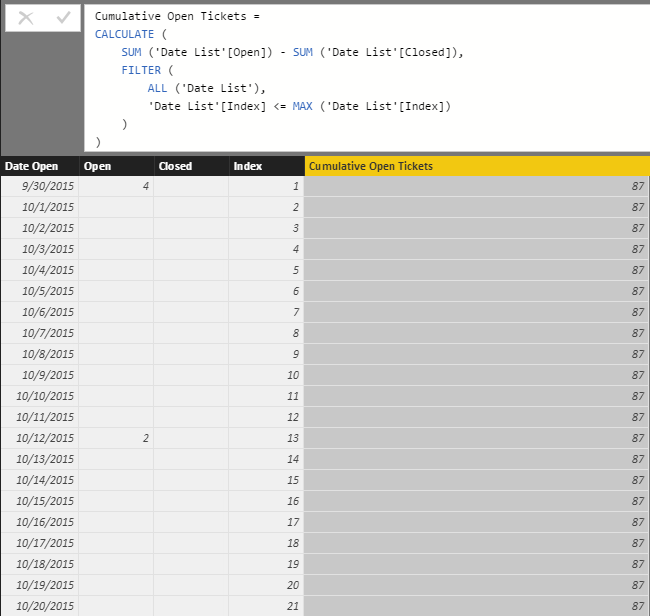
This is my resoult with the code you provided:
I will also check the link you mentioned in your post
- Mark as New
- Bookmark
- Subscribe
- Mute
- Subscribe to RSS Feed
- Permalink
- Report Inappropriate Content
That consistent 87 is suspicious. Did you by chance create 'Cumulative Open Tickets' as a Column rather than a Measure?
- Mark as New
- Bookmark
- Subscribe
- Mute
- Subscribe to RSS Feed
- Permalink
- Report Inappropriate Content
You are GENIUS :-)... I missed to see that. After quick change, now it works. Thank you for your help. It's much appriciated.

Helpful resources

Power BI Monthly Update - November 2025
Check out the November 2025 Power BI update to learn about new features.

Fabric Data Days
Advance your Data & AI career with 50 days of live learning, contests, hands-on challenges, study groups & certifications and more!

FabCon Atlanta 2026
Join us at FabCon Atlanta, March 16-20, for the ultimate Fabric, Power BI, AI and SQL community-led event. Save $200 with code FABCOMM.


