Don't miss your chance to take the Fabric Data Engineer (DP-600) exam for FREE! Find out how by watching the DP-600 session on-demand now through April 28th.
Learn moreJoin the FabCon + SQLCon recap series. Up next: Power BI, Real-Time Intelligence, IQ and AI, and Data Factory take center stage. All sessions are available on-demand after the live show. Register now
Hi,
I am trying to analyze data in matrix, its a budget vs actual report. i have data in rows like below.
Type Code Amount
Actual ABC 100,000
Budget ABC 500,000
Actual XYZ 50,000
Budget XYZ 600,000
Can anyone help me how can i put that in matrix, also show the difference between Budget and actual with variance percentage
i need report in following format
Code Budget Actual Difference Variance %
Solved! Go to Solution.
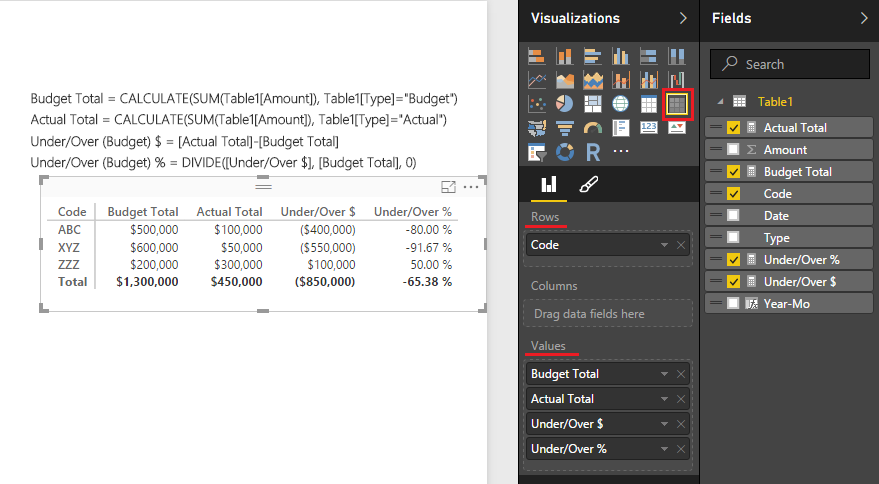
@shanjaf I think this is what you are trying to do... Just create these 4 Measures and organize as in the picture
Let me know if it works.
@shanjaf In powerbi desktop click on Query Editor. Select your table -> select column -> Under Transform tab -> pivot column. Use that to convert rows in your Type column to columns and use Amount as values field. To calculate percentage create new measure of total amount using DAX. Then divide actual amount by total amount and change column type of that to percentage. If you're unsure with DAX let me know and I will post the code.
@shanjaf I think this is what you are trying to do... Just create these 4 Measures and organize as in the picture
Let me know if it works.
I didn't try it, i think this will work, one more question. will that calculated field work in direct query?
Check out the April 2026 Power BI update to learn about new features.
If you have recently started exploring Fabric, we'd love to hear how it's going. Your feedback can help with product improvements.
A new Power BI DataViz World Championship is coming this June! Don't miss out on submitting your entry.
| User | Count |
|---|---|
| 45 | |
| 38 | |
| 34 | |
| 21 | |
| 17 |
| User | Count |
|---|---|
| 66 | |
| 64 | |
| 31 | |
| 26 | |
| 26 |