Don't miss your chance to take the Fabric Data Engineer (DP-700) exam on us!
Learn moreWe've captured the moments from FabCon & SQLCon that everyone is talking about, and we are bringing them to the community, live and on-demand. Starts on April 14th. Register now
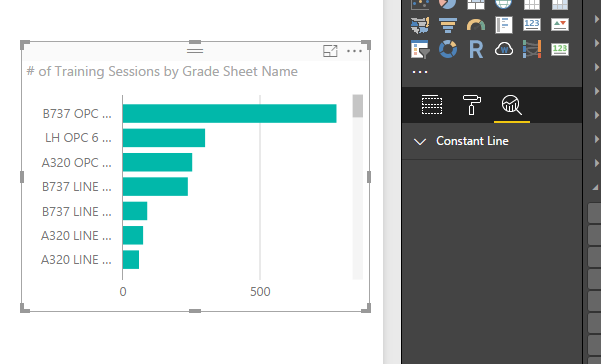
I am using the 2.40.4554.463 64-bit (October 2016) version of Power BI desktop. When I attempt to use the analytics pane, I only get the "Constant Line" option. Am I not supposed to get a choice of options with this version?
Solved! Go to Solution.
The Analytics Pane depends on the visual. The bar chart does not have much, but charts such as Line and Scatterplot have more robust options.
Please look at the “Limitations” section in this official document to see which dynamic reference lines can be used in different visuals.
Best Regards,
Herbert
Thanks guys, appreciate the information.
Please look at the “Limitations” section in this official document to see which dynamic reference lines can be used in different visuals.
Best Regards,
Herbert
You're correct. Looks like I have to use the clustered bar chart visual instead of the basic bar chart. One wonders why the full complement of analytics from the clustered bar chart is not available for basic bar chart?
The Analytics Pane depends on the visual. The bar chart does not have much, but charts such as Line and Scatterplot have more robust options.
If you have recently started exploring Fabric, we'd love to hear how it's going. Your feedback can help with product improvements.
A new Power BI DataViz World Championship is coming this June! Don't miss out on submitting your entry.
Share feedback directly with Fabric product managers, participate in targeted research studies and influence the Fabric roadmap.
| User | Count |
|---|---|
| 51 | |
| 37 | |
| 35 | |
| 19 | |
| 17 |
| User | Count |
|---|---|
| 70 | |
| 64 | |
| 39 | |
| 33 | |
| 23 |