Get certified for free when you join Fabric Data Days 2026 and dive into Fabric, Power BI, SQL, AI, and other essential data skills.
Join nowTry your skills in the Power BI Dataviz World Championship! Round one ends June 26. Join now
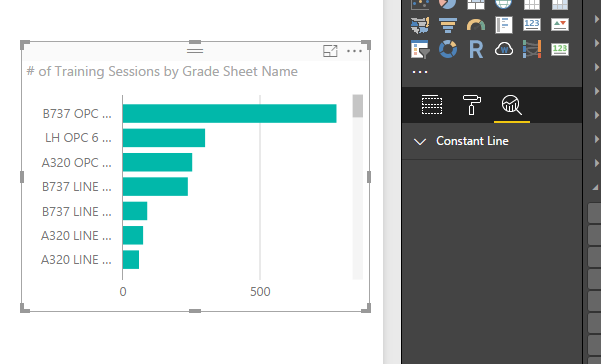
I am using the 2.40.4554.463 64-bit (October 2016) version of Power BI desktop. When I attempt to use the analytics pane, I only get the "Constant Line" option. Am I not supposed to get a choice of options with this version?
Solved! Go to Solution.
The Analytics Pane depends on the visual. The bar chart does not have much, but charts such as Line and Scatterplot have more robust options.
Please look at the “Limitations” section in this official document to see which dynamic reference lines can be used in different visuals.
Best Regards,
Herbert
Thanks guys, appreciate the information.
Please look at the “Limitations” section in this official document to see which dynamic reference lines can be used in different visuals.
Best Regards,
Herbert
You're correct. Looks like I have to use the clustered bar chart visual instead of the basic bar chart. One wonders why the full complement of analytics from the clustered bar chart is not available for basic bar chart?
The Analytics Pane depends on the visual. The bar chart does not have much, but charts such as Line and Scatterplot have more robust options.
| User | Count |
|---|---|
| 23 | |
| 19 | |
| 18 | |
| 17 | |
| 11 |
| User | Count |
|---|---|
| 54 | |
| 53 | |
| 42 | |
| 38 | |
| 32 |