Join us in Barcelona for FabCon and SQLCon, September 28 - October 1, 2026.
This is best Fabric, Power BI, SQL and AI community event. How do we know? The last event sold out! Save €200 with code FABCMTY200.
Register now- Power BI forums
- Get Help with Power BI
- Desktop
- Service
- Report Server
- Power Query
- Mobile Apps
- Developer
- DAX Commands and Tips
- Custom Visuals Development Discussion
- Health and Life Sciences
- Power BI Spanish forums
- Translated Spanish Desktop
- Training and Consulting
- Instructor Led Training
- Dashboard in a Day for Women, by Women
- Galleries
- Data Stories Gallery
- Themes Gallery
- Contests Gallery
- QuickViz Gallery
- Quick Measures Gallery
- Visual Calculations Gallery
- Fabric Apps Gallery
- Notebook Gallery
- Translytical Task Flow Gallery
- TMDL Gallery
- R Script Showcase
- Webinars and Video Gallery
- Ideas
- Custom Visuals Ideas (read-only)
- Issues
- Issues
- Events
- Upcoming Events
The Fabric community is now in read-only for platform upgrade. Learn more
- Power BI forums
- Forums
- Get Help with Power BI
- Desktop
- Re: Ambiguous Relationships
- Subscribe to RSS Feed
- Mark Topic as New
- Mark Topic as Read
- Float this Topic for Current User
- Bookmark
- Subscribe
- Printer Friendly Page


- Mark as New
- Bookmark
- Subscribe
- Mute
- Subscribe to RSS Feed
- Permalink
Ambiguous Relationships
I have customers buying oranges from one company and I am surveying them about the taste on a monthly basis. If a company has a low mean rating in a given month, we contact them. My tables and relationships are shown in orange.
I want to create a table to show each company's monthly mean rating and a contact date, if available. My issue is that the contact date needs to be filtered by both company and month, but one relationship is active, while the other is inactive. Hence the filtering issue.
Any help would be greatly appreciated. Thanks!

Solved! Go to Solution.


- Mark as New
- Bookmark
- Subscribe
- Mute
- Subscribe to RSS Feed
- Permalink
Hi @megm001,
I may misunderstand your requirement previously.
In your scenario, you can just remove the "Month Sort" table from your mode, then create bidirectional relationships among the other three tables like below.

And then you should be able to use the formula below to create a measure to get the Contact Date and show it with other three columns.
Measure for Contact Date =
CALCULATE (
    MAX ( Table4[Contact Date] ),
    FILTER ( Table4, Table4[Month of Low Rating] = MAX ( Table1[MonthSurveyed] ) )
)
Note: replace Table1 and Table4 with your real table name, and format the measure to show only Month and Day under Modeling tab.
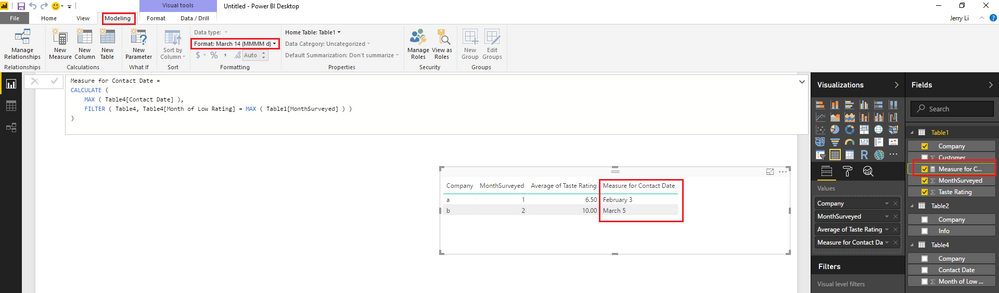
Here is sample pbix file for your reference. 
Regards
- Mark as New
- Bookmark
- Subscribe
- Mute
- Subscribe to RSS Feed
- Permalink
Hi @megm001,
Based on my test, the formula below should work to not show the "total" date.
Measure for Contact Date =
IF (
    HASONEVALUE ( Table1[Company] ),
    CALCULATE (
        MAX ( Table4[Contact Date] ),
        FILTER ( Table4, Table4[Month of Low Rating] = MAX ( Table1[MonthSurveyed] ) )
    )
)
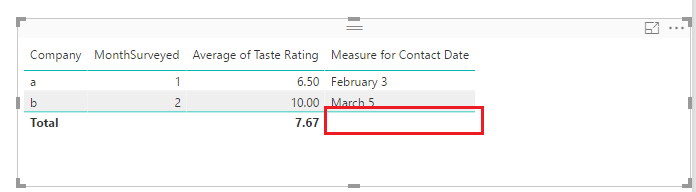
Regards
- Mark as New
- Bookmark
- Subscribe
- Mute
- Subscribe to RSS Feed
- Permalink
Hi @megm001,
Based on my test, if you set Cross filter direction to Single for all relationships, then you should be able to make all relationships active and then filter by both company and month in your scenario.

Regards
- Mark as New
- Bookmark
- Subscribe
- Mute
- Subscribe to RSS Feed
- Permalink
@v-ljerr-msftThank you for your response!
I was able to create the first three columns of my table with the relationships you specified.
However, when I added the "fourth" column (Contact Date splits into to Month, Day, Year, Quarter. I only need Month and Day, as shown below.), the filtering fails and each month of each company shows every day of the year. That's 730 entries!
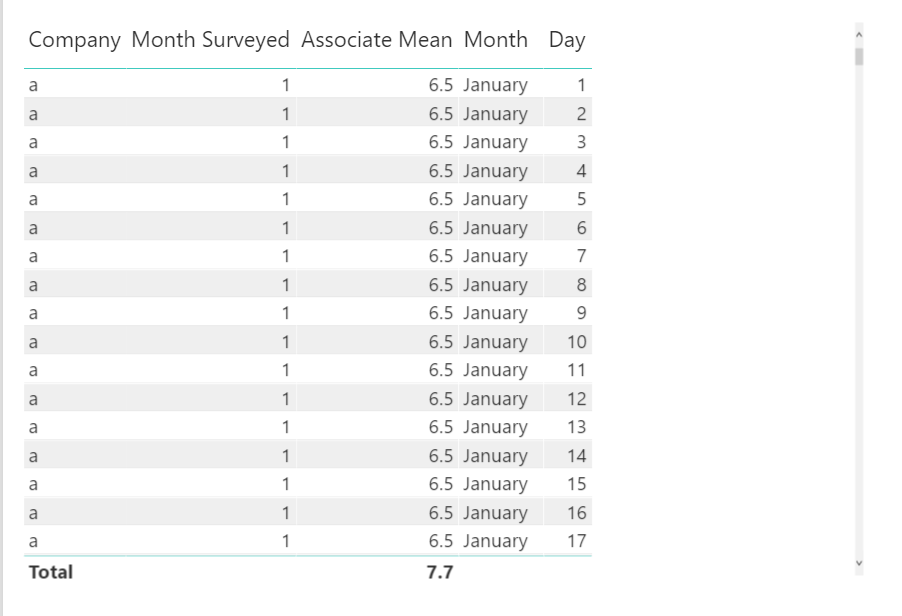
So I tried creating a bidirectional relationship between Companies[Company] and Performance Review [Company], which resulted in the following table. You can see that it's much better than the previous, but something's off. It may be filtering the company correctly (It's identified that there are two contact dates for Company a and only one for Company B. However, it's showing both contact dates for January! That's not right! If we look at the Performance Review table again, we see that each date refers to a review in Jan and Feb, respectively.
Since we can't filter bidirectionally for both company and month (Month Sort[Month Int] and Performance Review[Month of Low Rating]) I tried filtering bidirectionally for just month. However, we get a similar result to filtering bidirectionally for company only. As seen below. Again, it sees the one contact date in January and two in February, but it's not connecting it to the companies.
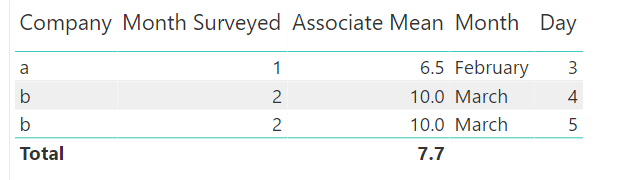
Is it possible to filter bidirectionally for both company and month? Is there a calculation I can use to fix this? Maybe using userelationship()?
Thank you!
- Mark as New
- Bookmark
- Subscribe
- Mute
- Subscribe to RSS Feed
- Permalink
Hi @megm001,
I may misunderstand your requirement previously.
In your scenario, you can just remove the "Month Sort" table from your mode, then create bidirectional relationships among the other three tables like below.
And then you should be able to use the formula below to create a measure to get the Contact Date and show it with other three columns.
Measure for Contact Date =
CALCULATE (
    MAX ( Table4[Contact Date] ),
    FILTER ( Table4, Table4[Month of Low Rating] = MAX ( Table1[MonthSurveyed] ) )
)
Note: replace Table1 and Table4 with your real table name, and format the measure to show only Month and Day under Modeling tab.
Here is sample pbix file for your reference.
Regards

- Mark as New
- Bookmark
- Subscribe
- Mute
- Subscribe to RSS Feed
- Permalink
Hi @megm001,
Based on my test, the formula below should work to not show the "total" date.
Measure for Contact Date =
IF (
    HASONEVALUE ( Table1[Company] ),
    CALCULATE (
        MAX ( Table4[Contact Date] ),
        FILTER ( Table4, Table4[Month of Low Rating] = MAX ( Table1[MonthSurveyed] ) )
    )
)
Regards
- Mark as New
- Bookmark
- Subscribe
- Mute
- Subscribe to RSS Feed
- Permalink
Perfect! Thank you!
- Mark as New
- Bookmark
- Subscribe
- Mute
- Subscribe to RSS Feed
- Permalink
@v-ljerr-msftThank you for your response!
I was able to create the first three columns of my table with the relationships you specified.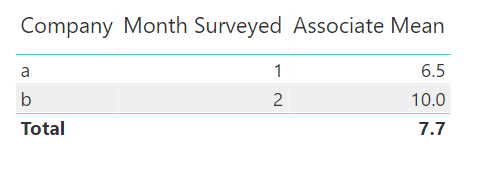
However, when I added the "fourth" column (Contact Date splits into to Month, Day, Year, Quarter. I only need Month and Day, as shown below.), the filtering fails and each month of each company shows every day of the year. That's 730 entries!
So I tried creating a bidirectional relationship between Companies[Company] and Performance Review [Company], which resulted in the following table. You can see that it's much better than the previous, but something's off. It may be filtering the company correctly (It's identified that there are two contact dates for Company a and only one for Company B. However, it's showing both contact dates for January! That's not right! If we look at the Performance Review table again, we see that each date refers to a review in Jan and Feb, respectively.
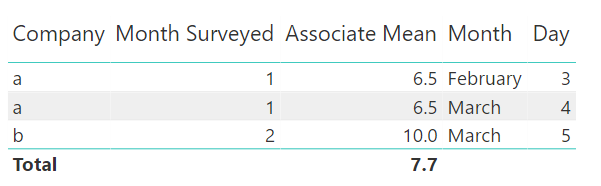
Since we can't filter bidirectionally for both company and month (Month Sort[Month Int] and Performance Review[Month of Low Rating]) I tried filtering bidirectionally for just month. However, we get a similar result to filtering bidirectionally for company only. As seen below. Again, it sees the one contact date in January and two in February, but it's not connecting it to the companies.
Is it possible to filter bidirectionally for both company and month? Is there a calculation I can use to fix this? Maybe using userelationship()?
Thank you!
- Mark as New
- Bookmark
- Subscribe
- Mute
- Subscribe to RSS Feed
- Permalink
@v-ljerr-msft Thank you for your response!
I was able to create the first three columns of my table with the relationships you specified.
However, when I added the "fourth" column (Contact Date splits into to Month, Day, Year, Quarter. I only need Month and Day, as shown below.), the filtering fails and each month of each company shows every day of the year. That's 730 entries!
So I tried creating a bidirectional relationship between Companies[Company] and Performance Review [Company], which resulted in the following table. You can see that it's much better than the previous, but something's off. It may be filtering the company correctly (It's identified that there are two contact dates for Company a and only one for Company B. However, it's showing both contact dates for January! That's not right! If we look at the Performance Review table again, we see that each date refers to a review in Jan and Feb, respectively.
Since we can't filter bidirectionally for both company and month (Month Sort[Month Int] and Performance Review[Month of Low Rating]) I tried filtering bidirectionally for just month. However, we get a similar result to filtering bidirectionally for company only. As seen below. Again, it sees the one contact date in January and two in February, but it's not connecting it to the companies.
Is it possible to filter bidirectionally for both company and month? Is there a calculation I can use to fix this? Maybe using userelationship()?
Thank you!

Helpful resources

FabCon & SQLCon – Barcelona 2026
Join us in Barcelona for FabCon and SQLCon, the Fabric, Power BI, SQL, and AI community event. Save €200 with code FABCMTY200.

Power BI DataViz World Championships - June 2026
A new Power BI DataViz World Championship is coming this June! Don't miss out on submitting your entry.

| User | Count |
|---|---|
| 23 | |
| 22 | |
| 14 | |
| 14 | |
| 13 |


| User | Count |
|---|---|
| 47 | |
| 39 | |
| 24 | |
| 20 | |
| 20 |


