Join us at FabCon Atlanta from March 16 - 20, 2026, for the ultimate Fabric, Power BI, AI and SQL community-led event. Save $200 with code FABCOMM.
Register now!The Power BI Data Visualization World Championships is back! Get ahead of the game and start preparing now! Learn more
Hi everyone!
I'm a new user to Power BI, but I've been using Alteryx for years. I used Alteryx's Publish to Power BI tool and noticed that when I use the data source created by Alteryx, I'm unable to create hierarchies. I also noticed that the Data and Relationship views are not available. For other Alteryx and Power BI users, are these features not available for you as well? Or is there a way to set up Power BI and Alteryx to allow these features (most importantly the hierarchy feature)?
When I connect to other data source types, all of these features are available.
Thank you in advance!
Hi there, I'm having the same issue. Did you find a solution to enable all PowerBI functionality with data flowing from Alteryx via the PowerBI connector?
Cheers,
PM
Hi @Anonymous,
Based on my research, when you have connected the data in Alteryx with Power BI Desktop, the connection mode is live connection, and in this mode, you could not see the Data and Relationship view.
Reference:https://powerbi.tips/2018/02/power-bi-connections-live-connection/
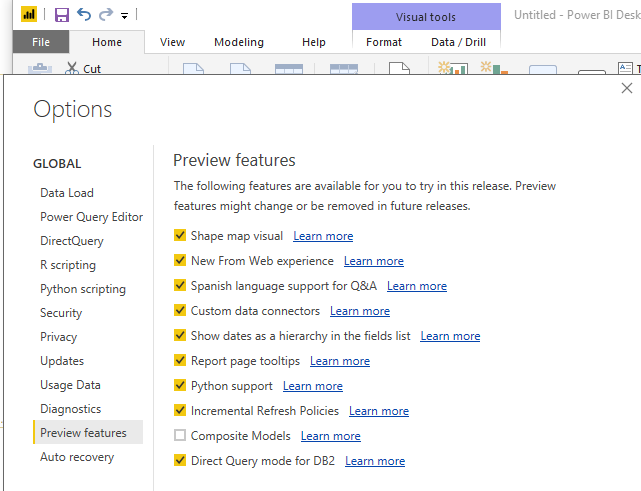
And you could check the option in Desktop: File -> Options -> Preview features ->Show dates as a hierarchy
Hope it could help you.
Regards,
Daniel He
The Power BI Data Visualization World Championships is back! Get ahead of the game and start preparing now!
| User | Count |
|---|---|
| 41 | |
| 38 | |
| 36 | |
| 30 | |
| 28 |
| User | Count |
|---|---|
| 129 | |
| 88 | |
| 79 | |
| 68 | |
| 63 |