cancel
Showing results for 
Search instead for 
Did you mean: 

Get Fabric Certified for FREE during Fabric Data Days. Don't miss your chance! Request now

Reply
dedelman_clng
Community Champion
Community Champion

Allocating costs from one table to values in another table

I'm hoping someone can point me in the right direction, because I'm starting to think what I'm trying to do can't be done. Smiley Indifferent


Data Model:

Server Detail (InstanceID) 1-to-many to BillingDetail (InstanceID, ExtendedCost)

Standard Date table


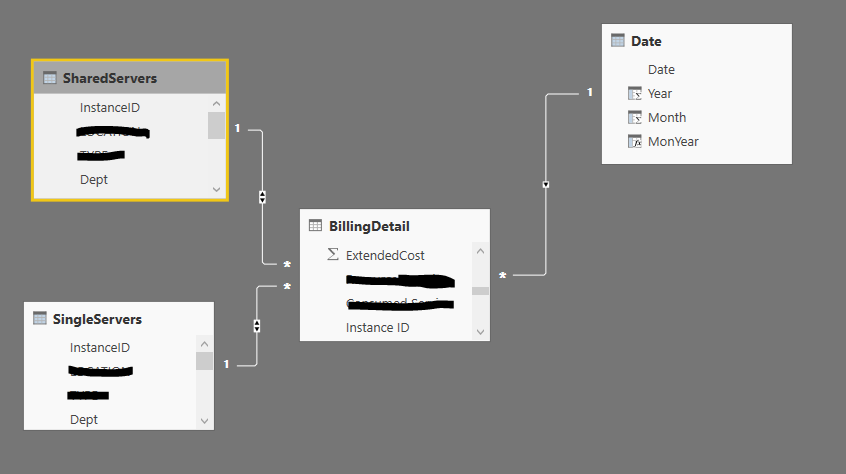
I split ServerDetail into SingleServers and SharedServers based on certain criteria (there is no overlap between SingleServers and SharedServers, and every row from ServerDetail goes into one or the other).


So the data model really looks like this:


DM.PNG


I need to total up the costs, per month and department, of the SingleServers, and figure out the percentage of each for a given month:


Total Cost := CALCULATE(
	sum(BillingDetail[ExtendedCost]),
		 'SingleServers'
	)

%GT := DIVIDE(
		[Total Cost],
		CALCULATE(
			[Total Cost],
			ALL(SingleServers[Dept])
		)
	)

So for example I would get


TotCost.PNG


So far so good.  Now I need to compute the total cost for Shared Server per month:

Total Shared Cost := CALCULATE(
	sum(BillingDetail[ExtendedCost]),
		SharedServers
)
1 ACCEPTED SOLUTION

Hi @Anonymous, @SqlJason


I don't know how I ended up with 2 or 3 versions of this topic, but the main thread is here:


https://community.powerbi.com/t5/Desktop/Allocating-costs-from-one-table-to-values-in-another-table/m-p/131756#M56199


I will be sharing PBIX files with both split and non-split tables showing that they both work if you are interested.


David

View solution in original post

4 REPLIES 4
SqlJason
Memorable Member
Memorable Member

I didn't understand the issue well, but based on what I undersatnd, i would definitely combine both the single servers and shared servers into one table, with an extra column called Server Type (can have 2 values - Shared or Single). It is best to do it in Power Query, but you can make a calculated table also  - 

Server =
UNION (
    SUMMARIZE ( 'SharedServer', [InstanceID], [Dept], "ServerType", "Shared" ),
    SUMMARIZE ( 'ingleServer', [InstanceID], [Dept], "ServerType", "Single" )
)
Now you can use the same measures and then put ServerType on slicer/columns to see the measures for Single or Shared.
Total Cost := CALCULATE(
	sum(BillingDetail[ExtendedCost])
	)

%GT := DIVIDE(
		[Total Cost],
		CALCULATE(
			[Total Cost],
			ALL(Server[Dept])
		)
	)


@SqlJason thank you, but that's not the issue I'm having.  I need to combine values from shared servers with values from single servers, calculating a percentage allocation of both.

Anonymous
Not applicable

Hi @dedelman_clng,


You can refer to below steps to achieve your requirement.


1. Use SELECTCOLUMNS funciton to choose the same part of each table, add a Tag column to remark the original table.

3. Merge these tables with UNION function.

4. Write two measures to calculate the percent of each table.


Sample:


Table formula:

SummaryTable=
Union(
SelectColumns(SingleServers,"InstanceId",[InstanceId],"Dept",[Dept],"ExtendedCost",Related(BillingDetail[ExtendedCost]),"Tag","SingleServers"),
SelectColumns(SharedServers,"InstanceId",[InstanceId],"Dept",[Dept],"ExtendedCost",Related(BillingDetail[ExtendedCost]),"Tag","SharedServers"))


Measures:

Total of SingleServers= Calculate(Sum(SummaryTable[ExtendedCost]),FILTER(ALL(SummaryTable),[Tag]="SingleServers"))

Total of SharedServers= Calculate(Sum(SummaryTable[ExtendedCost]),FILTER(ALL(SummaryTable),[Tag]="SharedServers"))

Percent of SingleServers=
DIVIDE(MAX(SummaryTable[ExtendedCost]),[Total of SingleServers],0)

Percent of SharedServers=
DIVIDE(MAX(SummaryTable[ExtendedCost]),[Total of SharedServers],0)


Regards,

Xiaoxin Sheng

Hi @Anonymous, @SqlJason


I don't know how I ended up with 2 or 3 versions of this topic, but the main thread is here:


https://community.powerbi.com/t5/Desktop/Allocating-costs-from-one-table-to-values-in-another-table/m-p/131756#M56199


I will be sharing PBIX files with both split and non-split tables showing that they both work if you are interested.


David

Helpful resources

Announcements
November Power BI Update Carousel

Power BI Monthly Update - November 2025

Check out the November 2025 Power BI update to learn about new features.

Fabric Data Days Carousel

Fabric Data Days

Advance your Data & AI career with 50 days of live learning, contests, hands-on challenges, study groups & certifications and more!

FabCon Atlanta 2026 carousel

FabCon Atlanta 2026

Join us at FabCon Atlanta, March 16-20, for the ultimate Fabric, Power BI, AI and SQL community-led event. Save $200 with code FABCOMM.

Top Solution Authors
Top Kudoed Authors