Join us at FabCon Atlanta from March 16 - 20, 2026, for the ultimate Fabric, Power BI, AI and SQL community-led event. Save $200 with code FABCOMM.
Register now!The Power BI Data Visualization World Championships is back! Get ahead of the game and start preparing now! Learn more
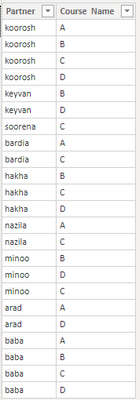
Hello Experts, Have a list that shows partners enrolled in courses, how to make a report that shows the partners enrolled all courses.
Solved! Go to Solution.
@koorosh , Try a measure like
measure =
var _cnt = calculate(distinctCOUNT(Table[Course]))
return
countx(filter(summarize(Table, Table[PARTNER], "_1", calculate(distinctCOUNT(Table[Course]))), [_1] =_cnt),[Partner])
Thanks, Amit, the measure returns a value, how we can get a table that returns all partners that took all courses? Like what we did for missing courses as following dax:
New table =except(crossjoin(all(Table[partner]),all(Table[Course Name])), selectcolumns(Table,"partner", Table[partner], "Course Name",Table[Course Name]))
Could you please let me know what expression we should write that says: create a table with summarize function (including just one partner column) with filter function that checks the number of total courses equal with the number of courses a partner enrolled.
The Power BI Data Visualization World Championships is back! Get ahead of the game and start preparing now!
| User | Count |
|---|---|
| 41 | |
| 39 | |
| 37 | |
| 29 | |
| 24 |
| User | Count |
|---|---|
| 124 | |
| 107 | |
| 80 | |
| 69 | |
| 67 |