cancel
Showing results for 
Search instead for 
Did you mean: 

View all the Fabric Data Days sessions on demand. View schedule

Reply
koorosh
Post Partisan
Post Partisan

All values

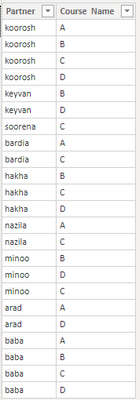
Hello Experts, Have a list that shows partners enrolled in courses, how to make a report that shows the partners enrolled all courses.

koorosh_0-1632293630282.png


1 ACCEPTED SOLUTION

@koorosh , In a table visual put this measure with partner

Share with Power BI Enthusiasts: Full Power BI Video (20 Hours) YouTube
Microsoft Fabric Series 60+ Videos YouTube
Microsoft Fabric Hindi End to End YouTube

View solution in original post

6 REPLIES 6
amitchandak
Super User
Super User

@koorosh , Try a measure like


measure =
var _cnt = calculate(distinctCOUNT(Table[Course]))
return
countx(filter(summarize(Table, Table[PARTNER], "_1", calculate(distinctCOUNT(Table[Course]))), [_1] =_cnt),[Partner])

Share with Power BI Enthusiasts: Full Power BI Video (20 Hours) YouTube
Microsoft Fabric Series 60+ Videos YouTube
Microsoft Fabric Hindi End to End YouTube

Thanks, Amit, the measure returns a value, how we can get a table that returns all partners that took all courses? Like what we did for missing courses as following dax:


New table =except(crossjoin(all(Table[partner]),all(Table[Course Name])), selectcolumns(Table,"partner", Table[partner], "Course Name",Table[Course Name]))


@koorosh , Please find the attached file after signature. Added new table and create two new visual table on right

Share with Power BI Enthusiasts: Full Power BI Video (20 Hours) YouTube
Microsoft Fabric Series 60+ Videos YouTube
Microsoft Fabric Hindi End to End YouTube

@koorosh , In a table visual put this measure with partner

Share with Power BI Enthusiasts: Full Power BI Video (20 Hours) YouTube
Microsoft Fabric Series 60+ Videos YouTube
Microsoft Fabric Hindi End to End YouTube

Could you please let me know what expression we should write that says: create a table with summarize function (including just one partner column) with filter function that checks the number of total courses equal with the number of courses a partner enrolled.

Table test =
var cnt = CALCULATE(DISTINCTCOUNT('Completed Courses'[Course Name]),ALLSELECTED())
return
FILTER(
summarize(
'Completed Courses','Completed Courses'[Partner Name],
"courses attended",DISTINCTCOUNT('Completed Courses'[Course Name])),
[courses attended] = cnt
)

Helpful resources

Announcements
November Power BI Update Carousel

Power BI Monthly Update - November 2025

Check out the November 2025 Power BI update to learn about new features.

Fabric Data Days Carousel

Fabric Data Days

Advance your Data & AI career with 50 days of live learning, contests, hands-on challenges, study groups & certifications and more!

FabCon Atlanta 2026 carousel

FabCon Atlanta 2026

Join us at FabCon Atlanta, March 16-20, for the ultimate Fabric, Power BI, AI and SQL community-led event. Save $200 with code FABCOMM.

Top Solution Authors
Top Kudoed Authors