Don't miss your chance to take the Fabric Data Engineer (DP-600) exam for FREE! Find out how by attending the DP-600 session on April 23rd (pacific time), live or on-demand.
Learn moreNext up in the FabCon + SQLCon recap series: The roadmap for Microsoft SQL and Maximizing Developer experiences in Fabric. All sessions are available on-demand after the live show. Register now
I am wondering if there is a way in Power BI to help the user maintain a sense of context while they are drilling down on a bar chart.
My specific bar chart has an axis with three levels - fiscal quarter, product type and product family. When I drill down into the product type breakdown for a specific fiscal quarter, there is no graphical indication of which specific quarter I am looking at the product type breakdown for.
Does anybody know of a way to make this series of clicks less confusing for the end user?
Thank you.
Solved! Go to Solution.
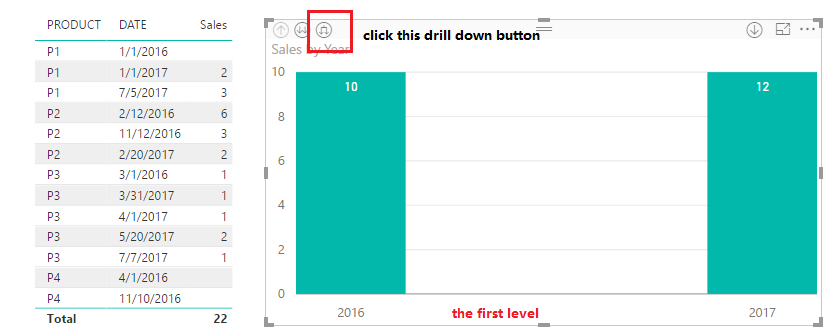
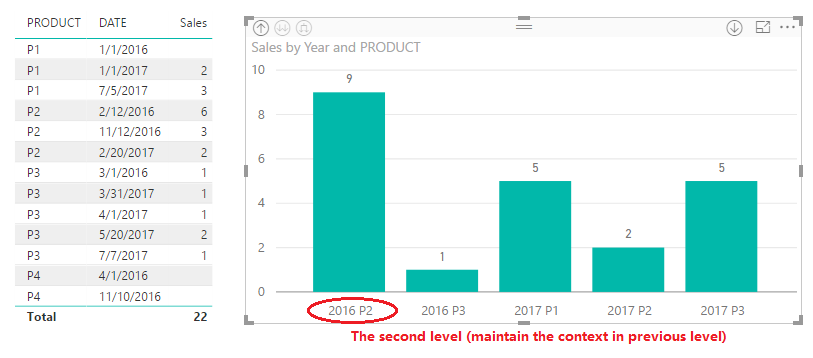
Use the "branching" drilldown (furthest right) instead of the double arrows drilldown?
Hi @mjmar025,
Have you worked out your requirement? If so, would you please kindly mark the corresponding reply as an answer or share your resolution so that it can benefit more users. If you still have any question, please feel free to ask.
Regards,
Yuliana Gu
Hi @mjmar025,
Please refer to below two images.
Best regards,
Yuliana Gu
Use the "branching" drilldown (furthest right) instead of the double arrows drilldown?
If you have recently started exploring Fabric, we'd love to hear how it's going. Your feedback can help with product improvements.
A new Power BI DataViz World Championship is coming this June! Don't miss out on submitting your entry.
Experience the highlights from FabCon & SQLCon, available live and on-demand starting April 14th.
| User | Count |
|---|---|
| 48 | |
| 40 | |
| 37 | |
| 20 | |
| 16 |
| User | Count |
|---|---|
| 70 | |
| 67 | |
| 32 | |
| 27 | |
| 25 |