Join us at FabCon Atlanta from March 16 - 20, 2026, for the ultimate Fabric, Power BI, AI and SQL community-led event. Save $200 with code FABCOMM.
Register now!Learn from the best! Meet the four finalists headed to the FINALS of the Power BI Dataviz World Championships! Register now
EDIT: Link to PBIX-file: ShopInfo
Hi all!
I could use some help wrapping my head around the following issue:
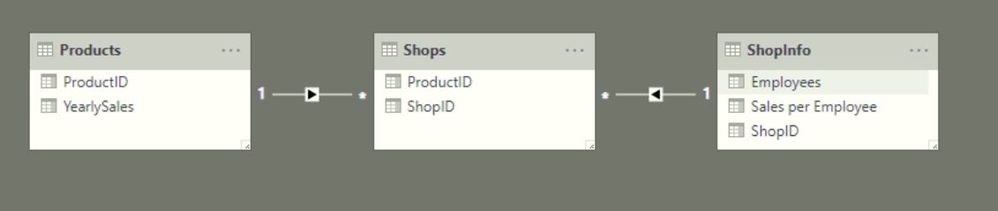
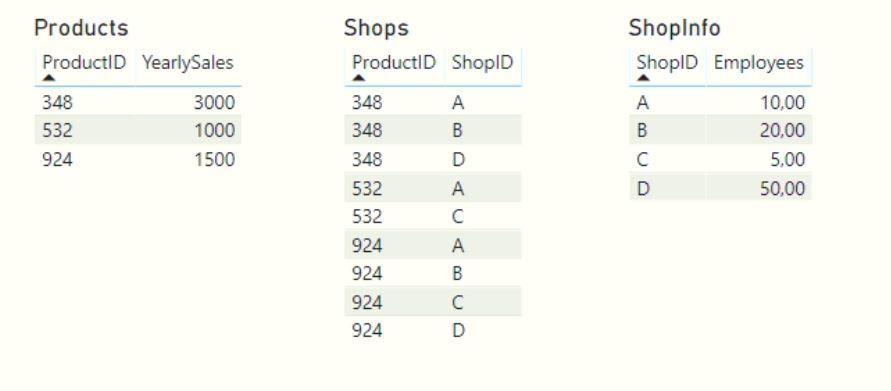
I have three tables in my model:
They look like:
Now I've created the following table using these tables:
Now, I want another column in this table that will divide the number of Employees over the YearlySales. So..
| ProductID | Employees | YearlySales | YearlySales per Employee |
| 348 | 10 | 3000 | 300 |
| 348 | 20 | 3000 | 150 |
| 348 | 50 | 3000 | 60 |
| 532 | 5 | 1000 | 200 |
| 532 | 10 | 1000 | 100 |
| 924 | 5 | 1500 | 300 |
| 924 | 10 | 1500 | 150 |
| 924 | 20 | 1500 | 75 |
| 924 | 50 | 1500 | 30 |
In the table, I have ticked the 'Don't Summarize' options for the columns 'Employees' and 'YearlySales'.
But as I try to create a measure or calculated column in the ShopInfo-table which just divides both values, the formula editor requires me to enforce some kind of aggregation (max, min, sum, etc...) before being able to include the YearlySales. Which in turn messes up the calculation.. 😞
Any ideas on how to solve this? I'm even questioning if I should create a measure or calculated column. Help is very much appreciated.
Solved! Go to Solution.
Help!? 😭
My output is supposed to be an actual table, just as I showed in the initial question.
When I create a calculated column (within any of the included tables), I still run into the issue of having some type of aggregation.
In all cases, whenever I use MAX(...), MIN(...), SUM(...), AVERAGE(...) to aggregate the field that 'needs' aggregation, I don't get the result I need.. 😞
Share feedback directly with Fabric product managers, participate in targeted research studies and influence the Fabric roadmap.
Check out the February 2026 Power BI update to learn about new features.
| User | Count |
|---|---|
| 66 | |
| 60 | |
| 45 | |
| 19 | |
| 15 |
| User | Count |
|---|---|
| 106 | |
| 106 | |
| 40 | |
| 29 | |
| 28 |