cancel
Showing results for 
Search instead for 
Did you mean: 

The Power BI Data Visualization World Championships is back! It's time to submit your entry. Live now!

Reply
Anonymous
Not applicable

Aggregation functionality returns wrong total

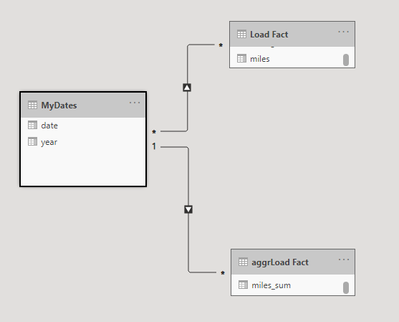
I have a fact table (direct query), fact table aggr (import) and a date table (dual). 
 

npsmith_3-1612128637697.png


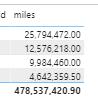
When I pull in the year from the Date and pull in a non-aggr value, I get a result where the lines are correct but the grand total is not:
 

npsmith_0-1612128428132.png

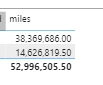
Why does this happen? When I take that year (Date table) field out, it shows that grand total correctly:
 

npsmith_1-1612128499455.png

And it hits the aggr fine- so the functionality works until I pull in the date dimension field. 


Any thoughts?


Thanks.


1 ACCEPTED SOLUTION

Hi @Anonymous 


Did you try to change the many:many relationship to a one:many relationship?


Best regards

Mikelytics


Did I solve your request? Please mark my post as solution. 

Appreciate your Kudos.


------------------------------------------------------------------
Visit my blog datenhungrig which I recently started with content about business intelligence and Power BI in German and English or follow me on LinkedIn!

View solution in original post

3 REPLIES 3
Anonymous
Not applicable

@Mikelytics  thanks for pointing that out. Staring at problem too long I guess :). that resolved it.


This was actually something I was doing to try to figure out a different problem. I get that same wrong grand total if the date table is something generated as a manual table/procedure within the pbix file's transformation.  It seems that because a manual table is always IMPORT (and can't be DUAL), that the aggregation functionality won't work with it. I will need to create that date dimension as a table in my source database so I can use it as DUAL type in the model.  Thanks!

Hi @Anonymous 


Did you try to change the many:many relationship to a one:many relationship?


Best regards

Mikelytics


Did I solve your request? Please mark my post as solution. 

Appreciate your Kudos.


------------------------------------------------------------------
Visit my blog datenhungrig which I recently started with content about business intelligence and Power BI in German and English or follow me on LinkedIn!
Anonymous
Not applicable

Yup- that was my issue for the specific setup I noted in the original posting.


Thanks!

Helpful resources

Announcements
FabCon Atlanta 2026 carousel

FabCon Atlanta 2026

Join us at FabCon Atlanta, March 16-20, for the ultimate Fabric, Power BI, AI and SQL community-led event. Save $200 with code FABCOMM.