cancel
Showing results for 
Search instead for 
Did you mean: 

The Power BI Data Visualization World Championships is back! Get ahead of the game and start preparing now! Learn more

Reply
Anonymous
Not applicable

Aggregation functionality returns wrong total

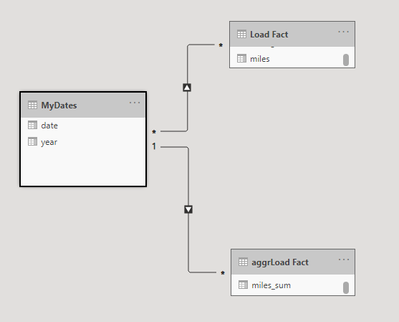
I have a fact table (direct query), fact table aggr (import) and a date table (dual). 


npsmith_3-1612128637697.png


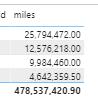
When I pull in the year from the Date and pull in a non-aggr value, I get a result where the lines are correct but the grand total is not:


npsmith_0-1612128428132.png

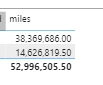
Why does this happen? When I take that year (Date table) field out, it shows that grand total correctly:


npsmith_1-1612128499455.png

And it hits the aggr fine- so the functionality works until I pull in the date dimension field. 


Any thoughts?


Thanks.


1 ACCEPTED SOLUTION

Hi @Anonymous 


Did you try to change the many:many relationship to a one:many relationship?


Best regards

Mikelytics


Did I solve your request? Please mark my post as solution. 

Appreciate your Kudos.


------------------------------------------------------------------
Visit my blog datenhungrig which I recently started with content about business intelligence and Power BI in German and English or follow me on LinkedIn!

View solution in original post

3 REPLIES 3
Anonymous
Not applicable

@Mikelytics  thanks for pointing that out. Staring at problem too long I guess :). that resolved it.


This was actually something I was doing to try to figure out a different problem. I get that same wrong grand total if the date table is something generated as a manual table/procedure within the pbix file's transformation.  It seems that because a manual table is always IMPORT (and can't be DUAL), that the aggregation functionality won't work with it. I will need to create that date dimension as a table in my source database so I can use it as DUAL type in the model.  Thanks!

Hi @Anonymous 


Did you try to change the many:many relationship to a one:many relationship?


Best regards

Mikelytics


Did I solve your request? Please mark my post as solution. 

Appreciate your Kudos.


------------------------------------------------------------------
Visit my blog datenhungrig which I recently started with content about business intelligence and Power BI in German and English or follow me on LinkedIn!
Anonymous
Not applicable

Yup- that was my issue for the specific setup I noted in the original posting.


Thanks!

Helpful resources

Announcements
Power BI DataViz World Championships

Power BI Dataviz World Championships

The Power BI Data Visualization World Championships is back! Get ahead of the game and start preparing now!

December 2025 Power BI Update Carousel

Power BI Monthly Update - December 2025

Check out the December 2025 Power BI Holiday Recap!

FabCon Atlanta 2026 carousel

FabCon Atlanta 2026

Join us at FabCon Atlanta, March 16-20, for the ultimate Fabric, Power BI, AI and SQL community-led event. Save $200 with code FABCOMM.