
cancel
Showing results for 
Search instead for 
Did you mean: 

Join the FabCon + SQLCon recap series. Up next: Power BI, Real-Time Intelligence, IQ and AI, and Data Factory take center stage. All sessions are available on-demand after the live show. Register now

Reply
bnevers
Regular Visitor

Aggregating Across Common Values

I have timecard data in a PowerBI table that looks like this:


Staff     Project     Hours

A          1000          2

A          2000          4

A          3000          2

B          1000          3

B          2000          1

B          4000          3


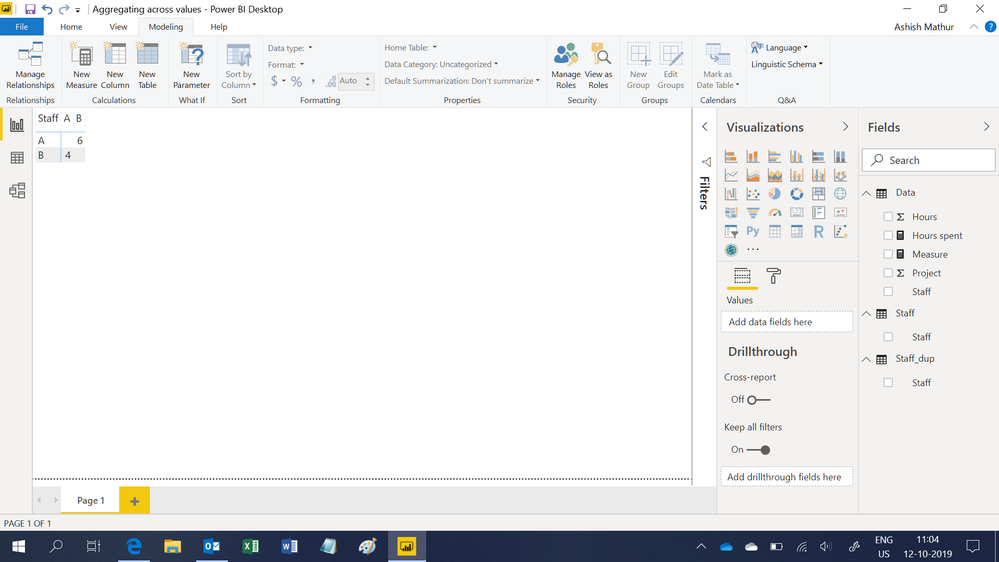
I would like to create a table that sums the hours each individual spent working on common projects with each other individual. In this case, A worked on projects 1000 and 2000 with B and vice versa. So the summary table would look like this:


Staff       A                 B

A            -               2+4 = 6

B            3+1=4        


Is there a way to do this with DAX? Any help is appreciated. 

2 ACCEPTED SOLUTIONS
AlB
Community Champion
Community Champion

Hi @bnevers 

Try this

1. Place Table1[Staff] in a table visual 

2. Place this measure in the visual

Measure =
SUMX (
    Table1;
    IF (
        CALCULATE (
            COUNT ( Table1[Project] );
            ALL ( Table1[Hours] );
            FILTER (
                ALL ( Table1[Staff] );
                Table1[Staff] <> SELECTEDVALUE ( Table1[Staff] )
            )
        ) <> 0;
        Table1[Hours]
    )
)


Please mark the question solved when done and consider giving kudos if posts are helpful.

Cheers  Datanaut

View solution in original post

Ashish_Mathur
Super User
Super User

Hi,

You may download my PBI file from here.

Hope this helps.

Untitled.png


Regards,
Ashish Mathur
http://www.ashishmathur.com
https://www.linkedin.com/in/excelenthusiasts/

View solution in original post

3 REPLIES 3
Ashish_Mathur
Super User
Super User

Hi,

You may download my PBI file from here.

Hope this helps.

Untitled.png


Regards,
Ashish Mathur
http://www.ashishmathur.com
https://www.linkedin.com/in/excelenthusiasts/

Perfect - thank you!!
AlB
Community Champion
Community Champion

Hi @bnevers 

Try this

1. Place Table1[Staff] in a table visual 

2. Place this measure in the visual

Measure =
SUMX (
    Table1;
    IF (
        CALCULATE (
            COUNT ( Table1[Project] );
            ALL ( Table1[Hours] );
            FILTER (
                ALL ( Table1[Staff] );
                Table1[Staff] <> SELECTEDVALUE ( Table1[Staff] )
            )
        ) <> 0;
        Table1[Hours]
    )
)


Please mark the question solved when done and consider giving kudos if posts are helpful.

Cheers  Datanaut

Helpful resources

Announcements
April Power BI Update Carousel

Power BI Monthly Update - April 2026

Check out the April 2026 Power BI update to learn about new features.

New to Fabric survey Carousel

New to Fabric Survey

If you have recently started exploring Fabric, we'd love to hear how it's going. Your feedback can help with product improvements.

Power BI DataViz World Championships carousel

Power BI DataViz World Championships - June 2026

A new Power BI DataViz World Championship is coming this June! Don't miss out on submitting your entry.

FabCon and SQLCon Highlights Carousel

FabCon &SQLCon Highlights

Experience the highlights from FabCon & SQLCon, available live and on-demand starting April 14th.