Join us at FabCon Atlanta from March 16 - 20, 2026, for the ultimate Fabric, Power BI, AI and SQL community-led event. Save $200 with code FABCOMM.
Register now!Vote for your favorite vizzies from the Power BI Dataviz World Championship submissions. Vote now!
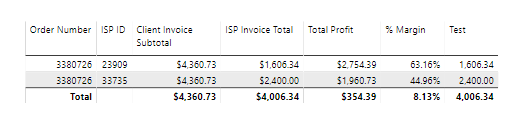
I'm trying to aggregate the below to the Order Number level (Test measure). This will be part of a % allocation of client invoice calculation down stream. The desired output of the Test measure will be 4006.34 for all records.
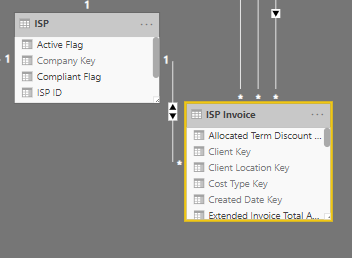
The relationship to the ISP dimension is the headache, I believe. I thought I could solve this with:
CALCULATE( SUM(ISP Total), ALL(From Company Key)), but this does not work. Any help would be appreciated.
Thanks in advance.
Hi @WCrayger ,
It's sorry that I can't understand your requirement, could you please share the sample data and expected result to us for analysis?
Best Regards,
Teige
I was able to accomplish the desired task by building a summary table:
ISP Invoice Summary =
SUMMARIZE(
'ISP Invoice'
,'ISP Invoice'[Work Order Number]
,'ISP Invoice'[Extended Invoice Total Amount]
)But still want to know if there's a more efficient way to do this in a single measure statement, one that won't use as much memory as a calculated table perhaps?
Vote for your favorite vizzies from the Power BI World Championship submissions!
If you love stickers, then you will definitely want to check out our Community Sticker Challenge!
Check out the January 2026 Power BI update to learn about new features.
| User | Count |
|---|---|
| 58 | |
| 53 | |
| 40 | |
| 17 | |
| 16 |
| User | Count |
|---|---|
| 116 | |
| 105 | |
| 41 | |
| 34 | |
| 25 |