Get Fabric or SQL Certified for Free.
Get certified for free when you join Fabric Data Days 2026 and dive into Fabric, Power BI, SQL, AI, and other essential data skills.
Join now- Power BI forums
- Get Help with Power BI
- Desktop
- Service
- Report Server
- Power Query
- Mobile Apps
- Developer
- DAX Commands and Tips
- Custom Visuals Development Discussion
- Health and Life Sciences
- Power BI Spanish forums
- Translated Spanish Desktop
- Training and Consulting
- Instructor Led Training
- Dashboard in a Day for Women, by Women
- Galleries
- Data Stories Gallery
- Themes Gallery
- Contests Gallery
- QuickViz Gallery
- Quick Measures Gallery
- Visual Calculations Gallery
- Notebook Gallery
- Translytical Task Flow Gallery
- TMDL Gallery
- R Script Showcase
- Webinars and Video Gallery
- Ideas
- Custom Visuals Ideas (read-only)
- Issues
- Issues
- Events
- Upcoming Events
Try your skills in the Power BI Dataviz World Championship! Round one ends June 26. Join now
- Power BI forums
- Forums
- Get Help with Power BI
- Desktop
- Re: Aggregate in same table
- Subscribe to RSS Feed
- Mark Topic as New
- Mark Topic as Read
- Float this Topic for Current User
- Bookmark
- Subscribe
- Printer Friendly Page

- Mark as New
- Bookmark
- Subscribe
- Mute
- Subscribe to RSS Feed
- Permalink
- Report Inappropriate Content
Aggregate in same table
Hello, I am trying to do aggregation in the same table...
Here is what I am looking for....
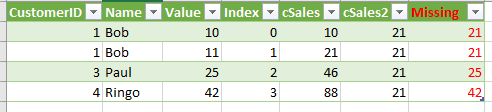
Basically I want the SUM(Value) Group by CustomerID.
The capture above came from my work around an example I found in here.
My code looks like this..
let
Source = Table.FromRecords({[CustomerID = 1, Name = "Bob", Value = 10],[CustomerID = 1, Name = "Bob", Value = 11],[CustomerID = 3, Name = "Paul", Value = 25],[CustomerID = 4, Name = "Ringo", Value = 42]}),
#"AddingIdx" = Table.AddIndexColumn(Source,"Index"),
#"AddingTot" = Table.AddColumn(#"AddingIdx", "Total", each Table.Range(#"AddingIdx",0,[Index]+1)),
#"Aggr" = Table.AggregateTableColumn(#"AddingTot", "Total", {{"Value", List.Sum, "cSales"}}),
#"Select" = Table.AddColumn(#"Aggr", "SubTotal", each Table.SelectRows(#"Aggr", each ([CustomerID]=1))),
#"Aggr2" = Table.AggregateTableColumn(#"Select", "SubTotal", {{"Value", List.Sum, "cSales2"}})
in
#"Aggr2"
I have been struggling around the syntax to replace my red hardcoded "1" by the current rows CustomerID... Can anyone help or am I workin on an unachievable misson?
Thanks in advance 🙂
Solved! Go to Solution.


- Mark as New
- Bookmark
- Subscribe
- Mute
- Subscribe to RSS Feed
- Permalink
- Report Inappropriate Content
Hi @DominicBrien,
=> I am working toward building a summarized visualisation that would translate in the context of the provided example to.
Did you mean that you want to create a new calculated table with SUMMARIZED() function based on the original table?
Maybe something like:
Table =
SUMMARIZE (
    'TableName',
    "Between 0 and 10", CALCULATE (
        COUNT ( 'TableName'[CustomerID] ),
        FILTER ( 'TableName', 'TableName'[Value] <= 10 )
    ),
    "Between 10 and 20", CALCULATE (
        COUNT ( 'TableName'[CustomerID] ),
        FILTER ( 'TableName', 'TableName'[Value] > 10 && 'TableName'[Value] <= 20 )
    )
)
Thanks,
Xi Jin.
- Mark as New
- Bookmark
- Subscribe
- Mute
- Subscribe to RSS Feed
- Permalink
- Report Inappropriate Content
Hi @DominicBrien,
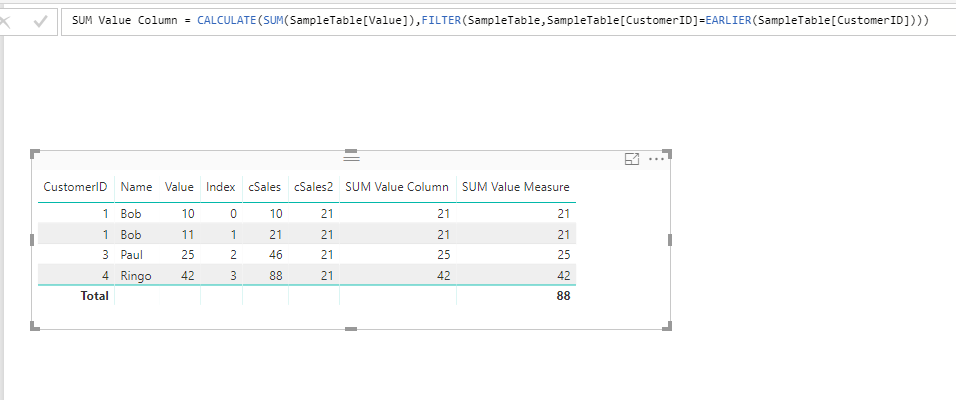
You can achieve this with simple DAX expressions:
Calculated Column:
SUM Value Column =
CALCULATE (
    SUM ( SampleTable[Value] ),
    FILTER (
        SampleTable,
        SampleTable[CustomerID] = EARLIER ( SampleTable[CustomerID] )
    )
)
Measure:
SUM Value Measure =
CALCULATE (
    SUM ( SampleTable[Value] ),
    ALLEXCEPT ( SampleTable, SampleTable[CustomerID] )
)
Thanks,
Xi Jin.
- Mark as New
- Bookmark
- Subscribe
- Mute
- Subscribe to RSS Feed
- Permalink
- Report Inappropriate Content
Thanks, I did have it at the DAX level before I am now working on a new model where again I was trying to add the aggregation at the Report level.
Because I build the model using Excel I cannot add DAX column at the report level.
The measure works whenb displaying a list that has the one item per "Customer"...
The problem I get working with DAX measures is that the the end result also involves another level of aggregation that is not at the customer level.
I am working toward building a summarized visualisation that would translate in the context of the provided example to (values in the original sample wouls not result in this out but I hope you can understand where I am tryinng to go).
Number of customers | Total value range |
3 | Between 0 and 10 |
1 | Between 10 and 20 |
- Mark as New
- Bookmark
- Subscribe
- Mute
- Subscribe to RSS Feed
- Permalink
- Report Inappropriate Content
Hi @DominicBrien,
=> I am working toward building a summarized visualisation that would translate in the context of the provided example to.
Did you mean that you want to create a new calculated table with SUMMARIZED() function based on the original table?
Maybe something like:
Table =
SUMMARIZE (
    'TableName',
    "Between 0 and 10", CALCULATE (
        COUNT ( 'TableName'[CustomerID] ),
        FILTER ( 'TableName', 'TableName'[Value] <= 10 )
    ),
    "Between 10 and 20", CALCULATE (
        COUNT ( 'TableName'[CustomerID] ),
        FILTER ( 'TableName', 'TableName'[Value] > 10 && 'TableName'[Value] <= 20 )
    )
)
Thanks,
Xi Jin.
- Mark as New
- Bookmark
- Subscribe
- Mute
- Subscribe to RSS Feed
- Permalink
- Report Inappropriate Content
Thanks, I changed my model quite a bit and was able to produce the result I wanted. Now I am struggeling with a new issue so It's probably better to start a new thread....


- Mark as New
- Bookmark
- Subscribe
- Mute
- Subscribe to RSS Feed
- Permalink
- Report Inappropriate Content
Hi @DominicBrien,
Use the Group By function and the advanced functions,
Group By - CustomerID
Aggregations - Sum of Value Column
- ALL Rows
Then expand the Table
Here if the M code appended to the end of your code
let
Source = Table.FromRecords({[CustomerID = 1, Name = "Bob", Value = 10],[CustomerID = 1, Name = "Bob", Value = 11],[CustomerID = 3, Name = "Paul", Value = 25],[CustomerID = 4, Name = "Ringo", Value = 42]}),
#"AddingIdx" = Table.AddIndexColumn(Source,"Index"),
#"AddingTot" = Table.AddColumn(#"AddingIdx", "Total", each Table.Range(#"AddingIdx",0,[Index]+1)),
#"Aggr" = Table.AggregateTableColumn(#"AddingTot", "Total", {{"Value", List.Sum, "cSales"}}),
#"Select" = Table.AddColumn(#"Aggr", "SubTotal", each Table.SelectRows(#"Aggr", each ([CustomerID]=1))),
#"Aggr2" = Table.AggregateTableColumn(#"Select", "SubTotal", {{"Value", List.Sum, "cSales2"}}),
    #"Grouped Rows" = Table.Group(Aggr2, {"CustomerID"}, {{"GroupTotal", each List.Sum([Value]), type number}, {"GroupedTable", each _, type table}}),
    #"Expanded GroupedTable" = Table.ExpandTableColumn(#"Grouped Rows", "GroupedTable", {"Name", "Value", "Index", "cSales", "cSales2"}, {"Name", "Value", "Index", "cSales", "cSales2"}),
    #"Reordered Columns" = Table.ReorderColumns(#"Expanded GroupedTable",{"CustomerID", "Name", "Value", "Index", "cSales", "cSales2", "GroupTotal"})
in
#"Reordered Columns"


- Mark as New
- Bookmark
- Subscribe
- Mute
- Subscribe to RSS Feed
- Permalink
- Report Inappropriate Content
Hi,
This can be donw quite easily with DAX (you are trying to do it with M). If you are OK with a DAX solution, post back. Also, do you want a calculated column solution or a measure solution?
Regards,
Ashish Mathur
http://www.ashishmathur.com
https://www.linkedin.com/in/excelenthusiasts/

Helpful resources

Fabric Data Days 2026
Don't miss out on Data Days, June 15 through August 7. Learn Fabric, Power BI, SQL, AI and more.

Power BI DataViz World Championships - June 2026
A new Power BI DataViz World Championship is coming this June! Don't miss out on submitting your entry.

| User | Count |
|---|---|
| 23 | |
| 19 | |
| 18 | |
| 17 | |
| 11 |


| User | Count |
|---|---|
| 54 | |
| 53 | |
| 42 | |
| 38 | |
| 32 |


