Join us in Barcelona for FabCon and SQLCon, September 28 - October 1, 2026.
This is best Fabric, Power BI, SQL and AI community event. How do we know? The last event sold out! Save €200 with code FABCMTY200.
Register now- Power BI forums
- Get Help with Power BI
- Desktop
- Service
- Report Server
- Power Query
- Mobile Apps
- Developer
- DAX Commands and Tips
- Custom Visuals Development Discussion
- Health and Life Sciences
- Power BI Spanish forums
- Translated Spanish Desktop
- Training and Consulting
- Instructor Led Training
- Dashboard in a Day for Women, by Women
- Galleries
- Data Stories Gallery
- Themes Gallery
- Contests Gallery
- QuickViz Gallery
- Quick Measures Gallery
- Visual Calculations Gallery
- Fabric Apps Gallery
- Notebook Gallery
- Translytical Task Flow Gallery
- TMDL Gallery
- R Script Showcase
- Webinars and Video Gallery
- Ideas
- Custom Visuals Ideas (read-only)
- Issues
- Issues
- Events
- Upcoming Events
The Fabric community is now in read-only for platform upgrade. Learn more
- Power BI forums
- Forums
- Get Help with Power BI
- Desktop
- Re: Aggregate in same table
- Subscribe to RSS Feed
- Mark Topic as New
- Mark Topic as Read
- Float this Topic for Current User
- Bookmark
- Subscribe
- Printer Friendly Page

- Mark as New
- Bookmark
- Subscribe
- Mute
- Subscribe to RSS Feed
- Permalink
Aggregate in same table
Hello, I am trying to do aggregation in the same table...
Here is what I am looking for....
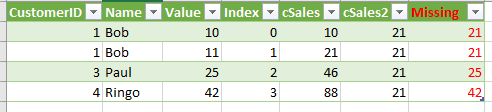
Basically I want the SUM(Value) Group by CustomerID.
The capture above came from my work around an example I found in here.
My code looks like this..
let
Source = Table.FromRecords({[CustomerID = 1, Name = "Bob", Value = 10],[CustomerID = 1, Name = "Bob", Value = 11],[CustomerID = 3, Name = "Paul", Value = 25],[CustomerID = 4, Name = "Ringo", Value = 42]}),
#"AddingIdx" = Table.AddIndexColumn(Source,"Index"),
#"AddingTot" = Table.AddColumn(#"AddingIdx", "Total", each Table.Range(#"AddingIdx",0,[Index]+1)),
#"Aggr" = Table.AggregateTableColumn(#"AddingTot", "Total", {{"Value", List.Sum, "cSales"}}),
#"Select" = Table.AddColumn(#"Aggr", "SubTotal", each Table.SelectRows(#"Aggr", each ([CustomerID]=1))),
#"Aggr2" = Table.AggregateTableColumn(#"Select", "SubTotal", {{"Value", List.Sum, "cSales2"}})
in
#"Aggr2"
I have been struggling around the syntax to replace my red hardcoded "1" by the current rows CustomerID... Can anyone help or am I workin on an unachievable misson?
Thanks in advance 🙂
Solved! Go to Solution.


- Mark as New
- Bookmark
- Subscribe
- Mute
- Subscribe to RSS Feed
- Permalink
Hi @DominicBrien,
=> I am working toward building a summarized visualisation that would translate in the context of the provided example to.
Did you mean that you want to create a new calculated table with SUMMARIZED() function based on the original table?
Maybe something like:
Table =
SUMMARIZE (
    'TableName',
    "Between 0 and 10", CALCULATE (
        COUNT ( 'TableName'[CustomerID] ),
        FILTER ( 'TableName', 'TableName'[Value] <= 10 )
    ),
    "Between 10 and 20", CALCULATE (
        COUNT ( 'TableName'[CustomerID] ),
        FILTER ( 'TableName', 'TableName'[Value] > 10 && 'TableName'[Value] <= 20 )
    )
)
Thanks,
Xi Jin.
- Mark as New
- Bookmark
- Subscribe
- Mute
- Subscribe to RSS Feed
- Permalink
Hi @DominicBrien,
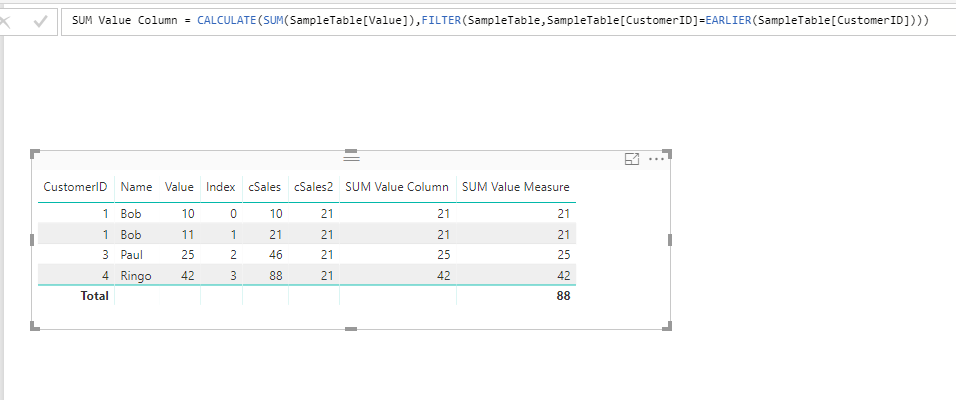
You can achieve this with simple DAX expressions:
Calculated Column:
SUM Value Column =
CALCULATE (
    SUM ( SampleTable[Value] ),
    FILTER (
        SampleTable,
        SampleTable[CustomerID] = EARLIER ( SampleTable[CustomerID] )
    )
)
Measure:
SUM Value Measure =
CALCULATE (
    SUM ( SampleTable[Value] ),
    ALLEXCEPT ( SampleTable, SampleTable[CustomerID] )
)
Thanks,
Xi Jin.
- Mark as New
- Bookmark
- Subscribe
- Mute
- Subscribe to RSS Feed
- Permalink
Thanks, I did have it at the DAX level before I am now working on a new model where again I was trying to add the aggregation at the Report level.
Because I build the model using Excel I cannot add DAX column at the report level.
The measure works whenb displaying a list that has the one item per "Customer"...
The problem I get working with DAX measures is that the the end result also involves another level of aggregation that is not at the customer level.
I am working toward building a summarized visualisation that would translate in the context of the provided example to (values in the original sample wouls not result in this out but I hope you can understand where I am tryinng to go).
Number of customers | Total value range |
3 | Between 0 and 10 |
1 | Between 10 and 20 |
- Mark as New
- Bookmark
- Subscribe
- Mute
- Subscribe to RSS Feed
- Permalink
Hi @DominicBrien,
=> I am working toward building a summarized visualisation that would translate in the context of the provided example to.
Did you mean that you want to create a new calculated table with SUMMARIZED() function based on the original table?
Maybe something like:
Table =
SUMMARIZE (
    'TableName',
    "Between 0 and 10", CALCULATE (
        COUNT ( 'TableName'[CustomerID] ),
        FILTER ( 'TableName', 'TableName'[Value] <= 10 )
    ),
    "Between 10 and 20", CALCULATE (
        COUNT ( 'TableName'[CustomerID] ),
        FILTER ( 'TableName', 'TableName'[Value] > 10 && 'TableName'[Value] <= 20 )
    )
)
Thanks,
Xi Jin.
- Mark as New
- Bookmark
- Subscribe
- Mute
- Subscribe to RSS Feed
- Permalink
Thanks, I changed my model quite a bit and was able to produce the result I wanted. Now I am struggeling with a new issue so It's probably better to start a new thread....


- Mark as New
- Bookmark
- Subscribe
- Mute
- Subscribe to RSS Feed
- Permalink
Hi @DominicBrien,
Use the Group By function and the advanced functions,
Group By - CustomerID
Aggregations - Sum of Value Column
- ALL Rows
Then expand the Table
Here if the M code appended to the end of your code
let
Source = Table.FromRecords({[CustomerID = 1, Name = "Bob", Value = 10],[CustomerID = 1, Name = "Bob", Value = 11],[CustomerID = 3, Name = "Paul", Value = 25],[CustomerID = 4, Name = "Ringo", Value = 42]}),
#"AddingIdx" = Table.AddIndexColumn(Source,"Index"),
#"AddingTot" = Table.AddColumn(#"AddingIdx", "Total", each Table.Range(#"AddingIdx",0,[Index]+1)),
#"Aggr" = Table.AggregateTableColumn(#"AddingTot", "Total", {{"Value", List.Sum, "cSales"}}),
#"Select" = Table.AddColumn(#"Aggr", "SubTotal", each Table.SelectRows(#"Aggr", each ([CustomerID]=1))),
#"Aggr2" = Table.AggregateTableColumn(#"Select", "SubTotal", {{"Value", List.Sum, "cSales2"}}),
    #"Grouped Rows" = Table.Group(Aggr2, {"CustomerID"}, {{"GroupTotal", each List.Sum([Value]), type number}, {"GroupedTable", each _, type table}}),
    #"Expanded GroupedTable" = Table.ExpandTableColumn(#"Grouped Rows", "GroupedTable", {"Name", "Value", "Index", "cSales", "cSales2"}, {"Name", "Value", "Index", "cSales", "cSales2"}),
    #"Reordered Columns" = Table.ReorderColumns(#"Expanded GroupedTable",{"CustomerID", "Name", "Value", "Index", "cSales", "cSales2", "GroupTotal"})
in
#"Reordered Columns"


- Mark as New
- Bookmark
- Subscribe
- Mute
- Subscribe to RSS Feed
- Permalink
Hi,
This can be donw quite easily with DAX (you are trying to do it with M). If you are OK with a DAX solution, post back. Also, do you want a calculated column solution or a measure solution?
Regards,
Ashish Mathur
http://www.ashishmathur.com
https://www.linkedin.com/in/excelenthusiasts/

Helpful resources

FabCon & SQLCon – Barcelona 2026
Join us in Barcelona for FabCon and SQLCon, the Fabric, Power BI, SQL, and AI community event. Save €200 with code FABCMTY200.

Power BI DataViz World Championships - June 2026
A new Power BI DataViz World Championship is coming this June! Don't miss out on submitting your entry.

| User | Count |
|---|---|
| 21 | |
| 21 | |
| 14 | |
| 14 | |
| 13 |


| User | Count |
|---|---|
| 47 | |
| 35 | |
| 24 | |
| 20 | |
| 19 |


