Join us at FabCon Atlanta from March 16 - 20, 2026, for the ultimate Fabric, Power BI, AI and SQL community-led event. Save $200 with code FABCOMM.
Register now!Get Fabric Certified for FREE during Fabric Data Days. Don't miss your chance! Request now
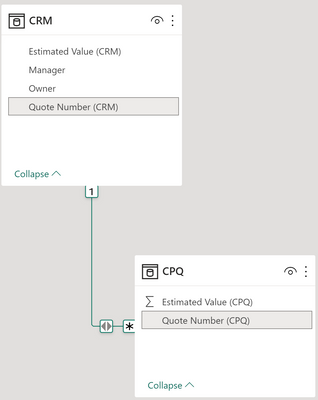
I have a parent-child tables set up using this relationship, where the child table is missing a few records, but the parent is not missing any. CRM = parent, CPQ = child.
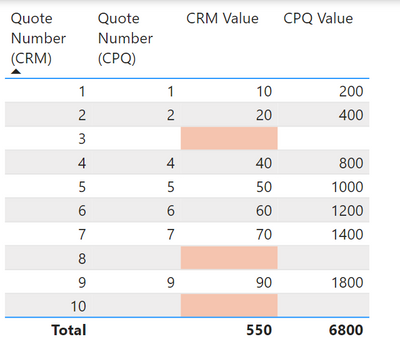
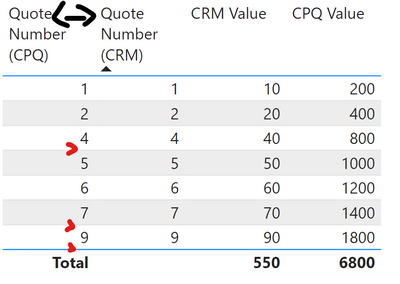
In a table visual, I'm not able to show SUM( CRM[Esimated Value] ) for all rows as you can see below. Even though CRM[Estimated Value] is not missing any values, it is showing blank if the child record is blank:
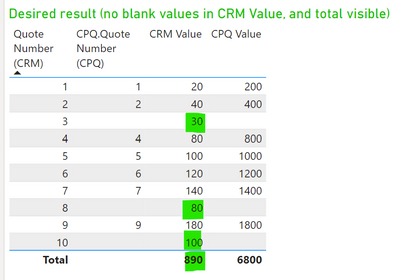
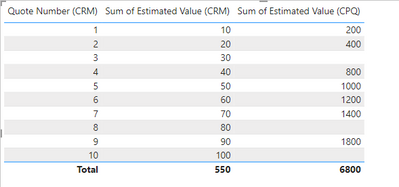
How can I obtain the result below? Although it is possible to join them in Power Query, which is how I got the result below for demonstration, I prefer not to do so.
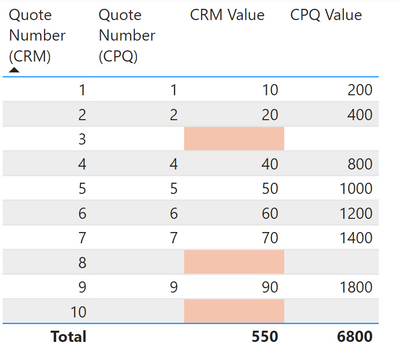
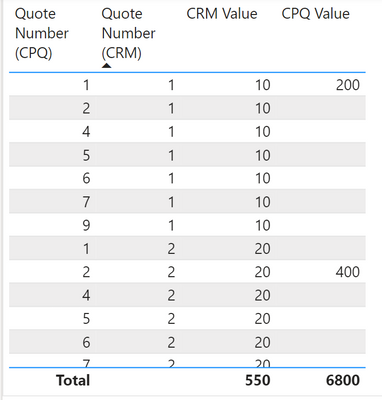
In addition to the problem above of the blank [CRM Value] values, I also don't understand why the table display changes when the column are in a different order.
When CRM.Quote Number is the first column, then the layout is like this:
But when CPQ.Quote number is the first column, then the blanks disappear:
Solved! Go to Solution.
Remove Quote Number CPQ from the visual.
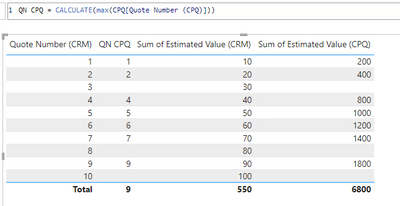
Or use a CALCULATE function to get it back.
Here is some background on why this is happening.
AutoExist and Normalization - SQLBI
See attached.
Enable "Show items with no data"
@lbendlin commenting from my other account which allows file sharing. Here is the sample file I'm working from https://drive.google.com/file/d/1fVDAjM3h-zmrvgMV-odduNgBjg0kbgNh/view?usp=sharing.
When filtering direction is single from CRM->CPQ, then 'show items with no data' has no visual effect.
Remove Quote Number CPQ from the visual.
Or use a CALCULATE function to get it back.
Here is some background on why this is happening.
AutoExist and Normalization - SQLBI
See attached.
change the filter direction to single, from CRM to CPQ. Show the code for the "CRM Value" measure.
Check out the November 2025 Power BI update to learn about new features.
Advance your Data & AI career with 50 days of live learning, contests, hands-on challenges, study groups & certifications and more!