This is best Fabric, Power BI, SQL and AI community event. How do we know? The last event sold out! Save €200 with code FABCMTY200.
Register nowA new Data Days event is coming soon! This time we’re going bigger than ever. Fabric, Power BI, SQL, AI and more. Don't miss out.
Hi,
I am quite new to PowerBI, and I want to do something that I am able to do with Excel and Macros
I have one table called SALES
Order,Order_Date,Product,EAN,Categorie,Volume,Price
On the column Order, I have the Order number
On the column Order_Date, I have the date when the order was placed (this is important)
Product is the production description
EAN is the EAN of the product
Volume is the number of piece ordered
Price is the total price for this EAN and this product
I have an other table CATEGORIE :
EAN,Supplier, Categorie, Start_Date, End_Date
On the table, one EAN may appears many time, as its categorie will change from time to time.
For exemple :
EAN1234547899,Nike,Category1, 2018-01-01, 2018-31-01
EAN1234547899,Nike,Category2, 2018-01-02, 2018-28-02
This means that from January 1st to the end of the month, the product will be part of the category 1
And, from february 1st to the end of the month, it will be part of Category2.
To know to which category I have to affect an order, it will depends on the order date.
If 5 orders are placed on january 15th, they will be affected to Categorie 1, and 18 orders placed on february 23, they will be category 2
Now, on my reports, I want to have a vision by Suppliers then by Category.
So it should be :
Nike
Category1 : 5
Category2 : 18
Is there any way to manage that ?
I hope I was clear.
Thanks for your help
Solved! Go to Solution.
Hi @Anonymous,
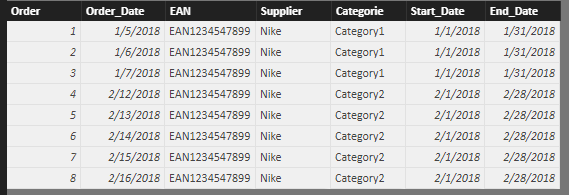
First cross join SALES table and CATEGORIE table.
Table_1 =
FILTER (
CROSSJOIN (
SELECTCOLUMNS ( SALES, "Order", SALES[Order], "Order_Date", SALES[Order_Date] ),
CATEGORIE
),
[Order_Date] >= [Start_Date]
&& [Order_Date] <= [End_Date]
)
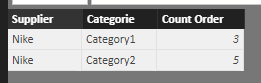
Then, calculate the order number grouped on Suppliers and Category.
Table_2 =
SUMMARIZE (
Table_1,
Table_1[Supplier],
Table_1[Categorie],
"Count Order", COUNT ( Table_1[Order] )
)
Best regards,
Yuliana Gu
Hi @Anonymous,
First cross join SALES table and CATEGORIE table.
Table_1 =
FILTER (
CROSSJOIN (
SELECTCOLUMNS ( SALES, "Order", SALES[Order], "Order_Date", SALES[Order_Date] ),
CATEGORIE
),
[Order_Date] >= [Start_Date]
&& [Order_Date] <= [End_Date]
)
Then, calculate the order number grouped on Suppliers and Category.
Table_2 =
SUMMARIZE (
Table_1,
Table_1[Supplier],
Table_1[Categorie],
"Count Order", COUNT ( Table_1[Order] )
)
Best regards,
Yuliana Gu
Hi,
Sorry for my late reply. Thanks for your solution.
Regards,
Check out the May 2026 Power BI update to learn about new features.
Sign up to receive a private message when registration opens and key events begin.
If you have recently started exploring Fabric, we'd love to hear how it's going. Your feedback can help with product improvements.
| User | Count |
|---|---|
| 31 | |
| 26 | |
| 23 | |
| 22 | |
| 15 |
| User | Count |
|---|---|
| 62 | |
| 47 | |
| 28 | |
| 24 | |
| 20 |