We've captured the moments from FabCon & SQLCon that everyone is talking about, and we are bringing them to the community, live and on-demand. Starts on April 14th. Register now
Hi fellow BI-enthusiastics,
I'm struggeling with a complex issue and hopefully someone can help me out.
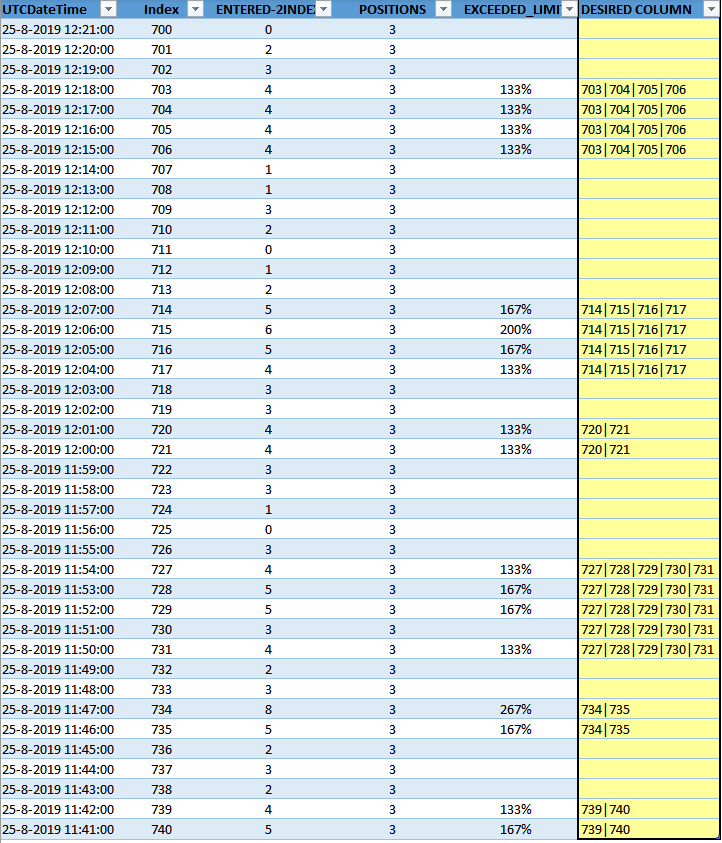
I'm trying to create groups based on a unstructed set that have some self defined events.
Definition of event =
If Index-1 or Index-2 has a value then it's an event and
if Index+1 or Index+2 has a value then it's an event.
Basically I want to scan and group the indexes together to make an Unique event. Hopefully the screenshot explains what I need
I have came up with the following DAX, but that doesn't quite give me the results I need.
IF([EXCEEDED_LIMIT]<>BLANK();
CALCULATE(CONCATENATEX(Tabel1;[Index];"|";[Index];ASC);
FILTER(Tabel1;
Tabel1[Index]>=EARLIER(Tabel1[Index])-1 &&
Tabel1[Index]<=EARLIER(Tabel1[Index])+1)
))
Hopefully someone posses' more skills then I do and can help me out. This would be highly appreciated!!
Sample file is here : Table1.xlsx
Solved! Go to Solution.
Hi Nico,
one solution could be to use (various) custom columns to get to unique identifiers.I have for testing purposes now split it into several columns, but most probably can be done in much more condensed way.
1) Group Ind
Hope this helps
BR
Jeroen Heerschop
Get Responsive
Hi @BI-Geniuz ,
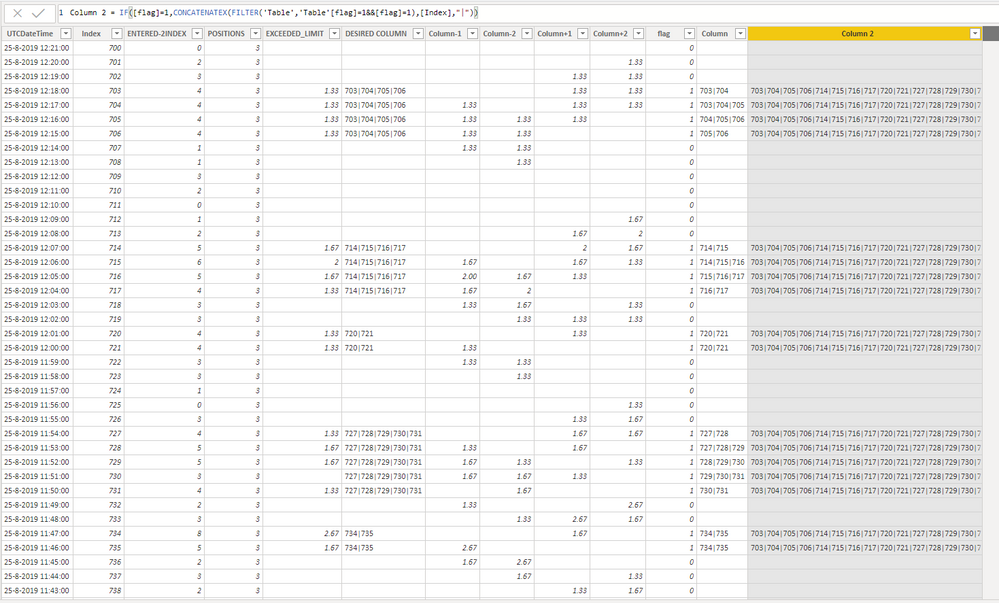
According to my test, I can only get the result below at present. This is my PBIX file. I will let you know as soon as I have other solutions.
Best Regards,
Icey Zhang
If this post helps, then please consider Accept it as the solution to help the other members find it more quickly.
Hi Icey,
thanks for helping out this far! highy appreciated and it's a tough one indeed 😛
Update:
I also got the flagging code wrapped in here. Maybe that helps a little bit?
var Index1 = LOOKUPVALUE([EXCEEDED_LIMIT];[Index];[Index]+1)
var Index2 = LOOKUPVALUE([EXCEEDED_LIMIT];[Index];[Index]-1)
return
IF([EXCEEDED_LIMIT]<>BLANK();1;
IF([EXCEEDED_LIMIT]=BLANK();
IF(Index1<>BLANK() && Index2<>BLANK();1;BLANK())))
Hi Nico,
one solution could be to use (various) custom columns to get to unique identifiers.I have for testing purposes now split it into several columns, but most probably can be done in much more condensed way.
1) Group Ind
Hope this helps
BR
Jeroen Heerschop
Get Responsive
Hi Jeroen, thanks a lot this is exactly what I needed. I followed your logic and understood the principle.
It works like a charm and for my own practice I have replicated your logic and make some DAX statements myself just for practicing.
Again thanks a lot Jeroen and I have attached your PBIX with some replicated code as well
PBIX
If you have recently started exploring Fabric, we'd love to hear how it's going. Your feedback can help with product improvements.
A new Power BI DataViz World Championship is coming this June! Don't miss out on submitting your entry.
Share feedback directly with Fabric product managers, participate in targeted research studies and influence the Fabric roadmap.
| User | Count |
|---|---|
| 54 | |
| 37 | |
| 32 | |
| 17 | |
| 15 |
| User | Count |
|---|---|
| 64 | |
| 63 | |
| 37 | |
| 34 | |
| 22 |