cancel
Showing results for 
Search instead for 
Did you mean: 

The Power BI Data Visualization World Championships is back! Get ahead of the game and start preparing now! Learn more

Reply
kumarleau
Frequent Visitor

Advance Editor dateadd function issue

Hi,


I am trying to do add a calculate column through advance editor by adding dateadd function to the date column.

It is giving me error that dateadd function was not recognized.

Please help me on this issue.


Regards,

Kumar

2 ACCEPTED SOLUTIONS
v-ljerr-msft
Microsoft Employee
Microsoft Employee

Hi @kumarleau,


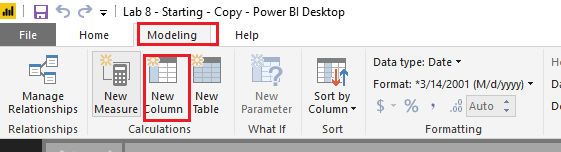
It seems to be that you may mix DAX and Power Query(M). DATEADD function is a DAX function, so it cannot be used in Query Editor. You should use it under Modeling tab like below. Smiley Happy


c1.PNG


Regards

View solution in original post

Apparently you didn't understand the reply.


DATEADD is a DAX function. You can't use DAX functions in the query editor.


Instead, try Power Query (M) function Date.AddYears


Power Query (M) and DAX are 2 completely different languages within Power BI.

Specializing in Power Query Formula Language (M)

View solution in original post

5 REPLIES 5
v-ljerr-msft
Microsoft Employee
Microsoft Employee

Hi @kumarleau,


It seems to be that you may mix DAX and Power Query(M). DATEADD function is a DAX function, so it cannot be used in Query Editor. You should use it under Modeling tab like below. Smiley Happy


c1.PNG


Regards

Hi,


Thanks for your reply.


let
    Source = Sql.Database("ebi-etl-dev-01", "dbname"),
    dbo_Report_Booking_Live = Source{[Schema="dbo",Item="Report_Booking_Live"]}[Data],
    OpportunityCreatedDate1 = dbo_Report_Booking_Live[OpportunityCreatedDate]
    OpportunityCreatedDate2=DateAdd(opportunityCreatedDate,-1,year)
in
    OpportunityCreatedDate1

Apparently you didn't understand the reply.


DATEADD is a DAX function. You can't use DAX functions in the query editor.


Instead, try Power Query (M) function Date.AddYears


Power Query (M) and DAX are 2 completely different languages within Power BI.

Specializing in Power Query Formula Language (M)
kumarleau
Frequent Visitor

Hello Experts, Any this.


Regards,

Kumar

@kumarleau,


Could you please share your sample code here?

Helpful resources

Announcements
Power BI DataViz World Championships

Power BI Dataviz World Championships

The Power BI Data Visualization World Championships is back! Get ahead of the game and start preparing now!

November Power BI Update Carousel

Power BI Monthly Update - November 2025

Check out the November 2025 Power BI update to learn about new features.

FabCon Atlanta 2026 carousel

FabCon Atlanta 2026

Join us at FabCon Atlanta, March 16-20, for the ultimate Fabric, Power BI, AI and SQL community-led event. Save $200 with code FABCOMM.