This is best Fabric, Power BI, SQL and AI community event. How do we know? The last event sold out! Save €200 with code FABCMTY200.
Register nowA new Data Days event is coming soon! This time we’re going bigger than ever. Fabric, Power BI, SQL, AI and more. Don't miss out.
Hi,
I am trying to do add a calculate column through advance editor by adding dateadd function to the date column.
It is giving me error that dateadd function was not recognized.
Please help me on this issue.
Regards,
Kumar
Solved! Go to Solution.
Hi @kumarleau,
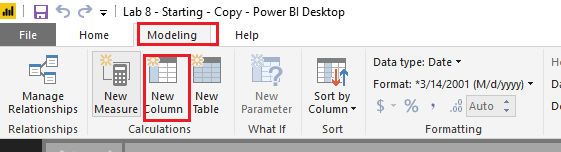
It seems to be that you may mix DAX and Power Query(M). DATEADD function is a DAX function, so it cannot be used in Query Editor. You should use it under Modeling tab like below. ![]()
Regards
Apparently you didn't understand the reply.
DATEADD is a DAX function. You can't use DAX functions in the query editor.
Instead, try Power Query (M) function Date.AddYears
Power Query (M) and DAX are 2 completely different languages within Power BI.
Hi @kumarleau,
It seems to be that you may mix DAX and Power Query(M). DATEADD function is a DAX function, so it cannot be used in Query Editor. You should use it under Modeling tab like below. ![]()
Regards
Hi,
Thanks for your reply.
let
Source = Sql.Database("ebi-etl-dev-01", "dbname"),
dbo_Report_Booking_Live = Source{[Schema="dbo",Item="Report_Booking_Live"]}[Data],
OpportunityCreatedDate1 = dbo_Report_Booking_Live[OpportunityCreatedDate]
OpportunityCreatedDate2=DateAdd(opportunityCreatedDate,-1,year)
in
OpportunityCreatedDate1
Apparently you didn't understand the reply.
DATEADD is a DAX function. You can't use DAX functions in the query editor.
Instead, try Power Query (M) function Date.AddYears
Power Query (M) and DAX are 2 completely different languages within Power BI.
Hello Experts, Any this.
Regards,
Kumar
Sign up to receive a private message when registration opens and key events begin.
If you have recently started exploring Fabric, we'd love to hear how it's going. Your feedback can help with product improvements.
| User | Count |
|---|---|
| 33 | |
| 26 | |
| 23 | |
| 21 | |
| 15 |
| User | Count |
|---|---|
| 63 | |
| 43 | |
| 28 | |
| 24 | |
| 22 |