Don't miss your chance to take the Fabric Data Engineer (DP-700) exam on us!
Learn moreThe FabCon + SQLCon recap series starts April 14th at 8am Pacific. If you’re tracking where AI is going inside Fabric, this first session is a can't miss. Register now
I am trying to refresh the data and I got a retry error exceeded count error.
Not sure how to resolve it.
Please help.
Thanks
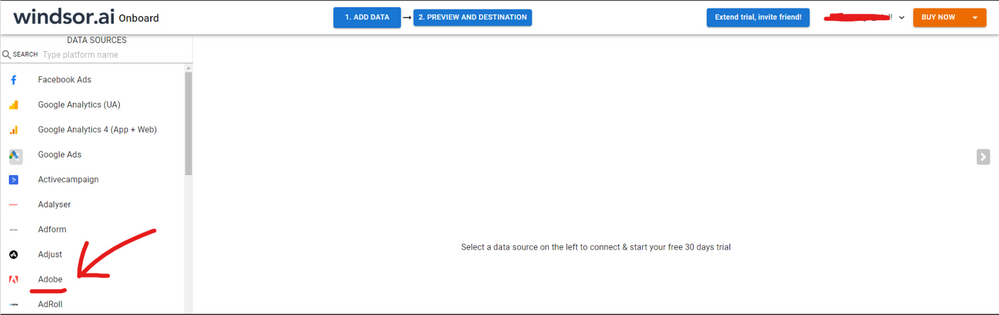
Hi @gmadraj As a workaround, maybe you can try connecting your data through a 3rd party connector. I've tried windsor.ai , supemetrics and funnel.io. I stayed with windsor because it is much cheaper so just to let you know other options. In case you wonder, to make the connection first search for the Adobe connector in the data sources list:
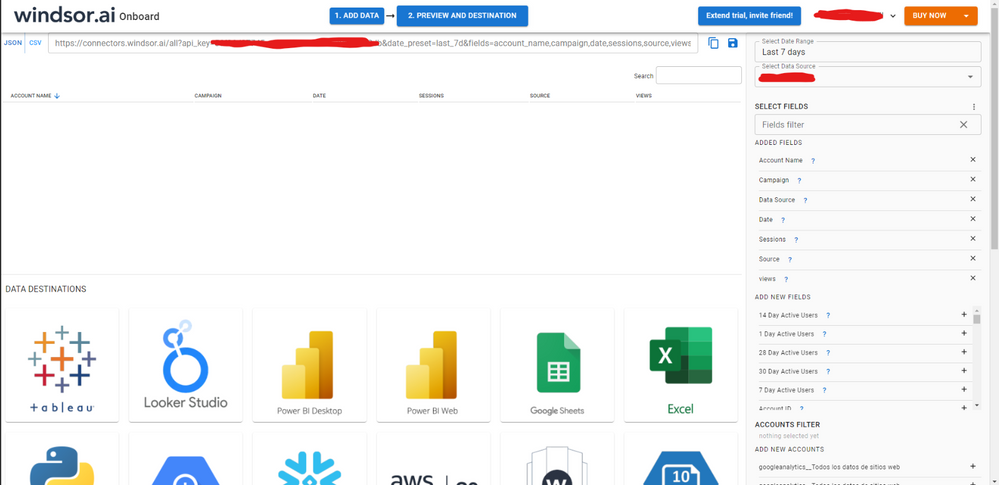
Then, you should enter your Adobe credentials to make the connection. After that, you'll see a preview of your data where you can select the fields you want to see in PBI.
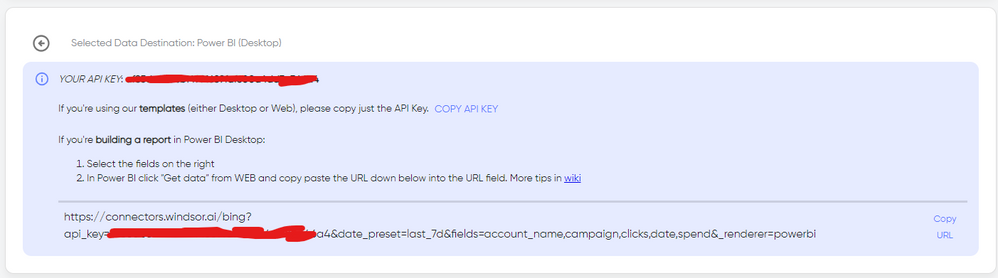
Finally, you just have to choose PBI as destination and copy and paste the url that will appear there in PBI desktop --> Get Data --Web > --> Paste the link
@gmadraj , Open Data Source settings from Home Tab-> Transforms Data -> Data Source Setting.
Clear permission and Try again with the correct credentials
https://experienceleague.adobe.com/docs/experience-cloud-kcs/kbarticles/KA-20997.html?lang=en
https://experienceleague.adobe.com/docs/experience-cloud-kcs/kbarticles/KA-20988.html?lang=en
https://community.fabric.microsoft.com/t5/Power-Query/Error-when-integrating-with-Adobe-Analytics/td...
If you have recently started exploring Fabric, we'd love to hear how it's going. Your feedback can help with product improvements.
A new Power BI DataViz World Championship is coming this June! Don't miss out on submitting your entry.
Share feedback directly with Fabric product managers, participate in targeted research studies and influence the Fabric roadmap.
| User | Count |
|---|---|
| 53 | |
| 40 | |
| 37 | |
| 19 | |
| 18 |
| User | Count |
|---|---|
| 69 | |
| 67 | |
| 34 | |
| 33 | |
| 30 |