Don't miss your chance to take the Fabric Data Engineer (DP-600) exam for FREE! Find out how by watching the DP-600 session on-demand now through April 28th.
Learn moreJoin the FabCon + SQLCon recap series. Up next: Power BI, Real-Time Intelligence, IQ and AI, and Data Factory take center stage. All sessions are available on-demand after the live show. Register now
Hi All,
Recently I am facing an issue in connecting my Adobe Analytics account to Power BI, I am unable to see the newly created Segments (in Adobe Analytics) over Power BI, though all the segments created earlier are available in Power BI but not the newly created one.
How can I solve this, any update or solution would be appreciated.
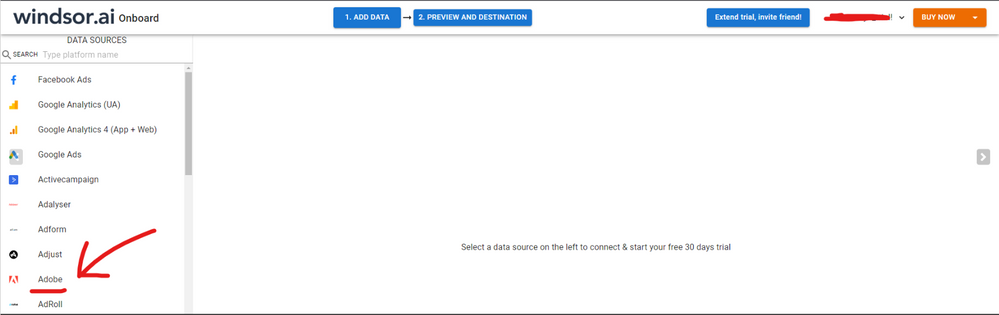
Hi @Anonymous were you able to find a solution? As a workaround, maybe you can make the connection using an external connector that pulls near real-time data directly from Adobe. I've tried windsor.ai , supemetrics and funnel.io. I stayed with Windsor because it is much cheaper so just to let you know about other options. In case you wonder, to make the connection first search for the Adobe connector in the data sources list:
Then, you should enter your Adobe credentials to make the connection. After that, you'll see a preview of your data where you can select the fields you want to see in PBI.
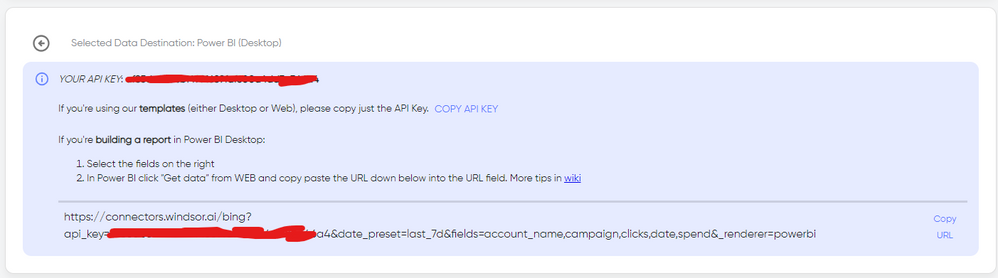
Finally, you just have to choose PBI as destination and copy and paste the url that will appear there in PBI desktop --> Get Data --Web > --> Paste the link
Hello @Anonymous,
Sometimes, there might be a delay in the synchronization between Adobe Analytics and Power BI. This could be due to caching or scheduled update intervals. Check if the segments appear after some time.
Also maybe try manually refreshing the data source in Power BI to see if the new segments appear.
Check out the April 2026 Power BI update to learn about new features.
If you have recently started exploring Fabric, we'd love to hear how it's going. Your feedback can help with product improvements.
A new Power BI DataViz World Championship is coming this June! Don't miss out on submitting your entry.
| User | Count |
|---|---|
| 41 | |
| 37 | |
| 34 | |
| 21 | |
| 16 |
| User | Count |
|---|---|
| 65 | |
| 59 | |
| 31 | |
| 25 | |
| 25 |