Join us at FabCon Atlanta from March 16 - 20, 2026, for the ultimate Fabric, Power BI, AI and SQL community-led event. Save $200 with code FABCOMM.
Register now!The Power BI Data Visualization World Championships is back! Get ahead of the game and start preparing now! Learn more
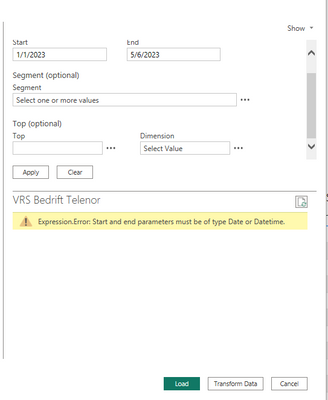
I receive an errror og date or datetime when i try to load data from adobe analytics connector into powerBI desktop. I know that there is som edate issues with the 2.0 (beta) connector, but have anyone manage to solve this error? It wont work with year, month, day or any of the date fields.
Hi @Arnerud ,
In general, such an error occurs when a date field in an Adobe Analytics data source is not recognized as a date or datetime data type.
You can try the following:
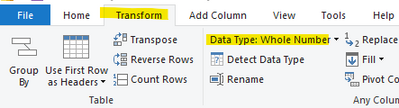
In Power Query, select the date column that caused the error, select Data Type, and convert it to "Date" or "Datetime".
Best Regards,
Liu Yang
If this post helps, then please consider Accept it as the solution to help the other members find it more quickly.
Thank you for the reply. The problem is that I don't get the data into Power Query and transform it. I solved the error above
I get here and when I try to add a metric I get a new error:
When I remove year as the "Date Granularity" I'm able to transform the data. But then the API take ages to load the data before I can transform it.
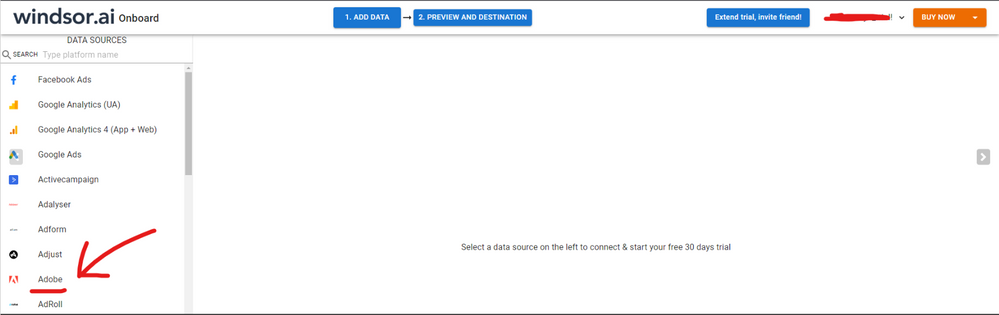
Hi @Arnerud were you able to find a solution? I used the Adobe native connector but I started having some issues from time to time, so I finally ended up using a 3rd party tool. I've tried windsor.ai , supemetrics and funnel.io. I stayed with windsor because it is much cheaper so just to let you know other options. In case you wonder, to make the connection first search for the Adobe connector in the data sources list:
Then, you should enter your Adobe credentials to make the connection. After that, you'll see a preview of your data where you can select the fields you want to see in PBI.
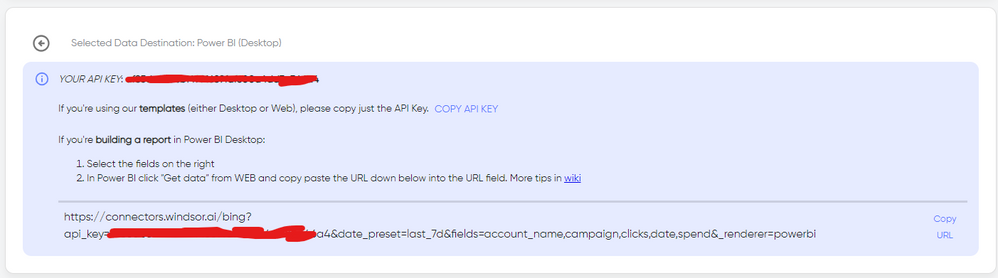
Finally, you just have to choose PBI as destination and copy and paste the url that will appear there in PBI desktop --> Get Data --Web > --> Paste the link
The Power BI Data Visualization World Championships is back! Get ahead of the game and start preparing now!
| User | Count |
|---|---|
| 41 | |
| 37 | |
| 35 | |
| 35 | |
| 28 |
| User | Count |
|---|---|
| 134 | |
| 101 | |
| 71 | |
| 67 | |
| 65 |