


cancel
Showing results for 
Search instead for 
Did you mean: 

The Power BI Data Visualization World Championships is back! Get ahead of the game and start preparing now! Learn more

Reply
Anonymous
Not applicable

Adobe Analytics 1.0 connector issue

Sudddenly Adobe analytics 1.0 connector is throwing an error today(25-01-2024). there are diffent errors while trying to refresh the data.
Errors:

1. Invalid credentials - but i am sure there is no problem with credentials see below images for the examples.


Rathinakumar_0-1706178674423.png

Rathinakumar_1-1706178720273.png

If any problem in the credentials, source step itself it asks for credentials / throws an error.

Note: With the same credentials I am able to fetch the datas in adobe analytics 2.0 but it is still in beta.


2. Data format error:(Please refer below screen shot)


Rathinakumar_2-1706179026666.png


note: This both errors are randomly comming while I try to refresh data and Till yesterday from this post same file, same credentials, same connector is working completely fine.


Please let me know is there any maintenance is going on? or this is a separete issue.


Thanks in advance...,

Rathina kumar

4 REPLIES 4
ReportGuru
Post Patron
Post Patron

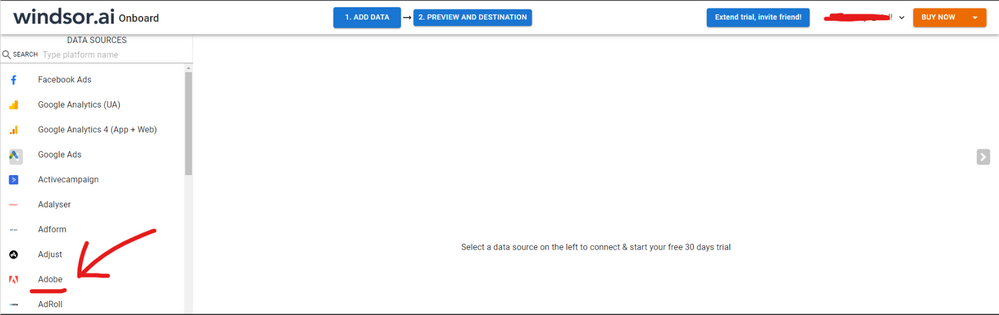
Hi @Anonymous were you able to find a solution? I used the Adobe native connector but I had some issues from time to time when refreshing my data too. I see this one was finally solved, but as a workaround, maybe you can try connecting your Adobe data using an external connector. I currently use windsor.ai's Adobe connector and I haven't had any problem or issue so far. In case you wonder,  to make the connection first search for the Adobe connector in the data sources list:


ADOBE-1.png


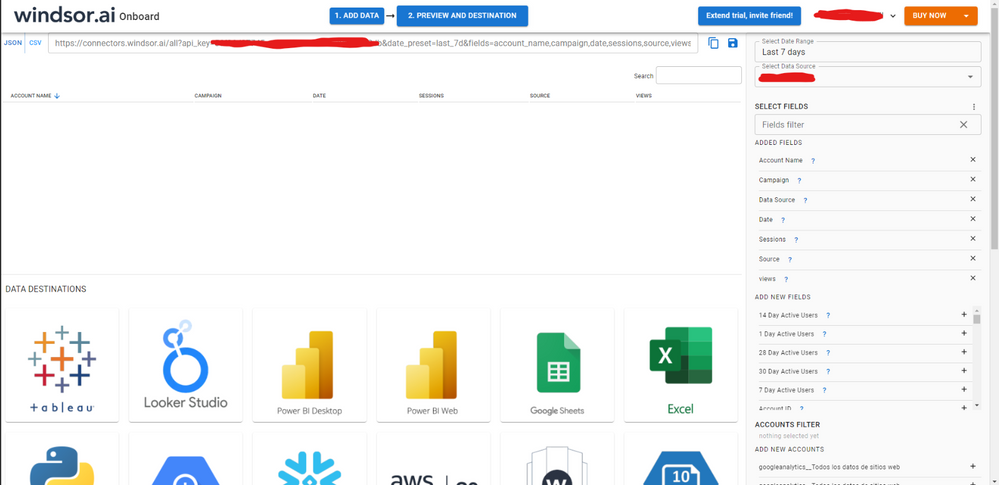
Then, you should enter your Adobe credentials to make the connection. After that, you'll see a preview of your data where you can select the fields you want to see in PBI. 


ADOBE-2.png


Finally, you just have to choose PBI as destination and copy and paste the url that will appear there in PBI desktop --> Get Data --Web > --> Paste the link


SELECT_DESTINATION_NEW.png

Anonymous
Not applicable

Hi @Anonymous ,

Based on the information you have provided, please perform the following action plan:

  1. If the issue persists, try clearing any cached credentials in Power BI and re-enter them.
  2. Check for any update or maintenance notifications from Adobe Analytics that may be related to API changes or service outages.

If the issue persists, consider using the Adobe Analytics 2.0 connector as a temporary workaround, as you have instructed it to apply.


Best Regards,

Ada Wang

If this post helps, then please consider Accept it as the solution to help the other members find it more quickly.

Anonymous
Not applicable

Hi Ada Wang,

    Thanks for your suggestion, but the issue was fixed in the backend on the next day. I don't know wheather it is fixed from adobe/Microsoft.


Thanks,

Rathinakumar N


JY_Jhansi
New Member

I am experiencing the same issue. 

Helpful resources

Announcements
Power BI DataViz World Championships

Power BI Dataviz World Championships

The Power BI Data Visualization World Championships is back! Get ahead of the game and start preparing now!

December 2025 Power BI Update Carousel

Power BI Monthly Update - December 2025

Check out the December 2025 Power BI Holiday Recap!

FabCon Atlanta 2026 carousel

FabCon Atlanta 2026

Join us at FabCon Atlanta, March 16-20, for the ultimate Fabric, Power BI, AI and SQL community-led event. Save $200 with code FABCOMM.