Join us in Barcelona for FabCon and SQLCon, September 28 - October 1, 2026.
This is best Fabric, Power BI, SQL and AI community event. How do we know? The last event sold out! Save €200 with code FABCMTY200.
Register now- Power BI forums
- Get Help with Power BI
- Desktop
- Service
- Report Server
- Power Query
- Mobile Apps
- Developer
- DAX Commands and Tips
- Custom Visuals Development Discussion
- Health and Life Sciences
- Power BI Spanish forums
- Translated Spanish Desktop
- Training and Consulting
- Instructor Led Training
- Dashboard in a Day for Women, by Women
- Galleries
- Data Stories Gallery
- Themes Gallery
- Contests Gallery
- QuickViz Gallery
- Quick Measures Gallery
- Visual Calculations Gallery
- Notebook Gallery
- Translytical Task Flow Gallery
- TMDL Gallery
- R Script Showcase
- Webinars and Video Gallery
- Ideas
- Custom Visuals Ideas (read-only)
- Issues
- Issues
- Events
- Upcoming Events
A new Data Days event is coming soon! This time we’re going bigger than ever. Fabric, Power BI, SQL, AI and more. Don't miss out.
- Power BI forums
- Forums
- Get Help with Power BI
- Desktop
- Adjacent row formula using IF statement
- Subscribe to RSS Feed
- Mark Topic as New
- Mark Topic as Read
- Float this Topic for Current User
- Bookmark
- Subscribe
- Printer Friendly Page

- Mark as New
- Bookmark
- Subscribe
- Mute
- Subscribe to RSS Feed
- Permalink
- Report Inappropriate Content
Adjacent row formula using IF statement
Hello,
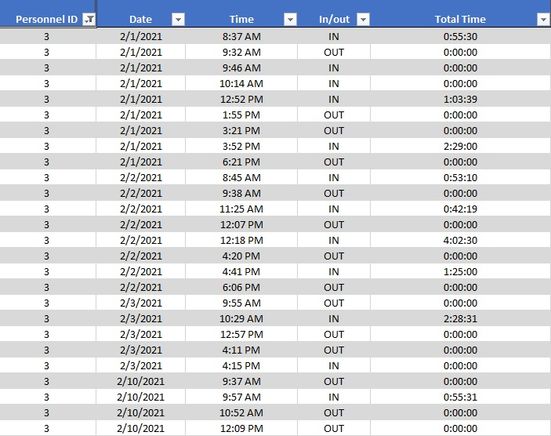
I have this problem that I couldn't find a work around in PBI and was hoping I could find some help here. I have a check in/check out system and I want to calculate the total time an employee spent at the office (i.e.: excluding breaks). the data is in a log fortmat as shown.
In the sample data below, I want column total time to first check if the person (Personnel ID) in the previous row is the same as the current row and then check if the day (Date) is also the same to calculate total number of hours per day by subtrackting the time in the 2 rows for each check in and check out.
I appreciate any help.
Solved! Go to Solution.


- Mark as New
- Bookmark
- Subscribe
- Mute
- Subscribe to RSS Feed
- Permalink
- Report Inappropriate Content
Hi @Alanoudfahad ,
Try the following formula to create measures:
next_in/out =
var next_time =
    MINX(
        FILTER(
            ALL('Table'),
            'Table'[Personnel ID] = MAX('Table'[Personnel ID]) && 'Table'[Date] = MAX('Table'[Date])
            && 'Table'[Time] > MAX('Table'[Time])
        ),
        'Table'[Time]
    )
var next_in_out =
    CALCULATE(
        MAX('Table'[In/out]),
        FILTER(
            ALL('Table'),
            'Table'[Personnel ID] = MAX('Table'[Personnel ID]) && 'Table'[Date] = MAX('Table'[Date])
            && 'Table'[Time] = next_time
        )
    )
return next_in_out
Diff_time =
var next_time =
MINX(
FILTER(
ALL('Table'),
'Table'[Personnel ID] = MAX('Table'[Personnel ID]) && 'Table'[Date] = MAX('Table'[Date])
&& 'Table'[Time] > MAX('Table'[Time])
),
'Table'[Time]
)
return next_time - MAX('Table'[Time])TotalTime =
IF(
MAX('Table'[In/out]) = "IN" && [next_in/out] = "OUT",
[Diff_time]
)
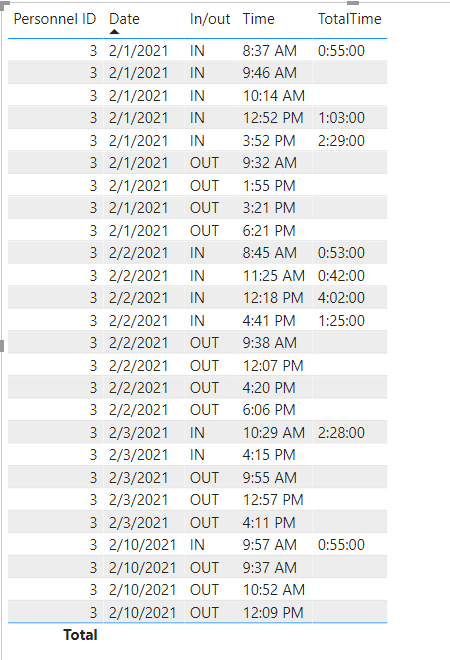
If the problem is still not resolved, please provide detailed error information or the expected result you expect. Let me know immediately, looking forward to your reply.
Best Regards,
Winniz
If this post helps, then please consider Accept it as the solution to help the other members find it more quickly.
- Mark as New
- Bookmark
- Subscribe
- Mute
- Subscribe to RSS Feed
- Permalink
- Report Inappropriate Content
Hi @Alanoudfahad ,
Try the following formula to create measures:
next_in/out =
var next_time =
    MINX(
        FILTER(
            ALL('Table'),
            'Table'[Personnel ID] = MAX('Table'[Personnel ID]) && 'Table'[Date] = MAX('Table'[Date])
            && 'Table'[Time] > MAX('Table'[Time])
        ),
        'Table'[Time]
    )
var next_in_out =
    CALCULATE(
        MAX('Table'[In/out]),
        FILTER(
            ALL('Table'),
            'Table'[Personnel ID] = MAX('Table'[Personnel ID]) && 'Table'[Date] = MAX('Table'[Date])
            && 'Table'[Time] = next_time
        )
    )
return next_in_out
Diff_time =
var next_time =
MINX(
FILTER(
ALL('Table'),
'Table'[Personnel ID] = MAX('Table'[Personnel ID]) && 'Table'[Date] = MAX('Table'[Date])
&& 'Table'[Time] > MAX('Table'[Time])
),
'Table'[Time]
)
return next_time - MAX('Table'[Time])TotalTime =
IF(
MAX('Table'[In/out]) = "IN" && [next_in/out] = "OUT",
[Diff_time]
)
If the problem is still not resolved, please provide detailed error information or the expected result you expect. Let me know immediately, looking forward to your reply.
Best Regards,
Winniz
If this post helps, then please consider Accept it as the solution to help the other members find it more quickly.
- Mark as New
- Bookmark
- Subscribe
- Mute
- Subscribe to RSS Feed
- Permalink
- Report Inappropriate Content
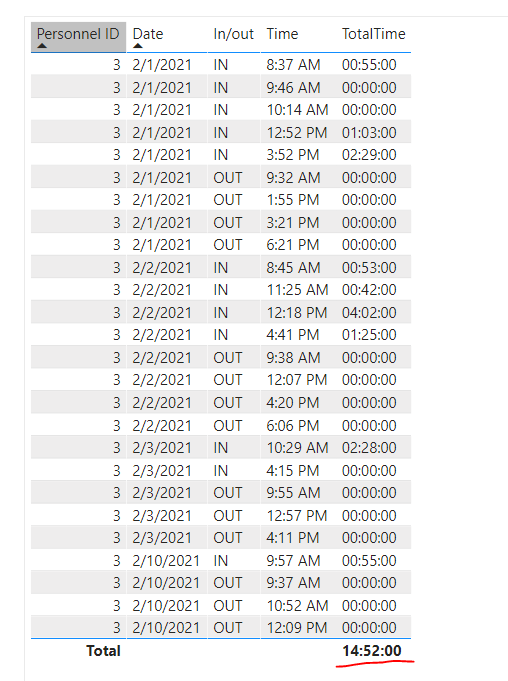
Hi @v-kkf-msft Thank you so much for the reply! I think we are almost there however, it's only showing my the IN and not the OUT, any idea?
- Mark as New
- Bookmark
- Subscribe
- Mute
- Subscribe to RSS Feed
- Permalink
- Report Inappropriate Content
Hi @Alanoudfahad ,
If you want to show total value, modify the measure:
TotalTime =
var result =
    IF(
        MAX('Table'[In/out]) = "IN" && [next_in/out] = "OUT",
        [Diff_time],
        0
    )
return
    IF(
        ISFILTERED('Table'[Time]),
        FORMAT(result,"hh:nn:ss"),
        FORMAT(
            SUMX(FILTER(ALL('Table'), 'Table'[In/out] = "IN" && [next_in/out] = "OUT"), [Diff_time] ),
            "hh:nn:ss"
        )
    )
- Mark as New
- Bookmark
- Subscribe
- Mute
- Subscribe to RSS Feed
- Permalink
- Report Inappropriate Content
Hi @Alanoudfahad ,
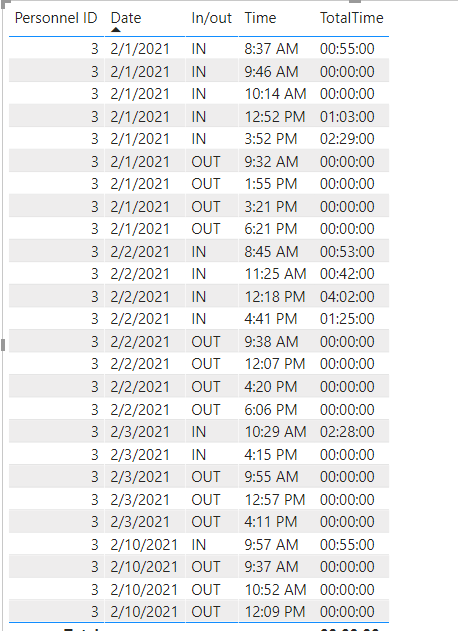
Do you want show the OUT as 0:00:00 as shown before? If so, modify measure TotalTime to the following formula:
TotalTime =
var result =
    IF(
        MAX('Table'[In/out]) = "IN" && [next_in/out] = "OUT",
        [Diff_time],
        0
    )
return FORMAT(result,"hh:nn:ss")
If the problem is still not resolved, please provide detailed error information or the expected result you expect. Let me know immediately, looking forward to your reply.
Best Regards,
Winniz
If this post helps, then please consider Accept it as the solution to help the other members find it more quickly.


- Mark as New
- Bookmark
- Subscribe
- Mute
- Subscribe to RSS Feed
- Permalink
- Report Inappropriate Content
@Alanoudfahad , Try a new column like this
if( [In/OUT] = "OUT" , datediff(maxx(filter(Table, [In/OUT] = "IN" && [Datetime] < earlier([[Datetime]])),[Datetime]),[Datetime], hour), blank())
and then you can sum this up in measure
- Mark as New
- Bookmark
- Subscribe
- Mute
- Subscribe to RSS Feed
- Permalink
- Report Inappropriate Content
Hello @amitchandak
It gives me the following error:
Too many arguments were passed to the EARLIER function. The maximum argument count for the function is 2.
Any idea?
- Mark as New
- Bookmark
- Subscribe
- Mute
- Subscribe to RSS Feed
- Permalink
- Report Inappropriate Content
@Alanoudfahad , There is small correction in formula,
Create a new column first
if( [In/OUT] = "OUT" , datediff(maxx(filter(Table, [In/OUT] = "IN" && [Datetime] < earlier([Datetime])),[Datetime]),[Datetime], hour), blank())
Then create a new measure with it.

Helpful resources

Power BI Monthly Update - May 2026
Check out the May 2026 Power BI update to learn about new features.

Data Days 2026 coming soon!
Sign up to receive a private message when registration opens and key events begin.

New to Fabric Survey
If you have recently started exploring Fabric, we'd love to hear how it's going. Your feedback can help with product improvements.

Power BI DataViz World Championships - June 2026
A new Power BI DataViz World Championship is coming this June! Don't miss out on submitting your entry.

| User | Count |
|---|---|
| 32 | |
| 25 | |
| 23 | |
| 22 | |
| 13 |


| User | Count |
|---|---|
| 61 | |
| 47 | |
| 27 | |
| 24 | |
| 19 |


