Join us at FabCon Atlanta from March 16 - 20, 2026, for the ultimate Fabric, Power BI, AI and SQL community-led event. Save $200 with code FABCOMM.
Register now!Vote for your favorite vizzies from the Power BI Dataviz World Championship submissions. Vote now!
Hi, I am having issues with slicers and measures.
I need two separate results using slicers. and then finally add the results together
Selection 1 = Average of results with Date range selection and Point selection
Selection 2 = Average of results with Date range selection and Point selection
I need to associate slicers Point 1 and Date 1 with Measure 1 and Point 2 and Date 2 with Measure 2. Then finally add the two slicers results together
One Table with the following columns - Date, Point, Name, and Value
Slicers
Point 1 = Point (example "AA")
Date 1 = Dates between, Date (example 1/7/2020 to 30/6/2021)
Point 2 = Point (example "BB")
Date 2 = Dates between, Date (example 1/10/2020 to 30/4/2021)
Measure 1 =
CALCULATE (
AVERAGE ( Table[Calculated Value] ),
FILTER ( Table, Table[Name] = "solids" ),
ALLSELECTED ( Table[Point], Table[Date] )
)
Solved! Go to Solution.
Hi, @zenton ;
If you want to calculate two measures form two different slicer status, you need to create another table as secondly slicer. as follows:
1.create a table .
Slicer2 = SUMMARIZE('Table',[Date],[Point])
2.create measure1、measure2 and sum.
Measure1 = CALCULATE (AVERAGE ('Table'[Value] ),FILTER (ALLSELECTED('Table' ), [Name] = "solids" ))Measure2 = CALCULATE(AVERAGE('Table'[Value]),FILTER(ALL('Table'),[Point]=MAX('Slicer2'[Point])&&[Date]<=MAX('Slicer2'[Date])&&[Date]>=MIN('Slicer2'[Date]) ))Measure = [Measure1]+[Measure2]
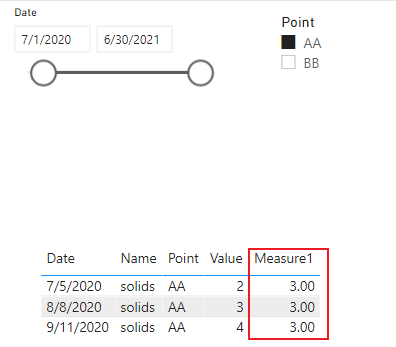
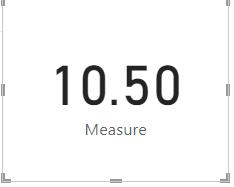
The final output is shown below:
Best Regards,
Community Support Team_ Yalan Wu
If this post helps, then please consider Accept it as the solution to help the other members find it more quickly.
Hi, @zenton ;
If you want to calculate two measures form two different slicer status, you need to create another table as secondly slicer. as follows:
1.create a table .
Slicer2 = SUMMARIZE('Table',[Date],[Point])
2.create measure1、measure2 and sum.
Measure1 = CALCULATE (AVERAGE ('Table'[Value] ),FILTER (ALLSELECTED('Table' ), [Name] = "solids" ))Measure2 = CALCULATE(AVERAGE('Table'[Value]),FILTER(ALL('Table'),[Point]=MAX('Slicer2'[Point])&&[Date]<=MAX('Slicer2'[Date])&&[Date]>=MIN('Slicer2'[Date]) ))Measure = [Measure1]+[Measure2]
The final output is shown below:
Best Regards,
Community Support Team_ Yalan Wu
If this post helps, then please consider Accept it as the solution to help the other members find it more quickly.
@zenton , I have video on similar topic, see if that can help
How to use two Date/Period slicers:https://www.youtube.com/watch?v=WSeZr_-MiTg
or
Vote for your favorite vizzies from the Power BI World Championship submissions!
If you love stickers, then you will definitely want to check out our Community Sticker Challenge!
Check out the January 2026 Power BI update to learn about new features.
| User | Count |
|---|---|
| 57 | |
| 52 | |
| 40 | |
| 17 | |
| 16 |
| User | Count |
|---|---|
| 115 | |
| 106 | |
| 41 | |
| 34 | |
| 25 |