cancel
Showing results for 
Search instead for 
Did you mean: 

Try your skills in the Power BI Dataviz World Championship! Round one ends June 26. Join now

Reply
Rsanjuan
Advocate III
Advocate III

Adding separate columns for statuses

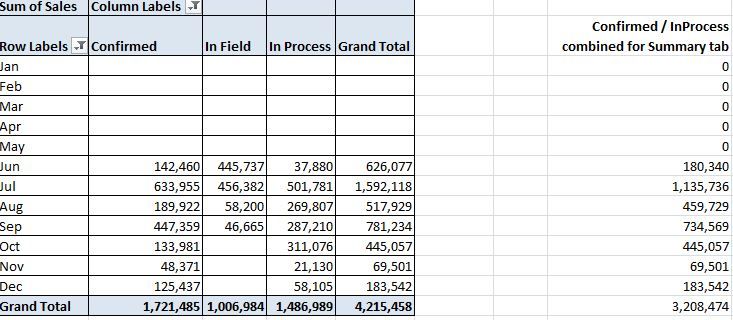
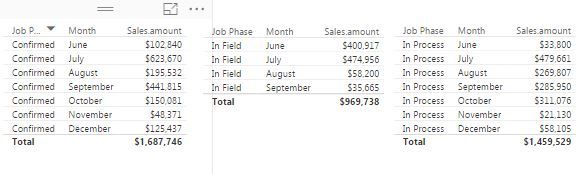
OriginalOriginalCurrent (had to break it down into separate tables)Current (had to break it down into separate tables)

I am very new to powerbi, but how do you create multiple columns with the summations based on that status based on different statuses of the original data colum?


1 ACCEPTED SOLUTION
sdjensen
Solution Sage
Solution Sage

You could try with a matrix visualization.


Put Month on Rows, Job Phase on Columns and Sales Amount in value.

/sdjensen

View solution in original post

4 REPLIES 4
sdjensen
Solution Sage
Solution Sage

You could try with a matrix visualization.


Put Month on Rows, Job Phase on Columns and Sales Amount in value.

/sdjensen

Thank you both for your quick assistance!

Ok


Lima - Peru
Vvelarde
Community Champion
Community Champion

hi @Rsanjuan


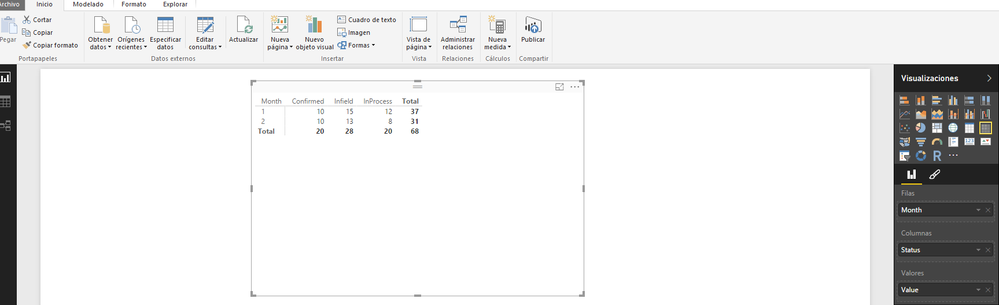
The Simple way is with a Matrix Visual:


M.png


Lima - Peru

Helpful resources

Announcements
Fabric Data Days is here Carousel

Fabric Data Days 2026

Don't miss out on Data Days, June 15 through August 7. Learn Fabric, Power BI, SQL, AI and more.

May Power BI Update Carousel

Power BI Monthly Update - May 2026

Check out the May 2026 Power BI update to learn about new features.

Power BI DataViz World Championships carousel

Power BI DataViz World Championships - June 2026

A new Power BI DataViz World Championship is coming this June! Don't miss out on submitting your entry.