Don't miss your chance to take the Fabric Data Engineer (DP-600) exam for FREE! Find out how by attending the DP-600 session on April 23rd (pacific time), live or on-demand.
Learn moreNext up in the FabCon + SQLCon recap series: The roadmap for Microsoft SQL and Maximizing Developer experiences in Fabric. All sessions are available on-demand after the live show. Register now
Hi team,
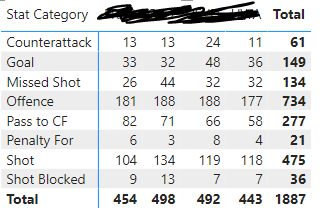
I have the attached example screenshot for statistics I'm working with - with Team names the hidden values.
I was wondering if I can add conditional formatting to rank each of these columns, i.e. highlight a cell green when the team has ranked #1 in that stat category and red when they're ranked #4.
Is this possible? I'm also open to adding a ranking column but wanting the data to stay looking clean.
Thanks so much.
Solved! Go to Solution.
Hi @AndyMeiks
You can format your matrix without adding unnecessary columns.
Please follow these steps:
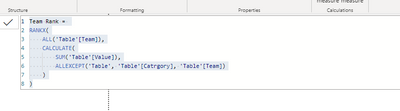
1. Create the measure for ranking teams in every category :
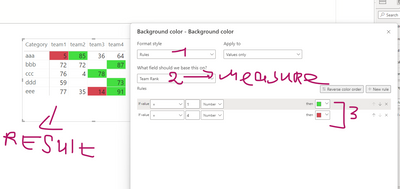
2. Apply conditional formatting based on this measure :
According to global accessibility law, it is forbidden to use traffic light colors to create emphasis because color-blind people cannot see these differences.
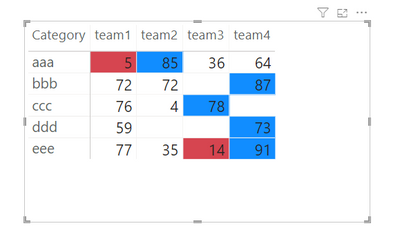
My recommendation or emphasis is only on red or the combination of red with blue.
If this post helps, then please consider Accepting it as the solution to help the other members find it more quickly
Hi @AndyMeiks
You can format your matrix without adding unnecessary columns.
Please follow these steps:
1. Create the measure for ranking teams in every category :
2. Apply conditional formatting based on this measure :
According to global accessibility law, it is forbidden to use traffic light colors to create emphasis because color-blind people cannot see these differences.
My recommendation or emphasis is only on red or the combination of red with blue.
If this post helps, then please consider Accepting it as the solution to help the other members find it more quickly
Hi there,
Thanks for this - when I input it I get an error saying Can't display the visual, and the error message:
MdxScript(Model) (7, 13) Calculation error in measure 'Table'[Team Rank]: The function SUM cannot work with values of type String.
Any ideas on how I could find and fix this?
Thanks.
Hi again @AndyMeiks
It says you trying to do calculations on the string column instead of a number...
Check your data types and modify them.
Thanks, I have fixed this and marked as accepted solution! The only question I have on this is would it be easy to adjust this to reverse the ranks in certain rows?
For example, in my table I have both Goals (ranked 1-4) and Missed Shots (ideally should have the lowest number ranked as #1). Is this possible or simpler to break into 2 different matrix?
It wasn't clear what you were trying to accomplish.
It might be easier if you attach a picture.
However, for effective data visualization, one graph per message is most effective.
Maybe it is worth separating so that the user does not have to decode multiple messages from the same graph regardless of technical possibilities.
If you have recently started exploring Fabric, we'd love to hear how it's going. Your feedback can help with product improvements.
A new Power BI DataViz World Championship is coming this June! Don't miss out on submitting your entry.
Experience the highlights from FabCon & SQLCon, available live and on-demand starting April 14th.
| User | Count |
|---|---|
| 47 | |
| 44 | |
| 40 | |
| 20 | |
| 15 |
| User | Count |
|---|---|
| 70 | |
| 67 | |
| 32 | |
| 27 | |
| 25 |