Don't miss your chance to take the Fabric Data Engineer (DP-600) exam for FREE! Find out how by attending the DP-600 session on April 23rd (pacific time), live or on-demand.
Learn moreNext up in the FabCon + SQLCon recap series: The roadmap for Microsoft SQL and Maximizing Developer experiences in Fabric. All sessions are available on-demand after the live show. Register now
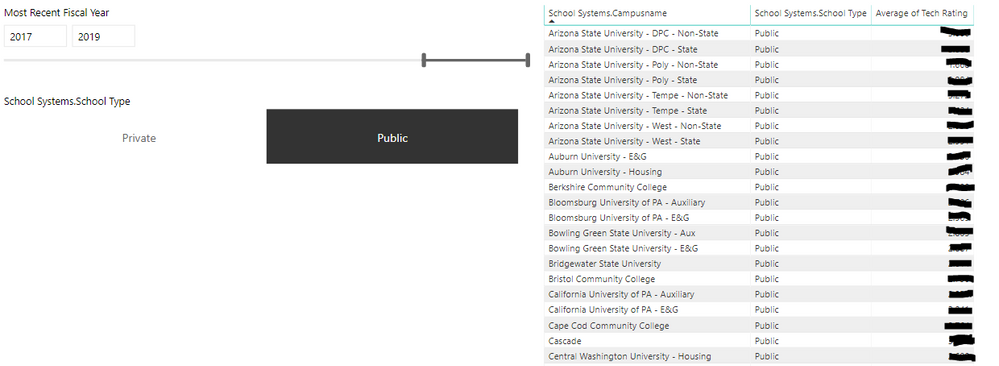
I have a dataset with a list of characteristics for colleges. I am trying to set up a visual that will allow me to filter the dataset based on a few metrics, but my measures are causing the data to look funny. For example, I have a simple table that allows me to toggle between private and public schools and their associated tech ratings.
My issue is when I add the below measure, it doesn't matter which campus type I select, the table always displays all schools.
Tech Rating Ranking % =
VAR _rnk =
MINX (
FILTER (
SELECTCOLUMNS (
ALLSELECTED ( 'Space Profile EDD' ),
"Index", 'Space Profile EDD'[School Systems.Campusname],
"Rank", RANKX ( ALLSELECTED ( 'Space Profile EDD' ), 'Space Profile EDD'[Tech Rating],, DESC, SKIP )
),
[Index] = MAX ( 'Space Profile EDD'[School Systems.Campusname] )
),
[Rank]
)
VAR _all =
CALCULATE ( COUNTROWS ( VALUES ( 'Space Profile EDD'[School Systems.Campusname] ) ), ALLSELECTED ( 'Space Profile EDD' ) )
RETURN
IF ( _all = 1, 1, DIVIDE ( _rnk - 1, _all - 1) )
How can I fix this so that I'm able to filter and still have the table include the measure?
Hi @Anonymous ,
Please check if there's any relationship between slicer and table visual and if interactions between slicer and table visual is active.
Otherwise, please share some sample data or your PBIX to me if you don't have any Confidential Information.
Best Regards,
Jay
If you have recently started exploring Fabric, we'd love to hear how it's going. Your feedback can help with product improvements.
A new Power BI DataViz World Championship is coming this June! Don't miss out on submitting your entry.
Share feedback directly with Fabric product managers, participate in targeted research studies and influence the Fabric roadmap.
| User | Count |
|---|---|
| 48 | |
| 45 | |
| 41 | |
| 20 | |
| 17 |
| User | Count |
|---|---|
| 69 | |
| 63 | |
| 32 | |
| 31 | |
| 23 |