Learn from the best! Meet the four finalists headed to the FINALS of the Power BI Dataviz World Championships! Register now
Hiya, maybe I'm just being thick but I can't work out why this is happening.
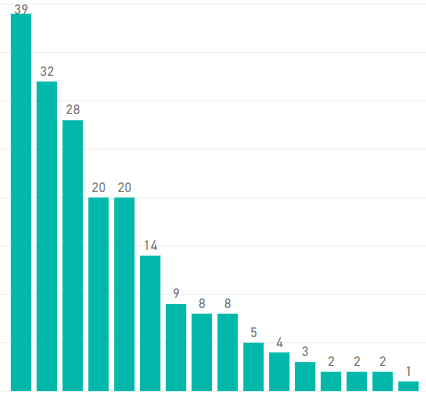
I have a simple bar chart, sorted descending by value. The value is 'Count of ID' and axis is 'Department'.
When I add another field as legend I seem to lose half the data. I've tried converting to a table, after which I can see all the data (exported the table to Excel too to manually count rows). The sorting remains so obbviously the data is there but it's not showing on the chart!
I've checked and all rows/fields have data.
First image is with no legend, second image is the same chart with the legend added:
This is super strange! Can you by any chance share the pbix?
There appears to be a limitation to the number of different values that there can be in the legend. I did not know this myself but from what i can tell it appears to be around 50 values.
A new Power BI DataViz World Championship is coming this June! Don't miss out on submitting your entry.
Share feedback directly with Fabric product managers, participate in targeted research studies and influence the Fabric roadmap.
| User | Count |
|---|---|
| 48 | |
| 35 | |
| 27 | |
| 15 | |
| 15 |
| User | Count |
|---|---|
| 58 | |
| 56 | |
| 38 | |
| 21 | |
| 21 |