Don't miss your chance to take the Fabric Data Engineer (DP-700) exam on us!
Learn moreNext up in the FabCon + SQLCon recap series: The roadmap for Microsoft SQL and Maximizing Developer experiences in Fabric. All sessions are available on-demand after the live show. Register now
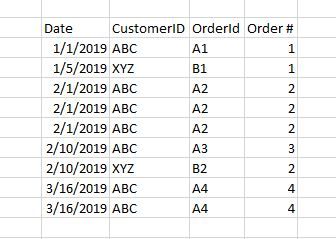
I'm working with a table that has unique Customer ID's and Order IDs, but has one row per item in a given order. I'm trying to add a calculated column to the table that will tell me whether the row belongs to their first order, second order, etc...
Here's a simplified example table with the desired Order # column that I'm trying to add.
I can't figure out how to add a count based on both a unique customer ID and for that customers unique OrderID.
I've been trying variations on this code, but whenever I add in customerID it either crashed Power BI or returns something else that's not what I need.
Order# =
VAR CurrentDate = Sales[order_date]
RETURN COUNTROWS (
FILTER(
CALCULATETABLE (
Sales,
ALLEXCEPT(Sales, Sales[customerId])
),
Sales[order_date] < CurrentDate
|| ( Sales[order_date] = CurrentDate )
)
)
Any help would be much appreciated! Thanks!
Solved! Go to Solution.
I was able to solve this problem after I learned about the "earlier" function. Here's the code that worked
Rank = RANKX(FILTER(Sales,Sales[customerId]=EARLIER(Sales[customerId])),Sales[order_date],,ASC,Dense)
I was able to solve this problem after I learned about the "earlier" function. Here's the code that worked
Rank = RANKX(FILTER(Sales,Sales[customerId]=EARLIER(Sales[customerId])),Sales[order_date],,ASC,Dense)
Hi @Kipple123 ,
You can create Order # column like DAX below.
Order #= MID(Sales[OrderId],2,1)
If you need to count based on both a unique customerId and for that customers unique OrderId, create measure like DAX below.
Count = CALCULATE(COUNT(Sales[order_date]),FILTER(ALLSELECTED(Sales),Sales[customerId]=MAX(Sales[customerId])&&Sales[OrderId]=MAX(Sales[OrderId])))
Best Regards,
Amy
If this post helps, then please consider Accept it as the solution to help the other members find it more quickly.
Thanks for your help!
Unfortunately the Order# calculation your provided won't work with the real data. The real data the orderID is 8-16 character long string containing numbers and characters. I just built the example table this way so it was easy to follow, sorry it was misleading.
The second DAX measure for the count is only returning blanks. I believe it's because the orderID is a string not a number. I'll try some variations on it though.
If you have recently started exploring Fabric, we'd love to hear how it's going. Your feedback can help with product improvements.
A new Power BI DataViz World Championship is coming this June! Don't miss out on submitting your entry.
Share feedback directly with Fabric product managers, participate in targeted research studies and influence the Fabric roadmap.
| User | Count |
|---|---|
| 48 | |
| 45 | |
| 41 | |
| 19 | |
| 18 |
| User | Count |
|---|---|
| 68 | |
| 67 | |
| 33 | |
| 31 | |
| 29 |