cancel
Showing results for 
Search instead for 
Did you mean: 

The Power BI Data Visualization World Championships is back! Get ahead of the game and start preparing now! Learn more

Reply
Kipple123
Frequent Visitor

Adding Customer Order Number Column

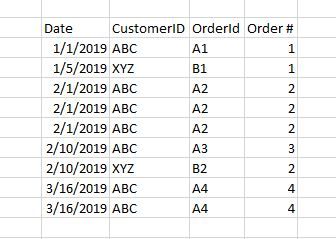
I'm working with a table that has unique Customer ID's and Order IDs, but has one row per item in a given order.  I'm trying to add a calculated column to the table that will tell me whether the row belongs to their first order, second order, etc...  


Here's a simplified example table with the desired Order # column that I'm trying to add.


Order Number Example.JPG


I can't figure out how to add a count based on both a unique customer ID and for that customers unique OrderID.


I've been trying variations on this code, but whenever I add in customerID it either crashed Power BI or returns something else that's not what I need.

Order# = 
VAR CurrentDate = Sales[order_date]
RETURN COUNTROWS (
    FILTER(
           CALCULATETABLE (
                Sales, 
                ALLEXCEPT(Sales, Sales[customerId])
             ),
        Sales[order_date] < CurrentDate
          || ( Sales[order_date] = CurrentDate )
    )
)


Any help would be much appreciated!  Thanks!


1 ACCEPTED SOLUTION
Kipple123
Frequent Visitor

I was able to solve this problem after I learned about the "earlier" function.  Here's the code that worked 

Rank = RANKX(FILTER(Sales,Sales[customerId]=EARLIER(Sales[customerId])),Sales[order_date],,ASC,Dense)

View solution in original post

4 REPLIES 4
Sunnie
Helper I
Helper I

Kipple123
Frequent Visitor

I was able to solve this problem after I learned about the "earlier" function.  Here's the code that worked 

Rank = RANKX(FILTER(Sales,Sales[customerId]=EARLIER(Sales[customerId])),Sales[order_date],,ASC,Dense)

v-xicai
Community Support
Community Support


Hi @Kipple123 ,


You can create Order # column like DAX below.


Order #= MID(Sales[OrderId],2,1)


If you need to count based on both a unique customerId and for that customers unique OrderId, create measure like DAX below.


Count = CALCULATE(COUNT(Sales[order_date]),FILTER(ALLSELECTED(Sales),Sales[customerId]=MAX(Sales[customerId])&&Sales[OrderId]=MAX(Sales[OrderId])))


Best Regards,

Amy


If this post helps, then please consider Accept it as the solution to help the other members find it more quickly.

@v-xicai 

Thanks for your help!


Unfortunately the Order# calculation your provided won't work with the real data.  The real data the orderID is 8-16 character long string containing numbers and characters.  I just built the example table this way so it was easy to follow, sorry it was misleading.


The second DAX measure for the count is only returning blanks.  I believe it's because the orderID is a string not a number.  I'll try some variations on it though.

Helpful resources

Announcements
Power BI DataViz World Championships

Power BI Dataviz World Championships

The Power BI Data Visualization World Championships is back! Get ahead of the game and start preparing now!

December 2025 Power BI Update Carousel

Power BI Monthly Update - December 2025

Check out the December 2025 Power BI Holiday Recap!

FabCon Atlanta 2026 carousel

FabCon Atlanta 2026

Join us at FabCon Atlanta, March 16-20, for the ultimate Fabric, Power BI, AI and SQL community-led event. Save $200 with code FABCOMM.