cancel
Showing results for 
Search instead for 
Did you mean: 

Vote for your favorite vizzies from the Power BI Dataviz World Championship submissions. Vote now!

Reply
jakemcmanus
New Member

Add trendline for each variable

Hello all, 


Im new to Power BI and was wondering if it was posible to add a trendline to a clustered column chart for each variable. For example, I have the net sales and product category by year all on one clustered column. I know how to add a trendline for the average of them all thorughout the 3 years but would like 9 different trendlines for each product category.


Sorry if thats confusing and thanks for your help!

1 REPLY 1
v-piga-msft
Resident Rockstar
Resident Rockstar

Hi @jakemcmanus,


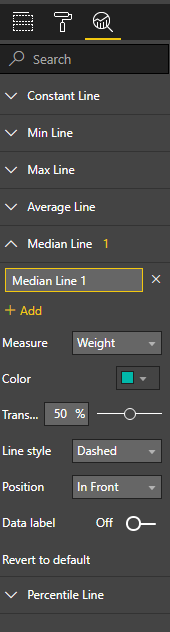
Normally, we could add different trand lines in the Analysis Pane in Power BI Desktop.


Capture.PNG


For your requirement, by my tests, it may have no options to add different trendlines for each product category in a clustered column chart in Power BI currently.


You could post your idea in Power BI idea forum and add your comments there to improve Power BI and make this feature coming sooner.


Best Regards,

Cherry

Community Support Team _ Cherry Gao
If this post helps, then please consider Accept it as the solution to help the other members find it more quickly.

Helpful resources

Announcements
Power BI DataViz World Championships

Power BI Dataviz World Championships

Vote for your favorite vizzies from the Power BI World Championship submissions!

Sticker Challenge 2026 Carousel

Join our Community Sticker Challenge 2026

If you love stickers, then you will definitely want to check out our Community Sticker Challenge!

January Power BI Update Carousel

Power BI Monthly Update - January 2026

Check out the January 2026 Power BI update to learn about new features.

FabCon Atlanta 2026 carousel

FabCon Atlanta 2026

Join us at FabCon Atlanta, March 16-20, for the ultimate Fabric, Power BI, AI and SQL community-led event. Save $200 with code FABCOMM.