Share feedback directly with Fabric product managers, participate in targeted research studies and influence the Fabric roadmap.
Sign up nowGet Fabric certified for FREE! Don't miss your chance! Learn more
Hi All.
I have a requirement something similar to below:
Data:
Emp Group 1 Group 2 Group 3
| A | Group 1 | ||
| B | Group 2 | ||
| C | Group 1 | ||
| D | Group 2 | ||
| E | Group 3 | ||
| F | Group 1 |
I need to show this data in line and stacked column chart with X Axis as group 1, group 2, group 3 and Y axis as count against each group.
Thanks in advance
Solved! Go to Solution.
Hi @Anonymous ,
Please check the following step as below.
1. Unpivot the table in power query. Please check the M code for your reference.
let
Source = Table.FromRows(Json.Document(Binary.Decompress(Binary.FromText("i45WclTSUXIvyi8tUDAEskAoVidayQnChkgYwUSdsap1warWFaoCJmEMFnXDNCEWAA==", BinaryEncoding.Base64), Compression.Deflate)), let _t = ((type text) meta [Serialized.Text = true]) in type table [Emp = _t, #"Group 1" = _t, #"Group 2" = _t, #"Group 3" = _t]),
#"Changed Type" = Table.TransformColumnTypes(Source,{{"Emp", type text}, {"Group 1", type text}, {"Group 2", type text}, {"Group 3", type text}}),
#"Unpivoted Columns" = Table.UnpivotOtherColumns(#"Changed Type", {}, "Attribute", "Value"),
#"Filtered Rows" = Table.SelectRows(#"Unpivoted Columns", each ([Attribute] <> "Emp"))
in
#"Filtered Rows"
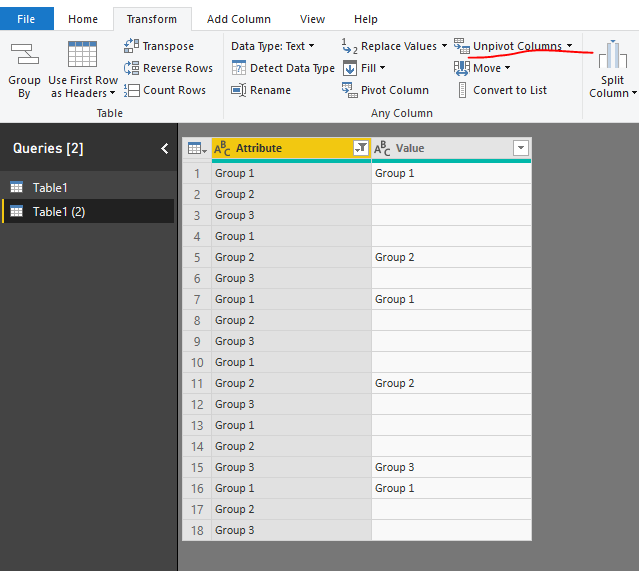
2. Then create a measure as below and add it to the line chart to get the result as we need.
Measure = CALCULATE(COUNTROWS('Table1 (2)'),FILTER('Table1 (2)','Table1 (2)'[Value]<>BLANK()))
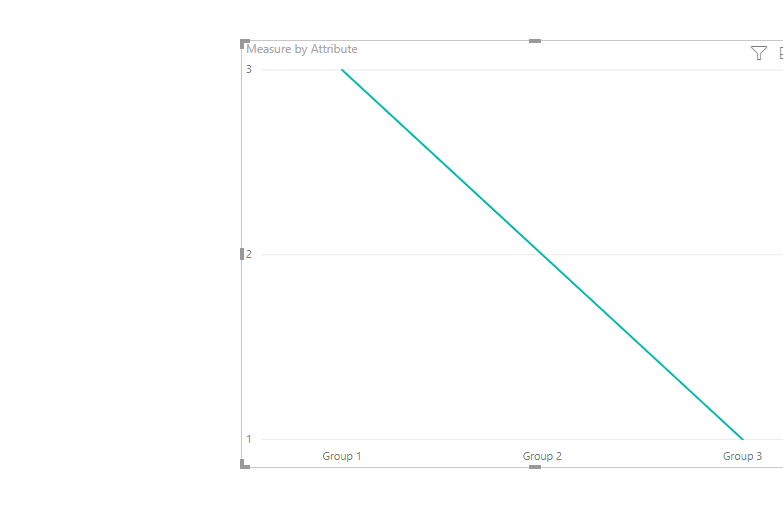
Please check the pbix as attached.
Regards,
Frank
Hi @Anonymous ,
Please check the following step as below.
1. Unpivot the table in power query. Please check the M code for your reference.
let
Source = Table.FromRows(Json.Document(Binary.Decompress(Binary.FromText("i45WclTSUXIvyi8tUDAEskAoVidayQnChkgYwUSdsap1warWFaoCJmEMFnXDNCEWAA==", BinaryEncoding.Base64), Compression.Deflate)), let _t = ((type text) meta [Serialized.Text = true]) in type table [Emp = _t, #"Group 1" = _t, #"Group 2" = _t, #"Group 3" = _t]),
#"Changed Type" = Table.TransformColumnTypes(Source,{{"Emp", type text}, {"Group 1", type text}, {"Group 2", type text}, {"Group 3", type text}}),
#"Unpivoted Columns" = Table.UnpivotOtherColumns(#"Changed Type", {}, "Attribute", "Value"),
#"Filtered Rows" = Table.SelectRows(#"Unpivoted Columns", each ([Attribute] <> "Emp"))
in
#"Filtered Rows"
2. Then create a measure as below and add it to the line chart to get the result as we need.
Measure = CALCULATE(COUNTROWS('Table1 (2)'),FILTER('Table1 (2)','Table1 (2)'[Value]<>BLANK()))
Please check the pbix as attached.
Regards,
Frank
Thanks a lot Frank. This really helped![]()
Share feedback directly with Fabric product managers, participate in targeted research studies and influence the Fabric roadmap.
| User | Count |
|---|---|
| 59 | |
| 51 | |
| 42 | |
| 18 | |
| 14 |
| User | Count |
|---|---|
| 111 | |
| 104 | |
| 35 | |
| 27 | |
| 27 |