Don't miss your chance to take the Fabric Data Engineer (DP-600) exam for FREE! Find out how by watching the DP-600 session on-demand now through April 28th.
Learn moreJoin the FabCon + SQLCon recap series. Up next: Power BI, Real-Time Intelligence, IQ and AI, and Data Factory take center stage. All sessions are available on-demand after the live show. Register now
Hallo,
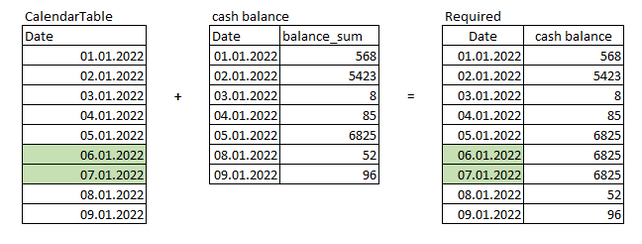
There is a table with cash balances by day at the end of the day.
This table skips weekends when the balance of money does not change, and I need the missed days to be filled in as well.
I have tried joining this table with the calendar table with this:
But as a result, the weekend is still missed.
What can be done with DAX or M ?
Solved! Go to Solution.
Thanks a lot, I have modified your formula and its works as required:
@roman_gorbunov Create a table visual with Calendar[Date] in the table and add a measure:
Value =
_lastsaledate = MAXX(FILTER(ALL(cashbalancetable), cashbalancetable[date] <= calendar[date]), cashbalancetable[date] )
RETURN
MAXX( FILTER(ALL(cashbalancetable), cashbalancetable[date] = _lastsaledate, cashbalancetable[balance_sum] )
Copying DAX from this post? Click here for a hack to quickly replace it with your own table names
Has this post solved your problem? Please Accept as Solution so that others can find it quickly and to let the community know your problem has been solved.
If you found this post helpful, please give Kudos C
I work as a Microsoft trainer and consultant, specialising in Power BI and Power Query.
www.excelwithallison.com
@roman_gorbunov , try last non Continuous with help from date table
Last Day Non Continuous = CALCULATE([sales],filter(ALLSELECTED('Date'),'Date'[Date] =MAXX(FILTER(ALLSELECTED('Date'),'Date'[Date]<max('Date'[Date])),'Date'[Date])))
or
CALCULATE(lastnonblankvalues( 'Date'[Date], [sales]) ,filter(ALLSELECTED('Date'),'Date'[Date] =MAX('Date'[Date] ) ) )
or
Day Intelligence - Last day, last non continous day
https://medium.com/@amitchandak.1978/power-bi-day-intelligence-questions-time-intelligence-5-5-5c324...
Thanks a lot, I have modified your formula and its works as required:
Check out the April 2026 Power BI update to learn about new features.
If you have recently started exploring Fabric, we'd love to hear how it's going. Your feedback can help with product improvements.
A new Power BI DataViz World Championship is coming this June! Don't miss out on submitting your entry.
| User | Count |
|---|---|
| 41 | |
| 37 | |
| 34 | |
| 21 | |
| 16 |
| User | Count |
|---|---|
| 66 | |
| 58 | |
| 31 | |
| 25 | |
| 24 |