
cancel
Showing results for 
Search instead for 
Did you mean: 

Vote for your favorite vizzies from the Power BI Dataviz World Championship submissions. Vote now!

Reply
pang22
Helper III
Helper III

Add hours in Power Query

Hi 


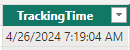
How to create a column and add 8 hours to the time in Power Query?

4/26/2024 7:19:04 AM   -->  4/26/2024 3:19:04 PM  

pang22_0-1714123767866.png


1 ACCEPTED SOLUTION
Anonymous
Not applicable

Hi @pang22 


You can add a custom column with below code. Use #duration(0,8,0,0) to add 8 hours to a datetime value. #duration - PowerQuery M | Microsoft Learn

[TrackingTime] + #duration(0,8,0,0)

vjingzhanmsft_1-1714355099313.png


@AnalyticsWizard Thanks for the prompt reply. To my knowledge Power Query doesn't have Date.AddHours function.


Best Regards,
Jing
If this post helps, please Accept it as Solution to help other members find it. Appreciate your Kudos!

View solution in original post

3 REPLIES 3
Anonymous
Not applicable

Hi @pang22 


You can add a custom column with below code. Use #duration(0,8,0,0) to add 8 hours to a datetime value. #duration - PowerQuery M | Microsoft Learn

[TrackingTime] + #duration(0,8,0,0)

vjingzhanmsft_1-1714355099313.png


@AnalyticsWizard Thanks for the prompt reply. To my knowledge Power Query doesn't have Date.AddHours function.


Best Regards,
Jing
If this post helps, please Accept it as Solution to help other members find it. Appreciate your Kudos!

AnalyticsWizard
Solution Supplier
Solution Supplier

@pang22 


In Power Query, you can create a new column that adds 8 hours to a datetime column by using the "Date.AddHours" function. Here’s how you can do it:


1. Click on the column that contains the datetime you want to adjust.
2. Go to the "Add Column" tab in the Power Query editor.
3. Choose "Custom Column" from the menu to open the "Add Custom Column" dialog.
4. In the new column formula area, enter a formula like this:


= Date.AddHours([TrackingTime], 8 )


Replace `[TrackingTime]` with the actual name of your column if it’s different.

5. Give your new column a name, such as "AdjustedTime".
6. Click "OK" to add the new column.


This will create a new column with each datetime value increased by 8 hours. After you’ve done this, remember to apply your changes and load the data back into Power BI if you're working from there.


If this post helps, please consider Accepting it as the solution to help the other members find it more quickly. Appreciate your Kudo 👍

👎 'Date.AddHours' isn't an actual formula - I'm guessing AI hallucinated this entire response. Let's try and keep this as factual as possible otherwise all the other AI bots start using this garbage in it's answers.

Helpful resources

Announcements
Power BI DataViz World Championships

Power BI Dataviz World Championships

Vote for your favorite vizzies from the Power BI World Championship submissions!

Sticker Challenge 2026 Carousel

Join our Community Sticker Challenge 2026

If you love stickers, then you will definitely want to check out our Community Sticker Challenge!

January Power BI Update Carousel

Power BI Monthly Update - January 2026

Check out the January 2026 Power BI update to learn about new features.

FabCon Atlanta 2026 carousel

FabCon Atlanta 2026

Join us at FabCon Atlanta, March 16-20, for the ultimate Fabric, Power BI, AI and SQL community-led event. Save $200 with code FABCOMM.