Join us at FabCon Atlanta from March 16 - 20, 2026, for the ultimate Fabric, Power BI, AI and SQL community-led event. Save $200 with code FABCOMM.
Register now!View all the Fabric Data Days sessions on demand. View schedule
Hello everyone,
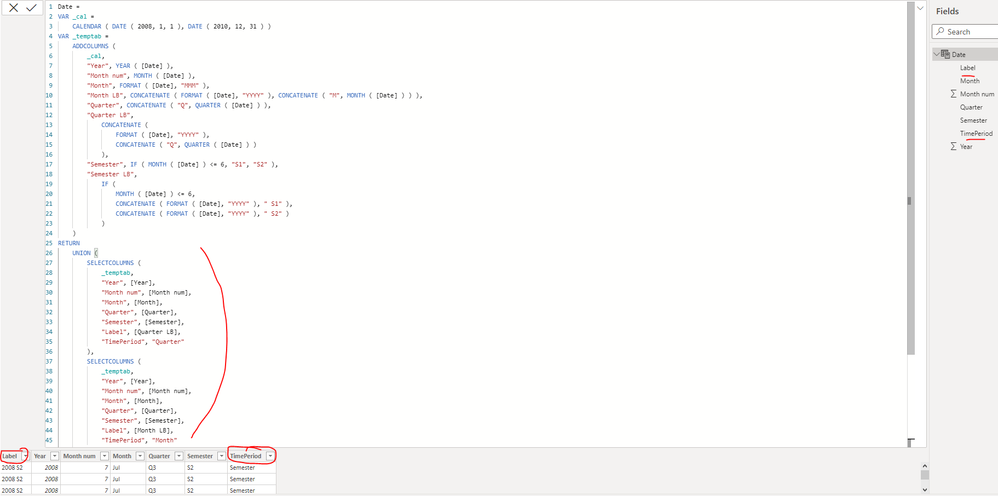
I have created the following time table in dax and I would like to add 2 columns. The 1st one is the result of pivoting the data of 3 columns ( Month, quater and semester labels) and also add another column where I have the type of the period ( month, semester or quarter)
Hope this picture provides a better idea of the result i'm looking for
Thank you in advance for your help,
Mariem
Solved! Go to Solution.
Why are you using an incorrect tool for the job at hand? Would it not be 10000000000 times easier to do all of this in Power Query? Most of this is just a mouse click away... What's more, you'll find read-made M code on the net that builds all of this and even more for you. Please do use the right tool for the job.
On top of that, a proper date table contains all years with all their days, without any gaps and miscontinuations. It seems you're not following this Best Practice.
Hi @Anonymous ,
You can update the formula of your calculated table as below:
| Date = VAR _cal = CALENDAR ( MIN ( 'FactAssignmentByDay'[TIMEBYDAY_DT] ), MAX ( 'FactAssignmentByDay'[TIMEBYDAY_DT] ) ) VAR _temptab = ADDCOLUMNS ( _cal, "Year", YEAR ( [Date] ), "Month num", MONTH ( [Date] ), "Month", FORMAT ( [Date], "MMM" ), "Month LB", CONCATENATE ( FORMAT ( [Date], "YYYY" ), CONCATENATE ( "M", MONTH ( [Date] ) ) ), "Quarter", CONCATENATE ( "Q", QUARTER ( [Date] ) ), "Quarter LB", CONCATENATE ( FORMAT ( [Date], "YYYY" ), CONCATENATE ( "Q", QUARTER ( [Date] ) ) ), "Semester", IF ( MONTH ( [Date] ) <= 6, "S1", "S2" ), "Semester LB", IF ( MONTH ( [Date] ) <= 6, CONCATENATE ( FORMAT ( [Date], "YYYY" ), " S1" ), CONCATENATE ( FORMAT ( [Date], "YYYY" ), " S2" ) ) ) RETURN UNION ( SELECTCOLUMNS ( _temptab, "Year", [Year], "Month num", [Month num], "Month", [Month], "Quarter", [Quarter], "Semester", [Semester], "Label", [Quarter LB], "TimePeriod", "Quarter" ), SELECTCOLUMNS ( _temptab, "Year", [Year], "Month num", [Month num], "Month", [Month], "Quarter", [Quarter], "Semester", [Semester], "Label", [Month LB], "TimePeriod", "Month" ), SELECTCOLUMNS ( _temptab, "Year", [Year], "Month num", [Month num], "Month", [Month], "Quarter", [Quarter], "Semester", [Semester], "Label", [Semester LB], "TimePeriod", "Semester" ) ) |
Best Regards
Hi @Anonymous ,
You can update the formula of your calculated table as below:
| Date = VAR _cal = CALENDAR ( MIN ( 'FactAssignmentByDay'[TIMEBYDAY_DT] ), MAX ( 'FactAssignmentByDay'[TIMEBYDAY_DT] ) ) VAR _temptab = ADDCOLUMNS ( _cal, "Year", YEAR ( [Date] ), "Month num", MONTH ( [Date] ), "Month", FORMAT ( [Date], "MMM" ), "Month LB", CONCATENATE ( FORMAT ( [Date], "YYYY" ), CONCATENATE ( "M", MONTH ( [Date] ) ) ), "Quarter", CONCATENATE ( "Q", QUARTER ( [Date] ) ), "Quarter LB", CONCATENATE ( FORMAT ( [Date], "YYYY" ), CONCATENATE ( "Q", QUARTER ( [Date] ) ) ), "Semester", IF ( MONTH ( [Date] ) <= 6, "S1", "S2" ), "Semester LB", IF ( MONTH ( [Date] ) <= 6, CONCATENATE ( FORMAT ( [Date], "YYYY" ), " S1" ), CONCATENATE ( FORMAT ( [Date], "YYYY" ), " S2" ) ) ) RETURN UNION ( SELECTCOLUMNS ( _temptab, "Year", [Year], "Month num", [Month num], "Month", [Month], "Quarter", [Quarter], "Semester", [Semester], "Label", [Quarter LB], "TimePeriod", "Quarter" ), SELECTCOLUMNS ( _temptab, "Year", [Year], "Month num", [Month num], "Month", [Month], "Quarter", [Quarter], "Semester", [Semester], "Label", [Month LB], "TimePeriod", "Month" ), SELECTCOLUMNS ( _temptab, "Year", [Year], "Month num", [Month num], "Month", [Month], "Quarter", [Quarter], "Semester", [Semester], "Label", [Semester LB], "TimePeriod", "Semester" ) ) |
Best Regards
Why are you using an incorrect tool for the job at hand? Would it not be 10000000000 times easier to do all of this in Power Query? Most of this is just a mouse click away... What's more, you'll find read-made M code on the net that builds all of this and even more for you. Please do use the right tool for the job.
On top of that, a proper date table contains all years with all their days, without any gaps and miscontinuations. It seems you're not following this Best Practice.
Check out the November 2025 Power BI update to learn about new features.
Advance your Data & AI career with 50 days of live learning, contests, hands-on challenges, study groups & certifications and more!