Don't miss your chance to take the Fabric Data Engineer (DP-600) exam for FREE! Find out how by attending the DP-600 session on April 23rd (pacific time), live or on-demand.
Learn moreJoin the FabCon + SQLCon recap series. Up next: Power BI, Real-Time Intelligence, IQ and AI, and Data Factory take center stage. All sessions are available on-demand after the live show. Register now
Hi All,
I would like to thank you in advance. I have a sales data. I created a data flow. The data gets appended as per the data. Like for Jan, Feb , March etc I get new data. I created a data flow for each month and then append them. I use this appended data for in PBI Desktop.
For example, lets say on Jan, Feb, March we have product A, B and C only. So I create a measure for each products, so that I have 3 measure. So, I put the name of the sales rep and the three measures I created for A,B and C. Doing so I get a table view with 4 columns.
Now lets say in April a new produt has been added which was not present in earlier month, lets call it D. Now I will have to create a new measure for D and put that measure in visualization. Lets say a new product is added each month, I need to do this manually each month. This is hectic. So, is there any way in PBI to make this automatic. I cannot find a straight way to do this.
As soon as the product get added in the data, it get automatically displayed in the table view in new column. The measure name should be Product D like earlier product, Product A, Product B, Product C.
I know it can be done in matrix view but the problem is that the measure gets repeated for every column and I do not want the meausre to be repeated for every column in the visualization.
Hope to get the answer.
@Mkrishna I think there is a basic issue with how you are bringing the data otherwise you don't have to do it every time a new product is added. How your raw data looks like in Power BI.
Subscribe to the @PowerBIHowTo YT channel for an upcoming video on List and Record functions in Power Query!!
Learn Power BI and Fabric - subscribe to our YT channel - Click here: @PowerBIHowTo
If my solution proved useful, I'd be delighted to receive Kudos. When you put effort into asking a question, it's equally thoughtful to acknowledge and give Kudos to the individual who helped you solve the problem. It's a small gesture that shows appreciation and encouragement! ❤
Did I answer your question? Mark my post as a solution. Proud to be a Super User! Appreciate your Kudos 🙂
Feel free to email me with any of your BI needs.
Hi @Mkrishna
you only need one measure
Totals Sales = SUM('Table'[Sales])
Create a table or matrix visual and add the product, month name and then the new mesure. This will pick up any new products in future data.
thanks
Joe
If this post helps, then please Accept it as the solution
Hi Joe,
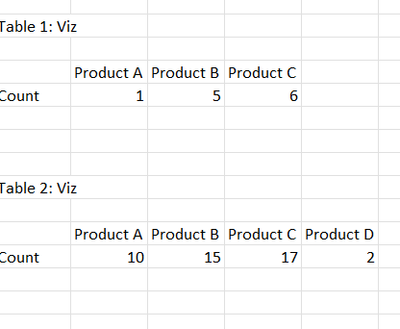
Thank you for your response. Is it possible to get in this format. As you can see that in April, a new product has been added and as such the new column has been created in Table view. I do not want the matrix view as the meausre get repeated.
Only the Matrix visual can offer this type of view. Add the Product column in the Column field and the date in the Rows. Add your measure to the values field.
What is the measure you want to achieve? What are you counting?
Check out the April 2026 Power BI update to learn about new features.
If you have recently started exploring Fabric, we'd love to hear how it's going. Your feedback can help with product improvements.
A new Power BI DataViz World Championship is coming this June! Don't miss out on submitting your entry.
| User | Count |
|---|---|
| 48 | |
| 46 | |
| 41 | |
| 20 | |
| 17 |
| User | Count |
|---|---|
| 70 | |
| 69 | |
| 32 | |
| 27 | |
| 26 |