Join us at FabCon Atlanta from March 16 - 20, 2026, for the ultimate Fabric, Power BI, AI and SQL community-led event. Save $200 with code FABCOMM.
Register now!Vote for your favorite vizzies from the Power BI Dataviz World Championship submissions. Vote now!
Hi all,
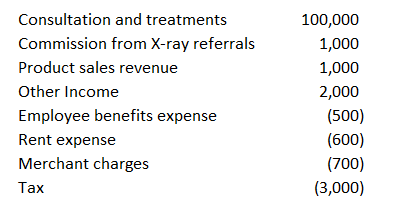
I am trying to get the subtotal for selected rows but I have no idea on how to do it.
Example for what I have :
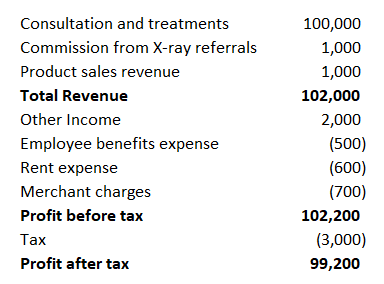
Example for what I wish :
Is there any way that I can add in subtotal which I highlighted in bold (Total Revenue, Profit before tax and Profit after tax)?
Thank you for you help 🙂
Solved! Go to Solution.
Hi @cfg_fang,
You can refer the following threads which has the similar requirement as yours, hope they can help you achieve your expected result.
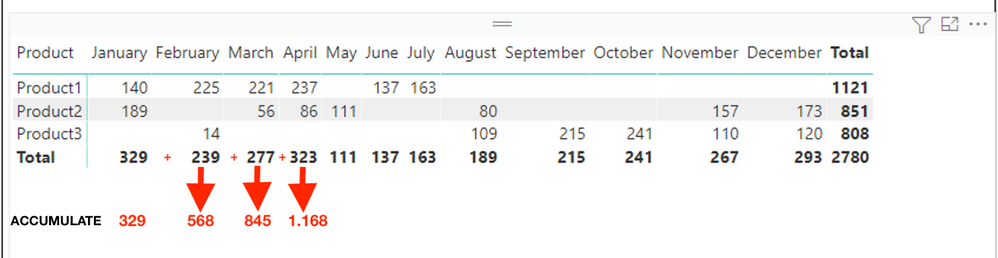
Add new row with accumulate in Matrix
![]()
1. Create a calculated table with below formula
Table = UNION(VALUES('Sales'[Product]),ROW("Product","XMonth Accumulate"))

2. Create two measures as below to get the sum of salesMeasure = VAR _selmonthname = SELECTEDVALUE ( 'Date'[MontName] ) VAR _selmonthnum = CALCULATE ( MAX ( 'Date'[MontNumber] ), FILTER ( 'Date', 'Date'[MontName] = _selmonthname ) ) RETURN SWITCH ( SELECTEDVALUE ( 'Table'[Product] ), "XMonth Accumulate", SUMX ( FILTER ( ALLSELECTED ( 'Sales' ), MONTH ( 'Sales'[Date] ) <= VALUE ( _selmonthnum ) ), [Sales (Selected Month)] ), SUMX ( FILTER ( 'Sales', 'Sales'[Product] = SELECTEDVALUE ( 'Table'[Product] ) ), [Sales (Selected Month)] ) )Month Accumulate = IF ( ISINSCOPE ( 'Table'[Product] ), SUMX ( VALUES ( 'Table'[Product] ), [Measure] ), [Sales (Selected Month)] )3. Create a matrix visual (Rows: field Product of Table Column: field MonthName in Date table Values: [Month Accumulate] )
Best Regards
Hi @cfg_fang,
You can refer the following threads which has the similar requirement as yours, hope they can help you achieve your expected result.
Add new row with accumulate in Matrix
![]()
1. Create a calculated table with below formula
Table = UNION(VALUES('Sales'[Product]),ROW("Product","XMonth Accumulate"))
2. Create two measures as below to get the sum of salesMeasure = VAR _selmonthname = SELECTEDVALUE ( 'Date'[MontName] ) VAR _selmonthnum = CALCULATE ( MAX ( 'Date'[MontNumber] ), FILTER ( 'Date', 'Date'[MontName] = _selmonthname ) ) RETURN SWITCH ( SELECTEDVALUE ( 'Table'[Product] ), "XMonth Accumulate", SUMX ( FILTER ( ALLSELECTED ( 'Sales' ), MONTH ( 'Sales'[Date] ) <= VALUE ( _selmonthnum ) ), [Sales (Selected Month)] ), SUMX ( FILTER ( 'Sales', 'Sales'[Product] = SELECTEDVALUE ( 'Table'[Product] ) ), [Sales (Selected Month)] ) )Month Accumulate = IF ( ISINSCOPE ( 'Table'[Product] ), SUMX ( VALUES ( 'Table'[Product] ), [Measure] ), [Sales (Selected Month)] )3. Create a matrix visual (Rows: field Product of Table Column: field MonthName in Date table Values: [Month Accumulate] )
Best Regards
Hi,
Not sure if it is a good idea,
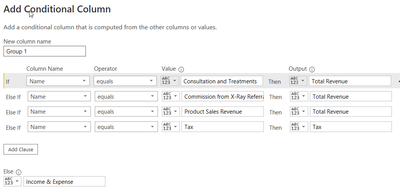
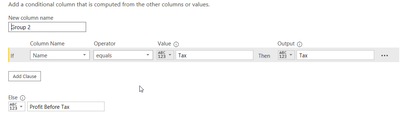
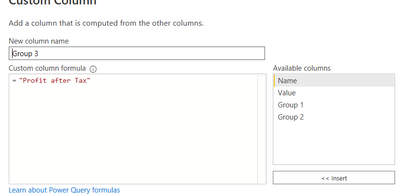
But I add the 3 separate column in Power Query :
- the first one is :
-The second one :
- The third one :
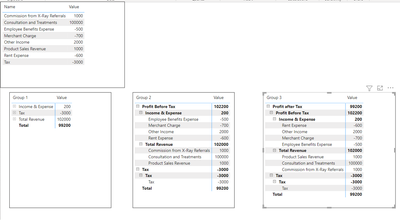
In the end I have this table :
Then Create the Matrix visual (the right one is with all groups) as below :
Appreciate your Kudos
@cfg_fang , What I have done for that is aI appended a table with those account names
Append : https://radacad.com/append-vs-merge-in-power-bi-and-power-query into my Account table (Append table power query)
Then I created a measure
if( Max(Table[Account Name]) <> "Profit before tax" ,
[Measure] , calculate([Measure], filter(allselected(Table[Account Name]) , Table[Account Group] in {"Income"} ) )
- calculate([Measure], filter(allselected(Table[Account Name]) , Table[Account Group] in {"Expense"} ) )
)
You can use individual account names too in place groups. I have given in for that in code
If you love stickers, then you will definitely want to check out our Community Sticker Challenge!
Check out the January 2026 Power BI update to learn about new features.
| User | Count |
|---|---|
| 58 | |
| 57 | |
| 45 | |
| 17 | |
| 17 |
| User | Count |
|---|---|
| 113 | |
| 108 | |
| 38 | |
| 35 | |
| 26 |