cancel
Showing results for 
Search instead for 
Did you mean: 

Level up your Power BI skills this month - build one visual each week and tell better stories with data! Get started

Reply
michellepace
Resolver III
Resolver III

Add Custom Column // use MOD( ) for values

Hi there.


If the value in AccNumber ends in 3 zeros, then the particular account is a "main account". Otherwise it is a "sub account". I'm trying to use the MOD( ) function as shown in the code below to populate my new column.


I get the Expression Error that "The Name 'MOD' wasn't recognised".


Can anyone tell me what I am doing wrong, please?


let
    Source = Odbc.DataSource("dsn=ROSVILLE_ODBC", [HierarchicalNavigation=true]),
    ROSVILLE_Database = Source{[Name="ROSVILLE",Kind="Database"]}[Data],
    LedgerMaster_Table = ROSVILLE_Database{[Name="LedgerMaster",Kind="Table"]}[Data],
    #"Removed Other Columns" = Table.SelectColumns(LedgerMaster_Table,{"FinancialCategory", "AccNumber", "AccDesc", "ReportWriterCategory", "NumberSubAccs", "BalanceThis01", "BalanceThis02", "BalanceThis03", "BalanceThis04", "BalanceThis05", "BalanceThis06", "BalanceThis07", "BalanceThis08", "BalanceThis09", "BalanceThis10", "BalanceThis11", "BalanceThis12", "BalanceThis13", "BalanceLast01", "BalanceLast02", "BalanceLast03", "BalanceLast04", "BalanceLast05", "BalanceLast06", "BalanceLast07", "BalanceLast08", "BalanceLast09", "BalanceLast10", "BalanceLast11", "BalanceLast12", "BalanceLast13", "Blocked", "TaxType", "DefaultTax"}),
    #"Unpivoted Columns" = Table.UnpivotOtherColumns(#"Removed Other Columns", {"FinancialCategory", "AccNumber", "AccDesc", "ReportWriterCategory", "NumberSubAccs", "Blocked", "TaxType", "DefaultTax"}, "Attribute", "Value"),
    #"Renamed Columns" = Table.RenameColumns(#"Unpivoted Columns",{{"Attribute", "Period"}, {"Value", "Period Balance"}}),
    #"Added Custom" = Table.AddColumn(#"Renamed Columns", "Sub GL Account", each if MOD([AccNumber],1000) = 0 then "is main" else "is a sub account")
in
    #"Added Custom"

Thanks in advance,

Michelle

1 ACCEPTED SOLUTION
Nathaniel_C
Community Champion
Community Champion

Hi @michellepace ,

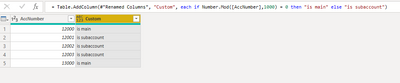
Try Number.Mod ()

If this solves your issues, please mark it as the solution, so that others can find it easily. Kudos are nice too.
Nathaniel


Did I answer your question? Mark my post as a solution!

Proud to be a Super User!


View solution in original post

2 REPLIES 2
Nathaniel_C
Community Champion
Community Champion

Hi @michellepace ,

Try Number.Mod ()

If this solves your issues, please mark it as the solution, so that others can find it easily. Kudos are nice too.
Nathaniel


Did I answer your question? Mark my post as a solution!

Proud to be a Super User!


Hi @michellepace , just make sure AcctNumber is not text.

sub acct mod.PNG

If this solves your issues, please mark it as the solution, so that others can find it easily. Kudos are nice too.
Nathaniel


Did I answer your question? Mark my post as a solution!

Proud to be a Super User!


Helpful resources

Announcements
April Power BI Update Carousel

Power BI Monthly Update - April 2026

Check out the April 2026 Power BI update to learn about new features.

Fabric SQL PBI Data Days

Data Days 2026 coming soon!

Sign up to receive a private message when registration opens and key events begin.

New to Fabric survey Carousel

New to Fabric Survey

If you have recently started exploring Fabric, we'd love to hear how it's going. Your feedback can help with product improvements.

Power BI DataViz World Championships carousel

Power BI DataViz World Championships - June 2026

A new Power BI DataViz World Championship is coming this June! Don't miss out on submitting your entry.