Hi there.
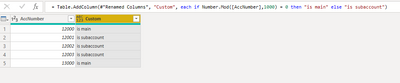
If the value in AccNumber ends in 3 zeros, then the particular account is a "main account". Otherwise it is a "sub account". I'm trying to use the MOD( ) function as shown in the code below to populate my new column.
I get the Expression Error that "The Name 'MOD' wasn't recognised".
Can anyone tell me what I am doing wrong, please?
let
    Source = Odbc.DataSource("dsn=ROSVILLE_ODBC", [HierarchicalNavigation=true]),
    ROSVILLE_Database = Source{[Name="ROSVILLE",Kind="Database"]}[Data],
    LedgerMaster_Table = ROSVILLE_Database{[Name="LedgerMaster",Kind="Table"]}[Data],
    #"Removed Other Columns" = Table.SelectColumns(LedgerMaster_Table,{"FinancialCategory", "AccNumber", "AccDesc", "ReportWriterCategory", "NumberSubAccs", "BalanceThis01", "BalanceThis02", "BalanceThis03", "BalanceThis04", "BalanceThis05", "BalanceThis06", "BalanceThis07", "BalanceThis08", "BalanceThis09", "BalanceThis10", "BalanceThis11", "BalanceThis12", "BalanceThis13", "BalanceLast01", "BalanceLast02", "BalanceLast03", "BalanceLast04", "BalanceLast05", "BalanceLast06", "BalanceLast07", "BalanceLast08", "BalanceLast09", "BalanceLast10", "BalanceLast11", "BalanceLast12", "BalanceLast13", "Blocked", "TaxType", "DefaultTax"}),
    #"Unpivoted Columns" = Table.UnpivotOtherColumns(#"Removed Other Columns", {"FinancialCategory", "AccNumber", "AccDesc", "ReportWriterCategory", "NumberSubAccs", "Blocked", "TaxType", "DefaultTax"}, "Attribute", "Value"),
    #"Renamed Columns" = Table.RenameColumns(#"Unpivoted Columns",{{"Attribute", "Period"}, {"Value", "Period Balance"}}),
    #"Added Custom" = Table.AddColumn(#"Renamed Columns", "Sub GL Account", each if MOD([AccNumber],1000) = 0 then "is main" else "is a sub account")
in
    #"Added Custom"
Thanks in advance,
Michelle