This is best Fabric, Power BI, SQL and AI community event. How do we know? The last event sold out! Save €200 with code FABCMTY200.
Register nowA new Data Days event is coming soon! This time we’re going bigger than ever. Fabric, Power BI, SQL, AI and more. Don't miss out.
Hello You All,
I'am busy building a report in de powerbi desktop application.
I want to categorize my customers manually. Because my dataset doesn't have this information.
So is there a way to create a column or something else where I manually can add the categorisation ID?
So what I want to create is the following:
Cat. ID can be A, B or C
Customer 001 = A
Customer 002 = B
Customer 003 = B
Customer 004 = C
Customer 005 = A
Hope to hear from you soon!
Hi @Flashed,
You can do it either by using DAX or M language:
You just use the IF clause, be aware M language is case sensitive.
IF clause in M language IF in M language.
Thanks,
Ricardo
Hi @Flashed,
The solution of @ricardocamargos could solve your problem, do you have a try?
If it works, please accept his answer as a solution so that more people will find the solution easily. If you still have problems, you could post it to the forum.
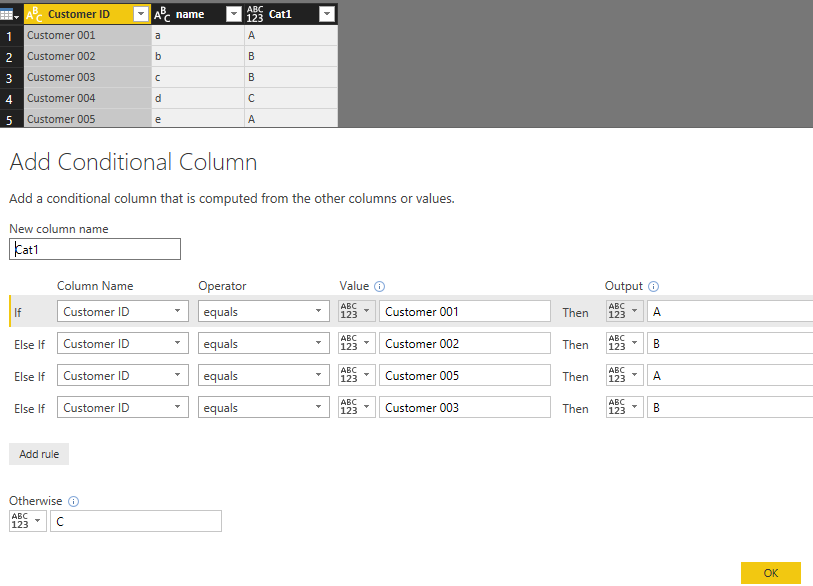
In addition, you could try to add condition column in Query Editor which is more simple without writing codes. You could refer to this picture.
Hope it can help you!
Best regards,
Cherry
Check out the May 2026 Power BI update to learn about new features.
Sign up to receive a private message when registration opens and key events begin.
If you have recently started exploring Fabric, we'd love to hear how it's going. Your feedback can help with product improvements.
| User | Count |
|---|---|
| 32 | |
| 26 | |
| 25 | |
| 24 | |
| 15 |
| User | Count |
|---|---|
| 61 | |
| 48 | |
| 26 | |
| 21 | |
| 20 |